
Ever wonder why some websites just feel right, while others make you want to click away instantly? The answer usually comes down to web design. The simplest way to think about it is this: your website is your best salesperson, working 24/7 without ever taking a break. It's your digital storefront, your brand's first handshake, and your primary lead generator, all rolled into one.
Your Website Is Your Hardest-Working Employee
Let's use a real-world analogy. Imagine walking past a brick-and-mortar shop. If the windows are grimy, the sign is cracked, and the inside looks chaotic, you're probably not going in. You'll just keep walking.
The exact same thing happens online. Your website is often the very first interaction someone has with your business. Every single element—the layout, the fonts, the colors, the images—is either pulling them in or sending them straight to your competition.
Good design is about more than just looking pretty. It’s a strategic tool that builds instant credibility. It creates a clear, intuitive path for visitors, helping them find what they need, understand what you offer, and take that next step—whether it's buying a product or scheduling a call.
The Power of a First Impression
You get one shot to make a first impression online, and it happens faster than you can blink. People form an opinion about your site in literal milliseconds, and that gut reaction is almost entirely based on how it looks.
In fact, studies show that 94% of first impressions are tied directly to design elements. Users decide in an instant whether to stay or leave. This means that things like a clean layout, a thoughtful color scheme, and readable typography aren't just details; they're mission-critical for keeping people on your page. You can find more data on how design shapes user perception to see just how important this is.
This diagram perfectly illustrates the different hats your website wears for your business every single day.
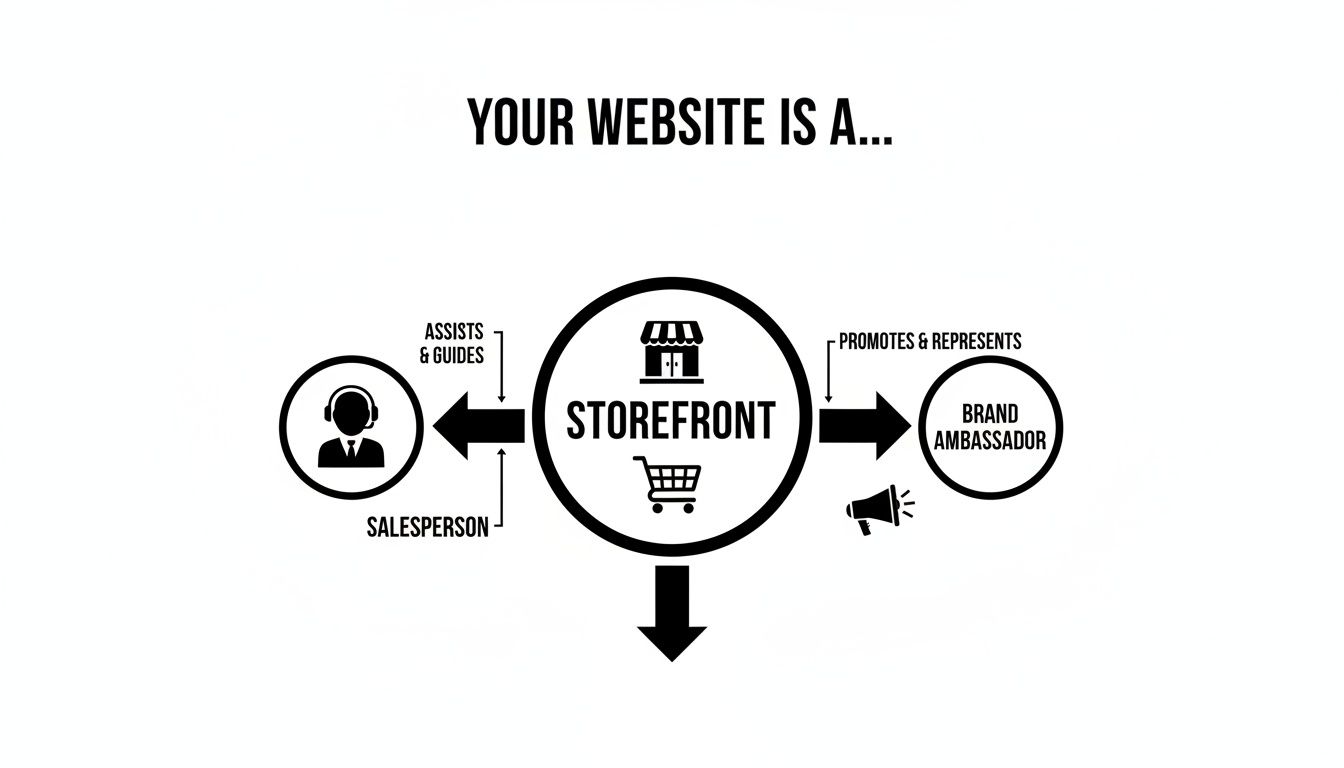
As you can see, it acts as your storefront, your salesperson, and your brand ambassador simultaneously. When all three are working in sync, the results are powerful.
Ultimately, putting money into professional web design isn't just another business expense; it's a fundamental investment in your company's growth. It's the foundation for everything else you do online, from SEO to social media. All the traffic you work so hard to get needs to land on a site that actually converts.
Great web design is a direct driver of business results. The following table breaks down how it impacts key areas of your company, for better or for worse.
How Quality Web Design Transforms Business Areas
| Business Area | Impact of Good Web Design | Consequence of Poor Web Design |
|---|---|---|
| Sales & Conversions | Guides users to purchase with clear calls-to-action and intuitive navigation. | Confuses and frustrates users, leading to high cart abandonment rates. |
| Brand Perception | Builds immediate trust, credibility, and a professional image. | Appears unprofessional, outdated, or untrustworthy, eroding confidence. |
| Search Engine Rankings | Improves SEO with a mobile-friendly, fast, and accessible structure. | Gets penalized by Google for slow speeds and a poor user experience. |
| Customer Engagement | Encourages visitors to stay longer and interact more with your content. | Causes high bounce rates as users leave almost immediately. |
| Accessibility | Ensures everyone, including users with disabilities, can access your site. | Alienates a significant portion of potential customers and risks legal issues. |
Each of these areas shows that a thoughtful design strategy is far more than window dressing—it’s an engine for growth.
Without a solid design foundation, even the most innovative products or stellar services will struggle. A confusing, slow, or untrustworthy site experience will always stand in the way of success. In this guide, we'll dig into exactly how each piece of the web design puzzle directly affects your bottom line.
Building Unshakeable Brand Trust Through Design
In the online world, trust is everything. It's the invisible currency that determines whether a visitor stays, buys, or bounces. Your website is often the very first place a potential customer interacts with your brand, and a professional, modern design is your best tool for making that first impression count.
Think of it like walking into a physical store. If it's clean, well-lit, and organized, you immediately feel more comfortable. A dated, confusing, or broken website has the opposite effect—it instantly raises red flags and makes people question if you're a legitimate business they can rely on.
The Psychology of Visual Credibility
We are wired to make snap judgments based on what we see. A polished, cohesive design signals professionalism and competence, while a site with clashing colors, blurry images, or a confusing layout just feels sketchy.
This isn't just a theory; it's a powerful psychological shortcut. Your design choices—from the font you pick to the quality of your photos—are constantly feeding a subconscious verdict on your brand's authority.
A landmark study by Stanford University revealed a staggering statistic: 75% of users admit to judging a company's credibility based on its website design alone. That means for three out of every four visitors, your design is your credibility.
That split-second judgment determines if someone will trust you with their email address, let alone their credit card details.
Essential Design Elements That Build Trust
Creating a trustworthy website isn't about smoke and mirrors. It's about a handful of core principles that, when done right, make visitors feel secure and confident.
Here are the non-negotiables for building trust through design:
- Consistent Branding: Your logo, color scheme, and typography should be the same on every single page. Consistency breeds familiarity and makes your brand feel stable and established.
- Professional Imagery: Ditch the cheesy stock photos. Use high-quality, original images of your team, your workplace, or your products in action. Real photos humanize your brand and prove you're not just hiding behind a template.
- Clear and Easy-to-Find Info: Can visitors find your contact details or "About Us" page in two clicks? Hiding essential information like a phone number or physical address makes you look shady and kills trust on the spot.
- Security and Privacy Signals: Prominently displaying trust badges, like an SSL certificate lock icon or secure payment logos, is crucial. These are visual reassurances that tell visitors their data is safe, especially when they're about to make a purchase.
A Tale of Two Websites
Picture two e-commerce sites selling the exact same sneakers. The first has a clean, minimalist layout, sharp product photos from every angle, glowing customer reviews, and a clearly marked "Secure Checkout" button. Finding the return policy is effortless.
The second site is a mess of mismatched fonts and pixelated images. There’s no easy way to contact them, and the checkout page looks like something from 1999. Which one are you buying from?
It's a no-brainer. The first site used design to build a bridge of trust. The second built a wall of doubt. That’s the real-world impact of great web design.
Connecting Web Design and SEO for Better Visibility
It’s a common mistake to see web design and Search Engine Optimization (SEO) as two different tasks, handled by separate teams at separate times. The reality is, they are two sides of the same coin. A fantastic web design is the foundation of any solid SEO strategy, paving the way for an experience that both your visitors and search engines will appreciate.
Imagine your website is a brand-new library. Great web design is the equivalent of organizing that library with clear signage, logical aisles, and an easy-to-use card catalog. When a search engine crawler comes to visit, it can effortlessly find, understand, and index every piece of content. A messy site, on the other hand, is like a library with books piled randomly on the floor—the crawler gets confused and just gives up.
This connection makes it clear that web design is about much more than looking good. It's the technical groundwork for getting discovered online in the first place.
How Design Directly Influences Your Rankings
Search engines like Google have a simple mission: give people the best possible answers to their queries. A huge part of what makes an answer "the best" is the user's experience on the webpage. If your site is sluggish, a pain to navigate, or looks terrible on a phone, Google knows people will get frustrated and click away.
Because of this, Google's algorithms are built to favor websites that offer a great user experience. This is precisely where design choices become direct SEO factors. The most critical overlaps include:
- Mobile-First Indexing: With most searches now happening on phones, Google primarily looks at the mobile version of your site for indexing and ranking. A responsive design that looks and works perfectly on any screen size isn't a "nice-to-have" anymore. It's essential.
- Page Speed: Nothing sends visitors running faster than a slow-loading page. High bounce rates are a major red flag for search engines, which is why page speed is a confirmed ranking factor. Design decisions—from compressing images to writing clean code—have a massive impact on load times.
- Intuitive Navigation: A logical site layout with clear menus helps users find what they’re looking for without a fuss. That same structure also helps search engine crawlers map out your content, understand how pages relate to one another, and index your site more effectively. To see how this works in practice, explore our guide on SEO and conversion optimization.
Making Your Website Crawler-Friendly
A well-designed website isn't just easy for people to use; it's also built for search engine bots to understand. Clean, semantic code and the correct use of header tags (H1, H2, H3) provide a clear roadmap for Google to follow.
A website's architecture is its SEO blueprint. When design and technical SEO work in harmony, you build a structure that search engines can easily crawl, index, and rank. The result is a steady stream of organic traffic.
To get your site ready for the future of search, it's worth brushing up on these technical SEO tips for AI search.
At the end of the day, a smart design removes friction for everyone. By focusing on a fast, accessible, and mobile-friendly experience, you’re not just creating a pretty website—you’re building a powerful engine that will climb the search rankings and bring in more customers.
Driving Conversions with User-Centric Design
A beautiful website that doesn't convert is just an expensive digital brochure. Let's be honest: the real test of a great web design is its power to get a visitor to do something—buy a product, fill out a form, or sign up for a newsletter. This is where user-centric design stops being a buzzword and starts being a powerful tool for growing your business.
At its heart, user-centric design is all about seeing your website through your visitors' eyes. What do they want? What problem are they trying to solve? When you answer those questions, you can make it incredibly easy for them to get what they need. Your website transforms from a passive billboard into an active sales machine, with every button and form field intentionally placed to create the smoothest possible path for the user.
This focus on the visitor's journey is the core idea behind Conversion Rate Optimization (CRO). Think of it as the science of turning more of your visitors into customers. By using clear visual cues to draw the eye toward your calls-to-action (CTAs) and speaking in a way that resonates with your audience, you can directly influence behavior and boost your bottom line.
Turning Clicks into Customers
The entire journey a person takes on your site, from the second they land on a page until the moment they leave, is called the user experience (UX). A great UX feels simple, clear, and efficient. When you get rid of the friction—like unnecessary clicks, confusing navigation, or hard-to-read text—you make it that much easier for someone to say "yes" and convert.
Take the checkout process on an e-commerce site, for example. If you force a customer to create an account, fill out a dozen fields, and navigate multiple pages just to give you their money, you're practically begging them to abandon their cart. A well-designed checkout, on the other hand, offers a guest option, autofills what it can, and presents a clean, single-page form. That simple design choice can be the difference between a lost sale and a happy, repeat customer. For a deeper dive into these strategies, check out our guide on conversion optimization tips.
The Financial Impact of a Great User Experience
Here's the thing: investing in a high-quality user experience isn't just about making people happy; it’s one of the smartest financial moves you can make. The numbers don't lie. Research consistently shows that putting money into UX delivers an almost unbelievable return, with some studies showing an ROI of 9,900%. That means for every $1 you spend on UX, you can expect to get $100 back.
It gets better. Even dedicating just 10% of your development budget to improving the user experience can lead to an 83% jump in conversions. This data makes it clear that great design isn't a cost—it's a primary driver of growth.
Key Principles for a High-Converting Design
Ready to turn your website into a conversion powerhouse? It all comes down to a few fundamental principles. These are the building blocks for an experience that naturally guides visitors toward taking action.
- Clarity Above All: Can a visitor understand what you do and why it matters in under five seconds? Your value proposition needs to be crystal clear, instantly.
- Frictionless Forms: Keep your forms short and sweet. Only ask for what you absolutely need. Use clear labels and make it obvious what goes in each field.
- Compelling Calls-to-Action: Your CTAs need to pop. Use action-focused words like "Get Your Free Quote" instead of a boring "Submit." Make the button stand out with a contrasting color.
- Visual Hierarchy: Use size, color, and smart placement to guide the user's eye. Lead them naturally from your headline to your call-to-action without them even realizing it.
The best designs are so intuitive that they feel invisible. The user accomplishes their goal without ever having to stop and think about how the interface works. That seamless experience is what builds trust and drives conversions.
When you prioritize these elements, you're tying your design choices directly to your revenue goals. To truly unlock your site's potential, implementing these proven conversion rate optimization tips is the next logical step. A user-centric approach ensures your website doesn't just look good—it performs.
Why Website Speed Is a Non-Negotiable Priority
In the online world, patience is in short supply. People expect websites to load in the blink of an eye, and their willingness to wait is measured in milliseconds, not seconds. Think of a slow website like a brick-and-mortar store with a massive queue just to get in the door—most people will just turn around and leave before they even see what you’re selling.
This isn't an overstatement. Even a one-second delay in your page load time can cause a huge chunk of your visitors to give up and click away. This quick exit, known as a "bounce," signals to search engines that your site offers a poor user experience, which can seriously hurt your rankings. Speed isn't a "nice-to-have"; it's a critical part of modern web design.
The Financial Cost of a Slow Website
A sluggish website doesn't just annoy visitors—it directly damages your bottom line. Every extra second a potential customer has to wait is a potential sale slipping through your fingers. The data on this is crystal clear: there's a direct line connecting website speed to financial performance.
For instance, a site that loads in one second boasts a conversion rate 5 times higher than a site that takes 10 seconds to appear. When a giant like Walmart improved its page load time by a single second, they saw their conversion rates jump by 2%. That's a massive revenue increase from a seemingly small technical tweak.
This proves that performance isn't just a technical metric for your IT team to worry about. It's a core business KPI that deserves as much attention as your sales figures or lead generation numbers.
Common Culprits Behind Slow Load Times
So, what’s putting the brakes on your website? It's usually not one single thing but a combination of factors that pile up. The good news is that most of these are entirely fixable with smart web design and development.
Here are the usual suspects we see time and time again:
- Unoptimized Images: Huge, high-resolution images are probably the number one cause of slow websites. Compressing them correctly and choosing the right format can slash file sizes without sacrificing visual quality.
- Bloated Code: Cluttered or excessive HTML, CSS, and JavaScript code makes the browser work overtime just to display your page. Clean, efficient code is the backbone of a fast website.
- Poor Server Response Time: Your choice of web hosting matters. A cheap, overloaded server will always struggle to deliver your content quickly, no matter how well-built your site is.
- Too Many Third-Party Scripts: Scripts for analytics, ads, social media feeds, or customer support widgets can add significant delays. Each one is a separate request the browser has to make, adding precious milliseconds to your load time.
A fast website feels professional, reliable, and respectful of the user's time. This seamless experience builds subconscious trust and makes visitors more likely to engage, convert, and return in the future.
Fixing these issues is fundamental to your online success. For a deeper dive into the technical fixes, our guide on how to optimize website performance is a great next step. Ultimately, speed isn't a luxury feature—it’s a foundational requirement for any business that wants to compete today.
Your Practical Web Design Action Plan
So, we've talked a lot about why good web design matters. Now, let's get our hands dirty and talk about how to make it happen. Knowing the theory is great, but taking action is what actually drives business forward. This is your roadmap for turning all that design knowledge into a website that doesn't just look good, but gets real results.
It all starts with measuring what matters. If you aren't tracking performance, you're essentially flying blind. Think of Key Performance Indicators (KPIs) as your website's vital signs—they tell you exactly what's working, what's not, and where you need to focus your efforts.
Key Metrics to Track Success
Here are three of the most important KPIs you should be watching:
Bounce Rate: This is the percentage of people who land on one of your pages and leave without clicking anything else. A high bounce rate is a red flag. It often means your page loaded too slowly, the design was confusing, or the content wasn't what they were looking for.
Average Session Duration: How long are people actually sticking around? Longer sessions are a great sign. It usually means your visitors are engaged with your content and find your site easy to explore.
Conversion Rate: This is the big one. It’s the percentage of visitors who do what you want them to do—whether that’s buying a product, filling out a form, or signing up for a newsletter. Your conversion rate is the ultimate test of whether your design is truly effective.
You can find all of this data in tools like Google Analytics. Keeping an eye on these numbers gives you direct feedback. If your bounce rate is high and session duration is low, you have a clear signal that something in your design needs fixing.
Tailored Design Strategies for Your Business
Let's be clear: there's no such thing as a one-size-fits-all website. Your design strategy has to be laser-focused on your specific goals, your company's stage, and who you're trying to reach. The answer to "why is web design important?" is different for every business.
A great website isn't just one that looks good—it's one that is strategically built to achieve a specific business outcome. For a startup, that might be credibility; for an e-commerce store, it's frictionless sales.
Here’s how different types of businesses should think about their web design to get the most impact:
For Startups and Solopreneurs: Your first mission is to look credible and quickly explain what you do. A clean, professional one-page website is often the perfect starting point. Nail down your value proposition, use high-quality images, and have one obvious call-to-action to grab those first leads.
For Growing Businesses (SMBs): Now your goals are bigger—you need to generate leads consistently and establish yourself as an authority. A multi-page site becomes essential for showcasing services, detailed case studies, and a blog. The design must create clear paths for users, with easy navigation and lead capture forms on all the important pages.
For E-commerce Stores: Here, the user experience is absolutely everything. Your site needs to be a high-performance machine built for speed, mobile shopping, and a checkout process so smooth that customers don't even have to think about it. Every single design choice must be about reducing friction and guiding shoppers from "just looking" to "just bought."
When you tailor your design to your business model, every pixel serves a purpose. This focused approach is what transforms a website from a simple online brochure into your hardest-working employee, driving growth 24/7.
A Few Common Web Design Questions Answered
Once you realize just how much your website's design impacts your bottom line, a flood of practical questions usually follows. It's easy to get bogged down in the jargon of redesigns, development tools, and industry buzzwords. Let's clear the air and tackle a few of the most common questions business owners ask.
How Often Should I Redesign My Website?
The old rule of thumb was to plan for a major website overhaul every 2-3 years. Things move fast online—design trends evolve, user expectations shift, and the technology powering your site can quickly fall behind. An older site doesn't just look dated; it can actively hurt your credibility and performance.
But that doesn’t mean you should just circle a date on the calendar and ignore your site until then. A better approach is to think of your website as a living project, blending periodic major redesigns with a steady stream of smaller, data-driven improvements.
You know a full redesign is overdue when you start seeing these signs:
- Your site looks noticeably older than your competitors' websites.
- The experience on a smartphone is clunky or broken.
- Your conversion rates have stalled or started to drop.
- It simply doesn't reflect who your brand is anymore.
Can I Just Use a DIY Website Builder?
Absolutely. For brand new businesses, freelancers, or anyone needing a simple, professional-looking site on a tight budget, DIY builders are a fantastic starting point. Their drag-and-drop editors and pre-made templates let you get online fast, no coding required.
The catch? You'll eventually hit a ceiling. As your business grows, the very simplicity that made those builders appealing can become a major limitation. You might find you're held back by:
- Deep Customization: You're often stuck within the rigid confines of a template, making a truly unique brand experience difficult.
- Scalability: Handling a surge in traffic or adding complex features like a custom booking system can be a real headache, if not impossible.
- Advanced SEO: They cover the basics, but for the kind of technical SEO that helps you dominate search results, a custom-built site is in a different league.
For a website that’s truly an asset—one that’s built for growth and fine-tuned for search engines—working with a design agency is the way to go for a serious, long-term solution.
What’s the Difference Between UX and UI?
People throw these two terms around a lot, often together, but they mean very different things. They're related, but distinct. The easiest way to get it is to think about a car.
UI (User Interface) is everything you see and touch inside the car. It's the sleek design of the dashboard, the feel of the steering wheel, the layout of the buttons, and the look of the digital display. It’s all about the aesthetics and the tangible controls.
UX (User Experience) is the feeling of driving that car. Is the ride smooth or bumpy? Are the controls easy to find and use without thinking? Does the whole journey feel effortless and enjoyable, or frustrating and confusing? It's the overall impression the experience leaves you with.
You can't have one without the other. A stunning UI might draw someone in, but a seamless UX is what convinces them to stay, builds their trust, and ultimately turns them into a customer.
Ready to build a website that not only looks great but also drives measurable business results? The team at Sugar Pixels specializes in creating custom, high-performance websites that build trust and convert visitors into loyal customers. Explore our web design services and start your project today.