
So, what do we actually mean when we talk about website accessibility?
In simple terms, it's the practice of making sure your website can be used by everyone, including people with disabilities. It’s about creating an online experience that doesn't shut anyone out, regardless of how they see, hear, or interact with the world.
Defining Website Accessibility Beyond the Buzzwords
Think of your website as your digital storefront. If a customer who uses a wheelchair can't get through the front door because there’s no ramp, you’ve lost their business. Website accessibility is the digital equivalent of that ramp—it removes barriers that prevent people from accessing your content and services.
This is about much more than just ticking a compliance box. It’s about being inclusive. True accessibility means a person who is blind can use a screen reader to understand your images, someone with a motor disability can navigate using only their keyboard, and a user who is hard of hearing can watch your videos with accurate captions.
More Than Just a Technical Task
It’s tempting to treat accessibility as just another technical checklist, but that misses the point entirely. At its heart, accessibility is simply good design. When you build a website that's accessible, it almost always becomes more intuitive and easier to use for everyone, including people without disabilities.
Things like clean navigation, high-contrast text, and a logical layout are universal wins that create a better experience for every single visitor. In fact, a solid grasp of https://www.sugarpixels.com/user-experience-design-best-practices/ is one of the best starting points for building a more inclusive website.
Sadly, the web still has a long way to go. A study from WebAIM's Million Project revealed that a shocking 94.8% of the top one million homepages had detectable accessibility failures. On average, each page had 51 errors. That gap presents a huge opportunity for businesses to get it right and stand out by creating a genuinely welcoming online space.
Website accessibility isn't just a feature; it's a fundamental part of a quality website. It shows a real commitment to providing equal access to every person who lands on your site, turning it from just a collection of pages into a space where everyone feels welcome.
The Foundation of an Inclusive Web
Building an accessible website means focusing on a set of core principles that support all kinds of user needs. This goes way beyond running an automated scan; it demands a thoughtful approach to design, content, and development from the very beginning. For a deeper dive into the fundamentals, this practical guide to understanding website accessibility is a fantastic resource.
By making accessibility a priority, you open your brand up to a much wider audience, boost your reputation, and ensure your message can reach everyone—no exceptions.
Why Website Accessibility Is a Non-Negotiable Priority
Knowing *what* website accessibility is gets you to the starting line. But the real question is *why* it matters so much. If you’re still treating accessibility as an optional add-on, you’re falling behind. It’s become a core priority for any serious business, and it all comes down to three unshakable pillars: legal compliance, real business growth, and a fundamentally better experience for every single visitor.
Ignoring accessibility isn't just a minor oversight anymore; it’s a significant business risk. The legal world is catching up fast, and courts are making it clear that disability rights apply online just as they do offline. This isn't some far-off threat—it's happening right now to businesses of all sizes.
The Legal and Financial Imperative
Legal frameworks around the globe are cementing digital inclusion into law. Here in the United States, Title III of the Americans with Disabilities Act (ADA) is consistently being applied to websites, treating them as "places of public accommodation." This has triggered a wave of legal action, with over 4,000 accessibility lawsuits filed in 2024 alone against companies with inaccessible sites and apps.
And this isn't just a US phenomenon. By mid-2025, over 180 countries had passed disability rights laws, and 78 of them now have specific rules for web accessibility. The European Accessibility Act is a huge one, coming into full force on June 28, 2025. We've already seen Germany issue its first penalty—a €50,000 fine in August 2025—and now over 500,000 businesses across the EU are on the clock to comply.
The bottom line is simple: an inaccessible website is a legal liability. Proactive compliance isn't just about dodging fines; it's about protecting your brand from expensive lawsuits and the public relations nightmare that comes with them.
Tapping Into a Vast and Overlooked Market
Look past the legal risks for a moment and you'll see a massive business opportunity. When your website isn't accessible, you’re basically hanging a "Closed" sign for a huge part of the population. Around 16% of people worldwide live with a disability, and that represents a whole lot of purchasing power that most companies simply ignore.
This is a market of potential customers actively searching for brands that actually meet their needs. By creating an inclusive online space, you can:
- Expand Your Customer Base: You instantly open your doors to millions of new people who your competitors are shutting out.
- Build Fierce Brand Loyalty: Customers with disabilities, along with their friends and families, are incredibly loyal to brands that deliver a smooth, inclusive experience.
- Improve Your SEO: So many accessibility best practices—like using proper heading structures, adding alt text to images, and providing transcripts for videos—are exactly the kinds of things search engines love. An accessible site almost always ranks better.
A smart accessibility strategy is a key part of great web design, which is why why website design is important is something we talk about so much. It's a direct investment in your brand's reach and reputation.
Elevating the Experience for Every Single User
Maybe the best reason to make accessibility a priority is that it just makes your website better for everyone. This is the core idea behind universal design: when you design for people with a wide range of abilities, you end up with a better product for every single user.
Think about some common accessibility features we all use:
- Video Captions: They're essential for users who are deaf or hard of hearing, but they’re also a lifesaver for anyone watching a video in a loud cafe or scrolling through their feed with the sound off.
- High-Contrast Text: Critical for users with low vision, sure, but it also makes your content much easier to read for anyone trying to view their phone in bright sunlight.
- Clear Navigation: A menu that works with just a keyboard is a game-changer for someone with a motor disability, but it also results in a more logical, intuitive site structure that helps every visitor find what they need faster.
At the end of the day, an accessible website is a more usable website. By removing barriers, you cut down on user frustration, boost engagement, and improve your conversion rates across the board. It’s where ethical responsibility meets smart business, creating a digital presence that’s truly open for business.
Understanding the Rules of the Road: WCAG and ARIA
To build a website that everyone can use, we need a common set of ground rules. Think of them like traffic laws for the internet—they create a predictable, safe environment for everyone, regardless of how they get around. The gold standard for these rules is the Web Content Accessibility Guidelines (WCAG).
WCAG isn't just a list of friendly suggestions. It's the internationally recognized playbook for digital accessibility, offering clear, testable criteria that show developers exactly how to build a website without barriers. If you want to create a site that truly works for all your users and meets legal standards, following WCAG is the way to do it.
The Three Levels of WCAG Success
WCAG is broken down into three conformance levels, which you can think of as "good, better, and best." Each level builds on the one before it, tackling more and more barriers to create a more inclusive experience.
- Level A (Good): This is the baseline. Meeting Level A criteria means you've fixed the most critical issues that would completely block someone from using your site. If your site doesn't meet this level, you've got some urgent problems to address.
- Level AA (Better): This is the sweet spot and the target for most organizations. It covers a much broader range of accessibility issues, making your site functional for people with many different types of disabilities. Crucially, most accessibility laws and legal cases point to Level AA conformance as the benchmark.
- Level AAA (Best): This is the highest standard, designed to make your site accessible to the widest possible audience. It’s an ambitious goal, but meeting every single AAA checkpoint isn't always practical or even necessary for all content. It's often reserved for dedicated government services or specialized disability resources.
For almost every business, achieving Level AA is the right goal. It ensures a high-quality, legally sound experience that serves the vast majority of your audience.
WCAG is much more than a compliance checklist; it's a framework for building a better website. When you aim for Level AA, you're not just dodging legal trouble—you're committing to a higher standard of user experience that helps every single person who lands on your site.
What Is ARIA and How Does It Help?
WCAG provides the rock-solid foundation, but modern websites are full of dynamic, interactive parts—things like pop-up forms, navigation menus that expand and collapse, or live-updating search results. Standard HTML can sometimes struggle to explain what these complex widgets are doing.
That's where ARIA (Accessible Rich Internet Applications) steps in. Think of ARIA as a helpful narrator for your website. It adds extra code that explains what’s happening on the page to assistive technologies like screen readers.
Imagine you're watching a movie with audio descriptions that explain the visual action between lines of dialogue. ARIA does something very similar for people who can't see the screen.
For instance, when a user clicks a button to open a login modal, a screen reader needs to know that a new window has appeared and is now the main focus. ARIA provides that context. It adds attributes to the code that essentially say, "Heads up! This is a dialog box, and it's the active element now." It fills in the gaps, allowing users to navigate complex features without getting lost or confused.
Together, WCAG and ARIA give us a complete toolkit for making the web a more welcoming place for everyone.
Identifying Common Accessibility Roadblocks
Knowing the principles of accessibility is a great start, but spotting the actual problems on a live website is where the rubber meets the road. Let's look at some of the most common issues that make websites frustrating, or even impossible, for people to use. Think of these as the digital equivalent of a building with only stairs and no ramp.
These barriers are often hiding in plain sight, easily missed during development but painfully obvious to someone who relies on assistive technology. And the problem is getting worse. A recent large-scale analysis of 15,000 websites found that the average webpage now has around 297 accessibility issues. That's a massive eightfold jump from the previous average of 37. You can discover more insights about the state of digital accessibility on AudioEye.com.
Navigational and Structural Barriers
One of the biggest showstoppers is a site that can't be used without a mouse. Millions of people navigate the web using only their keyboard because of motor disabilities or because they use screen readers. If they can't "Tab" through your menus, links, and buttons in a logical order, they're completely stuck.
Another frequent problem is a chaotic page structure. Proper headings (H1, H2, H3, etc.) create a clear outline, allowing screen reader users to quickly jump to the section they need—much like a sighted person scanning headlines. Without that structure, the page is just one giant wall of text.
It's like being handed a book with no table of contents or chapter titles. Forcing someone to listen to every single word from the beginning just to find one piece of information is a surefire way to make them give up and leave.
Content and Media Hurdles
Images and videos can create huge gaps in understanding if they aren't presented thoughtfully. Every meaningful image on your site needs descriptive alternative text (alt text). This short, hidden description is read aloud by screen readers, telling someone who can't see the image what it is and why it's there. Without it, the image is just a blank space.
Likewise, video and audio content can easily exclude people. A video without captions is useless to anyone who is deaf or hard of hearing. It's also a pain for anyone trying to watch in a loud place or with their sound off. Providing accurate captions and a full transcript is crucial for making your multimedia accessible to everyone.
This infographic shows the different levels of WCAG conformance, which provide the roadmap for avoiding these kinds of barriers.
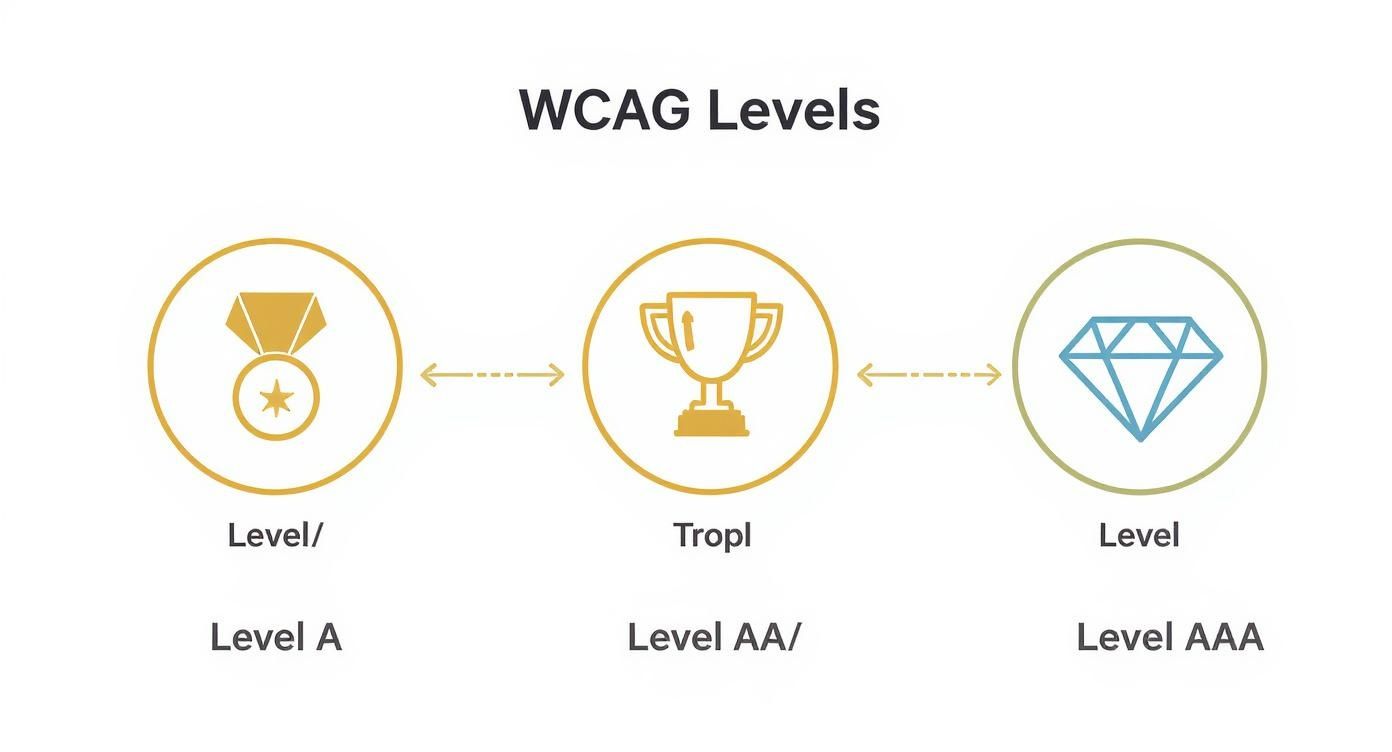
As you can see, Level AA is the sweet spot—it’s the accepted industry standard that balances robust accessibility with what’s practical for most businesses to implement.
Interaction and Design Flaws
Simple design choices can make or break usability. One of the most common mistakes is low color contrast. When the text color is too similar to the background, it’s tough to read for people with low vision or certain types of color blindness. It’s an easy fix that makes a world of difference.
Forms are another place where things often go wrong.
- Fields without clear, programmatically linked labels leave screen reader users guessing what to type.
- Vague error messages like "Invalid input" are a dead end. They trap users without explaining what's wrong or how to fix it.
- Poor website performance can also be an accessibility barrier, especially for users on slower connections or older devices. We cover how to optimize website performance in another guide.
Common Accessibility Issues and Their Impact
To tie this all together, here is a quick breakdown of some of the most frequent accessibility problems, who they affect, and the core WCAG principle they violate.
| Accessibility Barrier | Primary User Group Affected | WCAG Principle Violated |
|---|---|---|
| Missing Alt Text on Images | Users with visual impairments (blind, low vision) | Perceivable |
| Low Color Contrast | Users with low vision, color blindness | Perceivable |
| No Keyboard Navigation | Users with motor disabilities, screen reader users | Operable |
| Uncaptioned Videos | Users who are deaf or hard of hearing | Perceivable |
| Vague Link Text ("Click Here") | Screen reader users, users with cognitive disabilities | Understandable |
| Improper Heading Structure | Screen reader users, users with cognitive disabilities | Understandable |
| Unlabeled Form Fields | Screen reader users | Operable / Understandable |
Recognizing these issues is the first and most critical step toward creating a website that truly works for every visitor, not just some of them.
Your Action Plan for Building an Accessible Website
Knowing the common roadblocks is a great start, but turning that knowledge into a real strategy is where the magic happens. Making a website accessible isn't a one-and-done task; it's a commitment. This plan gives you a practical roadmap to start doing it right, right from the beginning.
The best way to tackle this is by combining technology's speed with the nuance of human experience. This means pairing automated accessibility scanners with hands-on manual testing. Neither tool is enough on its own, but together, they create a seriously effective quality check.
Automated tools are fantastic for catching common, code-based issues like missing alt text or poor color contrast. They can scan your whole site in minutes and give you a quick health report. The catch? They can only flag about 30% of all potential WCAG issues because they can't actually understand context or what makes a user's journey smooth or frustrating.
The Power of Manual Testing
This is where manual testing is absolutely critical. A person can spot problems an automated tool would sail right past, like confusing navigation, a nonsensical reading order, or forms that are technically "correct" but practically impossible to use.
Think of it like this: an automated tool can check if a building has a ramp. A manual tester actually gets in a wheelchair and tries to use it.
You can even start with a few simple but incredibly revealing manual checks yourself:
- Keyboard-Only Navigation: Unplug your mouse. Now, try to get around your entire website using only the Tab, Enter, and arrow keys. Can you get to every link, button, and form field? Crucially, can you always see where you are (is the focus indicator clear)?
- Screen Reader Simulation: Fire up a free screen reader like VoiceOver (on Mac) or NVDA (on Windows). Close your eyes and have it read your homepage to you. Does the content make any sense? Are the images described in a useful way?
These simple tests often uncover major barriers that automated scans miss entirely. They force you to step into someone else's shoes, building a genuine understanding of what accessibility means in the real world.
Shift Left: Integrate Accessibility from Day One
One of the single most effective changes you can make is to "shift left"—a simple concept that means thinking about accessibility as early as possible in any project. Too often, it's treated as a last-minute check before launch, which almost always leads to expensive, frustrating fixes.
Instead of waiting until the end, bake accessibility into every stage of your work.
- Design: From the very first wireframe, your designers should be considering color contrast, readable fonts, and logical layouts.
- Development: Developers should be writing clean, semantic HTML and using ARIA attributes correctly as they build, not patching them in later.
- Content: Writers should be crafting descriptive alt text, clear headings, and using plain language from the get-go.
When you "shift left," accessibility stops being a final hurdle and becomes a core part of your quality standard. This proactive mindset saves time, cuts down on costs, and leads to a fundamentally better and more inclusive website from the start.
Your Initial Accessibility Checklist
It can feel like a lot to take on, so here’s a straightforward checklist to get you moving. It doesn't cover everything, but it tackles the high-impact basics that will make an immediate difference for your users.
- Audit Your Current Site: Run an automated tool (like WAVE or Axe) and then do the manual keyboard test. This gives you a baseline of where you stand.
- Prioritize Critical Fixes: Start with the showstoppers. Fix things that completely block users, like keyboard traps or unusable forms on your checkout or contact pages.
- Review Your Color Palette: Check that all text and background color combos meet WCAG AA contrast standards.
- Add Alt Text to All Images: Go through your media library. Write meaningful alt text for every single image that conveys information. For purely decorative images, use null alt text (
alt=""). - Check Your Heading Structure: Ensure every page has a logical outline—one H1, followed by H2s, then H3s, and so on. No skipping levels!
- Caption Your Videos: If you have video, add accurate, synchronized captions.
For a deeper dive, this ultimate website accessibility checklist is an excellent resource. By following this action plan, you can finally move from just talking about accessibility to actually building a website that works for everyone.
Answering Your Top Accessibility Questions
Stepping into the world of website accessibility can feel overwhelming. It’s easy to get tangled up in legal jargon, budget worries, and confusing technical details. Let's cut through that noise and get straight to the answers you actually need.
Think of this as a no-nonsense FAQ for business owners. We'll tackle the tough questions about cost, legal standards, and those tempting quick-fix solutions. Getting a handle on these key topics is the first step toward making smart, strategic decisions for your company.
Is Making My Website Accessible Expensive?
This is probably the number one question, and the answer depends entirely on how you look at it. Instead of an "expense," think of it as an investment. And like any good investment, it pays dividends. The universal rule here is simple: it is always more affordable to build accessibility in from the start than to retrofit it later as an emergency fix.
Imagine you're building a house. Including ramps and wide doorways in the original blueprint is a relatively minor cost. But if you have to tear down walls and rebuild entryways after the house is finished? That’s a massive, expensive renovation. It's the exact same principle with your website. Integrating accessibility into the design and development process is efficient; a panicked overhaul after a legal notice is anything but.
The true ROI of accessibility isn't just a single number. It comes from an expanded customer base, better brand loyalty, a boost in SEO, and a dramatic drop in legal risk. While a full audit for a complex site does require a budget, many of the most important improvements are surprisingly low-cost and deliver a huge impact.
What Is the Difference Between ADA and WCAG?
This is a major point of confusion, but the relationship is actually pretty straightforward.
- The ADA is the "what." The Americans with Disabilities Act is a U.S. civil rights law that says you can't discriminate based on disability. Courts have repeatedly ruled that websites count as "places of public accommodation," so the ADA's rules apply to your digital presence. It mandates that you must be accessible.
- WCAG is the "how." The Web Content Accessibility Guidelines are the globally recognized technical standards that show you how to make it happen. They provide a clear, testable checklist for designers and developers to follow.
So, while the ADA itself doesn't mention WCAG by name, the legal system has overwhelmingly pointed to it as the gold standard. Following WCAG Level AA has become the accepted way to show you're meeting your ADA obligations and is the benchmark used in most legal settlements.
Do Small Businesses Really Need to Worry About This?
Yes. Absolutely. There's a dangerous myth out there that accessibility lawsuits only target huge corporations. The reality is that legal claims are filed against businesses of every size, from the local coffee shop to massive retail chains. This isn't a "big company" problem; it's an "every company" problem.
But forget the legal threat for a moment and think about the opportunity. Why would you ever want to voluntarily turn away customers? For a small business, offering an inclusive digital experience can be a powerful competitive advantage. It helps you stand out and build a fiercely loyal customer base that your bigger, slower competitors might be ignoring.
Just consider that one in four adults in the United States lives with some form of disability. That is a massive part of the market. Making your website accessible opens your doors to them and sends a powerful message that you value every single customer.
Can an Accessibility Overlay Widget Make My Site Compliant?
This is the siren song of accessibility: a simple tool that promises to fix everything with a single line of code. These "overlays" add an on-page menu that lets users change things like font sizes or colors. They sound great in theory, but in practice, they are highly controversial and largely ineffective.
Accessibility experts and disability advocates have been sounding the alarm for years. These tools simply don't fix the underlying code that creates barriers for users. Worse, they can sometimes interfere with the assistive technologies people already use, like screen readers, making the website even harder to navigate.
Relying on an overlay gives you a false sense of security. Hundreds of lawsuits have been filed against companies using these widgets, which proves they aren't a reliable legal shield. The only real path to accessibility and compliance is through thoughtful design, clean code, and a genuine commitment to your users—not a quick software patch.
Building a truly accessible website takes expertise and a proactive strategy. At Sugar Pixels, we weave accessibility best practices into every step of our design and development process, making sure your site is ready for all users from day one. If you're ready to build an inclusive online presence that grows your business and protects your brand, learn more about our web design services.