
Think of your website as your single most important employee. It’s your 24/7 digital storefront, your most vocal brand ambassador, and a lead-generation machine that never sleeps. It's the one place on the internet you truly own.
Your Blueprint for Digital Success
Let's be clear: having a professional, user-friendly website isn't just a nice-to-have anymore. It's the cost of entry for staying relevant. If potential customers can't find you online, you might as well be invisible.
This guide is designed to pull back the curtain on the entire process of website design and development. We'll walk you through the journey, from a rough idea scribbled on a napkin to a polished digital asset that actually moves the needle for your business.
Why a Strategic Website Matters
A great website is the heart of your marketing ecosystem. Every social media campaign, email newsletter, or paid ad you run is almost always trying to funnel people back to your site. It’s where the magic happens—where visitors become customers.
The numbers don't lie. The global web design market is expected to hit $92.06 billion by 2030, and the U.S. market alone is valued at $43.5 billion in 2024. This isn't just random spending; it's a massive investment because businesses know that a good website is a competitive necessity. You can dive deeper into these web design statistics to get the full picture.
What You Will Learn in This Guide
We've broken down the entire lifecycle into clear, digestible stages. The goal is to give you a roadmap so you can make smart decisions and work effectively with any web professional you hire.
As you read through this guide, you’ll get a solid grip on:
- The Key Stages: We'll cover everything from the initial strategy and design concepts to the hands-on development, testing, launch day, and the ongoing work that keeps a site healthy.
- The Distinct Roles: You’ll finally understand the real difference between a designer (the architect who creates the blueprint) and a developer (the builder who brings it to life).
- Making Informed Choices: We’ll give you the criteria to choose the right technologies, weigh the pros and cons of a custom build versus a template, and decide whether to hire an agency or build an in-house team.
A great website is a blend of art and science. It requires creative vision to engage users and technical precision to deliver a flawless experience across all devices.
By the end of this guide, you'll have the knowledge you need to transform your website from a simple online brochure into your company's most valuable asset.
2. Distinguishing Website Design From Development
People often toss around the terms "website design" and "website development" like they’re the same thing. They're definitely two sides of the same coin, but they are completely different disciplines with their own unique goals, skills, and tools. Getting this difference straight is the first—and most important—step in talking about your project and bringing your vision to life.
Think about it like building a house. Website design is what the architect does. They draw up the blueprints, thinking constantly about the person who will live there. The architect decides the layout of the rooms (the user's journey), the color of the paint (visual identity), and the overall flow of the home (the user interface).
This phase is all about the look, feel, and usability. A designer's mission is to make sure the final product is not only beautiful but also intuitive and dead simple for the intended audience to use.
The Role of the Web Designer
At their core, web designers are visual artists and strategic thinkers. They obsess over the what and why behind a user’s every click. Their final output isn't a working website; it's the detailed plan needed to build one.
Here’s what a designer spends their time on:
- User Experience (UX) Design: This is the deep-dive research into what users actually need, which informs how they'll move through the site logically and without friction.
- User Interface (UI) Design: This is the creative part, focused on crafting the visual feel of every button, menu, and interactive element.
- Wireframing and Prototyping: Designers build simple sketches (wireframes) and interactive mockups to test out layouts and ideas long before a single line of code gets written.
The Role of the Web Developer
If the designer is the architect, then the web developer is the construction crew. They take those detailed blueprints and use programming languages to build a real, functional structure. Their world is all about logic, code, and solving technical puzzles. They’re the ones who transform a static picture into a living, breathing website.
Developers usually fall into two specialized camps: front-end and back-end.
Front-end developers build everything you actually see and click on in your browser—the buttons, the text, the images. Back-end developers build the hidden engine that makes it all run, like the server, database, and application logic.
This division of labor is key for any serious project. The front-end developer makes sure the site looks and behaves exactly like the designer planned, using languages like HTML, CSS, and JavaScript. Their work is what makes a site "responsive," meaning it looks great on your phone, tablet, and desktop computer.
Meanwhile, the back-end developer is working behind the scenes. They manage the database that stores information, write the code for features like a contact form or a shopping cart, and ensure the entire system is secure and running smoothly. Without their work, the beautiful front-end would just be an empty, non-functional shell.
To get a better handle on how these two roles work together, you can dig deeper into the differences between web design and web development.
To make this distinction crystal clear, here’s a quick breakdown:
Website Design vs Development at a Glance
| Aspect | Website Design (The Architect) | Website Development (The Builder) |
|---|---|---|
| Primary Goal | Define the look, feel, and user journey. | Build a fully functional, live website from the design plans. |
| Core Focus | Visuals, usability, aesthetics, user experience. | Functionality, performance, security, technical structure. |
| Key Skills | Graphic design, UX/UI principles, prototyping, color theory. | Programming (HTML, CSS, JS), server management, databases. |
| Common Tools | Figma, Sketch, Adobe XD, Photoshop. | Code editors (VS Code), frameworks (React), CMS (WordPress). |
| Deliverables | Wireframes, mockups, style guides, prototypes. | A live, interactive, and functional website. |
Ultimately, a truly great website is born from a seamless partnership. The designer provides the vision, and the developer provides the technical skill to bring it to life. One can't succeed without the other.
Breaking Down the Website Creation Process, Step by Step
Building a website isn't a single event; it's a journey. Think of it like building a house. You wouldn't just start throwing up walls without a blueprint, and you certainly wouldn't start construction without knowing what the house is for. A structured, step-by-step process is the only way to launch a successful site without descending into chaos. It ensures the final product isn't just pretty, but also technically solid, a breeze for customers to use, and perfectly aligned with your business goals.
The relationship between design (the blueprint) and development (the construction) is fundamental. You have to finish one before you can properly start the other.
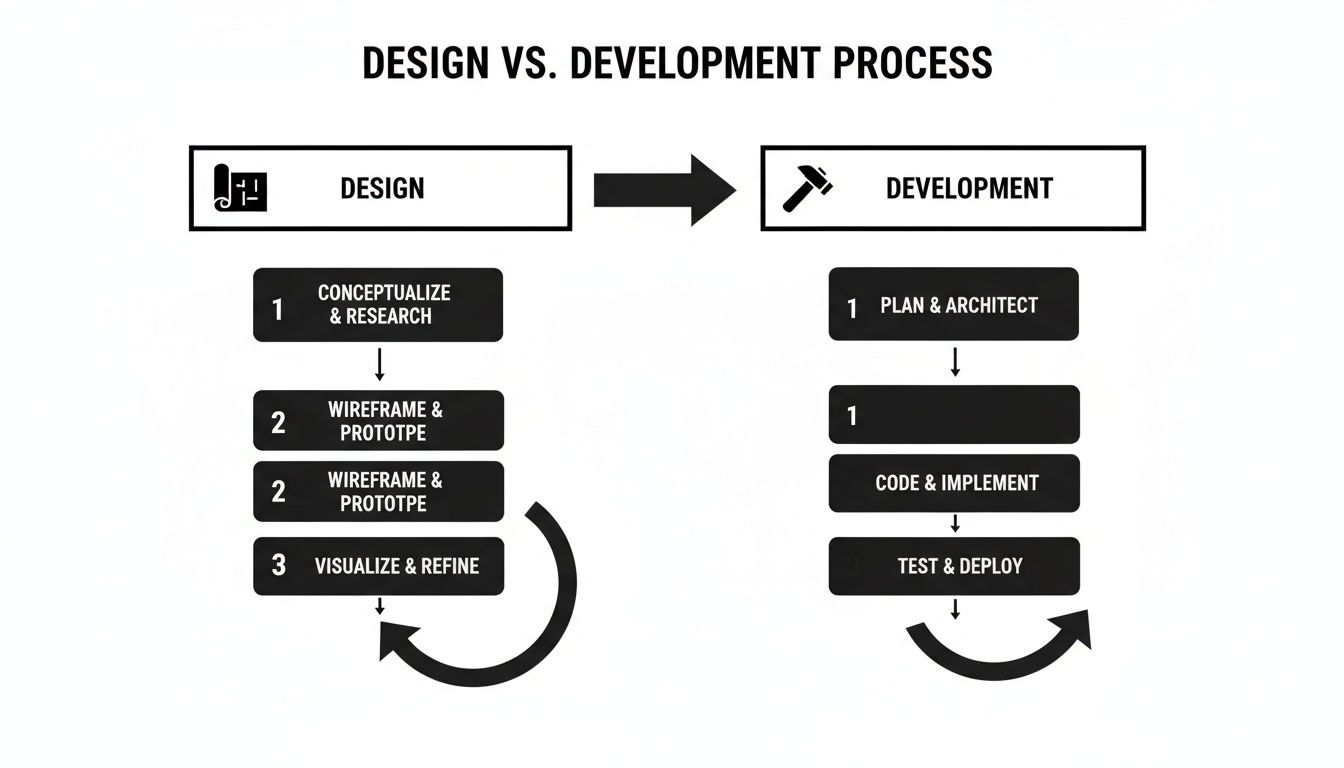
This visual split makes a critical point crystal clear: complete the architectural planning (design) before the building process (development) begins. It’s the single best way to prevent expensive, time-consuming rework down the line.
Phase 1: Strategy and Discovery
Before a single pixel is designed or a line of code is written, every great project starts with a deep dive into strategy. This is the foundation for everything that follows. Skipping this step is like setting off on a road trip without a map—you’ll end up somewhere, but it probably won’t be where you intended to go.
During this discovery phase, your team needs to nail down the answers to some core questions:
- What is this website's main job? Is it meant to generate leads, sell products, act as an information hub, or build a community?
- Who are we building this for? Defining clear user personas helps tailor the design, content, and features to what your actual audience needs and expects.
- What’s the full scope? This means detailing every single feature, page, and function. A clear scope prevents "scope creep"—that dreaded project-killer where new requests keep getting added on.
Phase 2: UX and UI Design
With a solid strategy in hand, the focus shifts to how the user will actually experience the site. This is where the architect—the designer—drafts the blueprints for your digital home, making sure it's both beautiful and effortless to navigate. This is broken down into two related but distinct disciplines: User Experience (UX) and User Interface (UI).
UX design is all about the invisible logic. It’s the science of creating an intuitive path for users. Designers create wireframes, which are simple, black-and-white layouts that map out the site’s structure and how a user moves through it, all without the distraction of colors or images.
Once that structure is locked in, UI design adds the visual flair. This involves creating high-fidelity mockups that define the color scheme, typography, button styles, and overall look and feel. The end result is a clickable prototype that looks and feels like a real website, allowing everyone to weigh in before a developer starts building.
Phase 3: Content Creation
A stunning website with weak content is like a beautiful storefront with empty shelves. It just doesn't work. This phase often runs parallel to design and development, focusing on crafting the words and visuals that will bring the site to life. Great content does more than fill space; it communicates your brand's voice, convinces visitors to take action, and is non-negotiable for SEO.
Content creation covers a few key areas:
- Copywriting: Writing clear, compelling text for every single page, from the homepage headline to the last sentence of a blog post.
- Visual Assets: Sourcing or creating high-quality images, videos, and icons that reinforce the brand message and make the site a pleasure to use.
- SEO Integration: Weaving target keywords into the copy naturally, so search engines can easily understand what your site is all about.
Phase 4: Front-End and Back-End Development
Now it's time for the builders—the developers—to take the designer's blueprints and construct a fully functional website. This process is split into two connected parts: the front-end and the back-end.
Front-end development is all about the client-side—everything the user actually sees and interacts with in their browser. Developers use languages like HTML, CSS, and JavaScript to bring the UI mockups to life. They ensure the site is responsive, meaning it looks and works perfectly on desktops, tablets, and smartphones.
Back-end development is the engine under the hood. It’s the server-side work that powers the website from behind the scenes, including setting up servers, managing databases, and writing the application's logic. When you're planning your site's technical needs, think about crucial functions like payment gateway API integration for an e-commerce store—that’s a classic back-end job.
A seamless user experience is the result of perfect harmony between front-end and back-end development. The user only sees the beautiful interface, completely unaware of the complex server-side operations making it all possible.
Phase 5: Testing and Quality Assurance
No website should ever go live without being put through its paces. The Quality Assurance (QA) phase is a critical checkpoint to hunt down and fix bugs, errors, and any weird quirks before the public sees them. A single broken link or a contact form that won't submit can destroy user trust and cost you business.
QA specialists test for a whole range of potential problems:
- Cross-Browser Compatibility: Does the site look and work correctly on Chrome, Firefox, Safari, and Edge?
- Device Responsiveness: Is the experience flawless across different screen sizes, from a huge monitor to a small smartphone?
- Functionality Testing: Do all the links, buttons, forms, and other interactive elements do what they're supposed to do?
- Performance Checks: How fast does the site load? A Google study found that 53% of mobile users will leave a page that takes more than three seconds to load.
Phase 6: Launch and Post-Launch Maintenance
Finally, with all tests passed, it's time to go live. The launch itself involves deploying the website files to a live server and pointing your domain name to it. But the work doesn't stop there. A website is a living asset that needs ongoing care to stay secure, fast, and effective.
Post-launch maintenance is a non-negotiable part of any professional project. This ongoing plan should include regular software updates, security scans to fend off malware, performance monitoring, and consistent backups. Neglecting maintenance is one of the fastest ways to let a valuable investment fall apart.
Choosing the Right Technology for Your Website
The technology that powers your website is its engine. Think about it: you wouldn't put a scooter engine in a freight truck and expect it to haul heavy cargo. The same logic applies here. The tech you choose has to match what you need your website to do for your business.
Getting this right from the start is crucial. It dictates whether your site is fast, secure, and ready to grow with you. More importantly, it saves you a world of headaches and expense down the road. This decision isn't just a technical detail; it’s a foundational piece of the entire website design and development puzzle.
We often talk about a website’s technology as its “tech stack.” That’s just a simple way of describing the mix of programming languages, software, and databases that developers use to build and run your site. It's the complete recipe.
Understanding the Tech Stack
Now, you don't need to get bogged down in the technical weeds of a tech stack. Most business owners don't. But knowing the basic concept helps you have a more informed conversation with your development team.
For instance, you might hear them mention the LAMP stack (Linux, Apache, MySQL, PHP), a classic workhorse for web applications. Or they might talk about the MERN stack (MongoDB, Express.js, React, Node.js), which is popular for building slick, modern interactive sites.
The main takeaway? Different stacks are built for different jobs. Your developer will suggest the best fit based on your project's specific needs. For most businesses, however, the more practical decision isn't about the code itself, but the platform it's built on.
Content Management Systems (CMS)
For the vast majority of businesses, a Content Management System (CMS) is the perfect engine. A CMS is basically software that lets you create, edit, and manage all the content on your site—like blog posts, images, and page text—without having to touch a line of code.
A good CMS cleanly separates your content from the website's design. This is huge, because it means you can update a blog post or change a product description without any fear of accidentally breaking the entire site.
In the world of CMS platforms, one name stands head and shoulders above the rest: WordPress.
- WordPress: It started life as a simple blogging tool, but it has since grown into a powerhouse that runs over 43% of all websites on the internet. Why is it so popular? It’s incredibly flexible, has a massive library of plugins to add almost any feature you can imagine, and is supported by a global community of developers. If you're building a versatile informational site, a blog, or a portfolio, WordPress is usually the go-to. To dig deeper, check out our guide on choosing the best CMS for a small business.
E-Commerce Platforms
If your main goal is selling products online, you’ll want a platform built specifically for the job. E-commerce platforms come out of the box with all the essentials you need—product pages, a shopping cart, and a secure way to take payments.
Two of the biggest players you’ll come across are Shopify and WooCommerce, and they cater to slightly different needs.
Shopify: This is your all-in-one, fully hosted solution. You pay a monthly fee, and Shopify handles everything else: the hosting, the security, the software updates. It’s famously easy to use, which makes it a favorite for entrepreneurs who want to launch a store fast without getting bogged down in technical details.
WooCommerce: This isn't a separate platform, but rather a free plugin that transforms a WordPress website into a powerful online store. WooCommerce gives you total control and flexibility over every aspect of your shop. The trade-off is that you're responsible for managing your own hosting, security, and updates. It’s a fantastic choice for businesses that are already on WordPress or want ultimate creative freedom.
Building Your Website for Business Growth
A great website is so much more than a digital business card. Think of it as an active, tireless employee working 24/7 to grow your business. While a stunning design is what first grabs a visitor's attention, the real magic happens when your site starts bringing in revenue and new customers all on its own.
This is where a smart approach to website design and development makes all the difference. To build a true growth engine, you have to focus on two things from day one: e-commerce functionality and search engine optimization (SEO). These aren't just features you tack on at the end. They need to be baked into the website's DNA from the initial blueprint. Trying to add SEO after a site is launched is like trying to add a foundation to a finished house—it’s clumsy, expensive, and never works as well.

Engineering Your Site for E-commerce Success
If you're selling anything online, your number one job is to make buying from you feel effortless and safe. A confusing checkout process is the quickest way to lose a sale. In fact, studies show that nearly 70% of online shopping carts are abandoned before the customer pays. To avoid becoming another statistic, your e-commerce site needs a rock-solid technical setup.
Here are a few non-negotiables that help turn browsers into buyers:
- Secure Payment Gateways: Integrating trusted processors like Stripe, PayPal, or Square is an absolute must. This keeps customer data encrypted and transactions secure, which is the cornerstone of building trust.
- Intuitive Inventory Management: Your website’s backend needs to be smart enough to track stock levels in real-time. Nothing frustrates a customer more than ordering an item only to find out later it's out of stock.
- High-Converting Product Pages: The perfect product page is a blend of art and science. It needs high-quality images, persuasive descriptions, clear pricing, and a big, obvious "Add to Cart" button that guides the user smoothly toward making a purchase.
Integrating SEO From the Ground Up
Search Engine Optimization (SEO) is simply the art of getting your website found on Google. If your site isn't built with SEO in mind, it's like opening a shop on a backstreet with no sign—no one will ever find you. An effective SEO strategy doesn't start with blog posts; it starts with the code.
This behind-the-scenes work is often called technical SEO, and it’s the bedrock of your site's visibility. It’s not about stuffing keywords onto a page; it’s about how the site is structured for search engines to understand.
Think of technical SEO as the plumbing and wiring of your website. It ensures search engine crawlers can easily navigate, understand, and index your content, giving you a fighting chance to rank for the right searches.
This foundational work involves several key tasks your development team needs to handle:
- Mobile Responsiveness: More than half of all web traffic now comes from phones. Your site must look and work perfectly on every screen size. Google even prioritizes mobile-friendly sites in its rankings, so this is no longer optional.
- Fast Site Speed: Nobody waits for a slow website. If your pages take too long to load, visitors will leave, and Google will notice. Optimizing images and writing clean code are development tasks that directly impact speed and, therefore, your ranking potential.
- Clean URL Structures: Your page addresses should be simple and descriptive, like
yourstore.com/womens-tops/long-sleeve-shirts. This helps both people and search engines understand what the page is about just by looking at the link. - XML Sitemaps and Schema Markup: A sitemap is a roadmap of your website that you give to search engines to help them find all your pages. Schema markup is a type of code that adds context, helping search engines display richer, more helpful results for your site.
Beyond the technical build, learning how to build an online business that lasts is key to long-term success. By weaving e-commerce best practices and fundamental SEO into your website from the very start, you aren't just creating a digital presence. You're building a profitable, findable, and sustainable asset that will support your business for years to come.
Making the Right Investment for Your Project
Deciding how and with whom you build your website is one of the most critical business decisions you'll make. This choice directly shapes your budget, timeline, and what your final website can actually do. Getting it right from the start means matching your project's ambition with your resources.
The first big question you'll face is whether to go with a custom-built website or start with a pre-made template. Each path comes with its own set of trade-offs, and understanding them is key to making a smart investment in your website design and development.
Think of a template-based website like buying a model home in a new development. It's quick, affordable, and the structure is already there. The downside? You're limited to the floor plans and finishes the builder offers, which can feel a bit cookie-cutter if you have a unique vision.
Custom Builds Versus Template Designs
A custom-built website, on the other hand, is like hiring an architect to design and build your dream home from scratch. It’s a bigger commitment of both time and money, but every single detail is crafted to fit your exact needs, brand, and future ambitions. This gives you total creative control and the ability to build features that make you stand out.
So, which one is for you? It really boils down to your immediate needs versus your long-term goals.
- Templates are a great fit for: Startups, small businesses with a tight budget, or anyone who needs to get online fast. They offer a polished, professional look without a hefty price tag.
- Custom builds are essential for: Businesses with complex functional needs, a powerful brand that needs to shine, or a clear roadmap for scaling up in the future.
A website is not just an expense; it's an investment in your business's future. The "right" choice is the one that provides the best return on that investment over time.
Choosing Your Build Partner
Once you've figured out the "how," it's time to tackle the "who." Generally, you have three options to bring your site to life: build an in-house team, hire an agency, or work with a freelancer. Each model works best for different types of companies and projects.
An in-house team gives you the ultimate control and a deep understanding of your company's DNA, but it's also the most expensive route when you factor in salaries and benefits. A freelancer is often the most budget-friendly option for smaller, clearly defined projects, but you might miss out on the diverse expertise a full team provides.
A web design agency strikes a great balance. You get a dedicated team of specialists—designers, developers, project managers, and strategists—all working together. This approach delivers deep expertise and efficiency without the long-term overhead of hiring everyone yourself.
Decoding Website Pricing Factors
Website pricing can feel like a black box, but it almost always comes down to a few core elements. The more time, complexity, and specialized skills your project demands, the more it will cost. If you're looking for a deep dive, you can learn more about how website design costing is calculated in our detailed guide.
Here are the main factors that drive the price up:
- Custom Features: Anything that goes beyond a simple brochure site, like a custom e-commerce checkout, a customer login portal, or unique interactive tools, requires more development time.
- Number of Pages: It's simple math—more pages mean more design, content, and development work.
- Ongoing Support: Your website needs care after it launches. Post-launch maintenance, security monitoring, and hosting are recurring costs that keep it running smoothly and securely.
Your Top Questions, Answered
Jumping into a website project can feel like navigating a maze. It’s natural to have questions, so let's clear up some of the most common ones we hear from business owners and marketing teams.
How Long Does It Really Take to Build a Website?
This is the classic "how long is a piece of string?" question. The honest answer? It completely depends on what you're building.
For a straightforward, small business website using a pre-built template, you could be looking at a launch in as little as 4-6 weeks. That's assuming you have all your text and images ready to go from day one.
But if you're building a custom e-commerce store with all the bells and whistles—think hundreds of products, secure payment systems, and unique customer features—you should plan for a timeline of 3-6 months. For even bigger, more complex web applications, the project can stretch out even longer. Remember, that timeline covers everything: the initial strategy, design mockups, coding, testing, and getting all your content loaded in.
What's the Real Cost of a Professional Website?
Just like timelines, costs can be all over the map. You could get a simple site from a freelancer for a few thousand dollars. On the other end of the spectrum, a massive, custom-built enterprise platform from a top-tier agency can easily run into six figures or more.
Think of it this way: the price tag is a direct reflection of the custom work and complexity involved. The more unique features, pages, and integrations your site needs, the more it will cost.
So, what drives the price up or down?
- Custom vs. Template: A unique, from-scratch design will always cost more than a modified template.
- Scale: The total number of pages and unique layouts is a major factor.
- Functionality: Adding e-commerce capabilities and payment gateways adds significant development time.
- Who You Hire: The cost will vary greatly between a solo freelancer, a dedicated agency, or building an in-house team.
Once My Site Is Live, Am I Done? Do I Need Ongoing Maintenance?
Absolutely, yes. Think of your website launch as the beginning of its life, not the end. Ongoing maintenance is non-negotiable if you want your site to stay secure, fast, and functional. It’s just like getting regular oil changes for your car—if you skip them, you’re eventually going to run into major, expensive problems.
A good maintenance plan is your site's insurance policy. It should include regular software and plugin updates to close security holes, frequent backups to protect your data from disaster, and security scans to keep hackers out. This isn't just about security; it also keeps your site running smoothly for your visitors, which is a huge deal for both user experience and your SEO rankings.
Ready to build a website that delivers results without the technical headaches? Sugar Pixels offers everything from design and development to hosting and SEO, all under one roof. Start your project with us today!