

Managing a web development project can feel like a high-wire act. Success depends on a delicate balance of technical skill, crystal-clear communication, and a solid strategic plan. All too often, projects get sidelined by murky requirements, scope creep, and a failure to lock down core business goals before a single line of code gets written.
Why Most Web Development Projects Go Off The Rails
If you've ever felt that managing a web project is like herding cats in a wind tunnel, you're not wrong. These projects have a reputation for being notoriously difficult, and for good reason. Unlike building a house from a fixed blueprint, a website is a living, breathing entity built from invisible, interconnected code—the one place where brand, user experience (UX), SEO, and raw technical power collide.

The root of this chaos usually boils down to a simple disconnect. A client sees a "simple" button. A developer, on the other hand, sees a cascade of dependencies: API calls, database queries, state management, and accessibility rules. This gap in perspective is the perfect breeding ground for misunderstandings that can quickly spin a project out of control.
The True Cost of Small Misunderstandings
One of the biggest hurdles is translating broad business goals into specific, actionable technical tasks. A stakeholder might say, "I want the site to be faster." It’s a perfectly reasonable request, but what does "faster" actually mean in practice?
- Does it mean improving the server's initial response time (TTFB)?
- Should we focus on compressing images and switching to modern formats like WebP?
- Is the real issue about optimizing JavaScript to make the site feel more interactive?
Each of these is a distinct task with its own timeline and resource needs. Without a project manager who can act as a translator, developers are left guessing, and clients are left wondering why their "simple" ask is taking so long. This is why a solid grasp of effective website development project management is so critical right from the start.
This communication gap is precisely where things start to unravel. It's not surprising, then, that only 35% of web development projects are completed successfully—on time, on budget, and to scope. In fact, a staggering 70% of projects fail to meet expectations, primarily due to poor planning.
The most common point of failure in web development isn't a buggy deployment or a server crash. It’s a weak foundation, built on assumptions and vague conversations long before any developer is involved.
Why a Disciplined Framework Is Your Best Defense
Putting in the effort for detailed, upfront planning isn't just a nice-to-have; it's your best defense against chaos. Taking the time to ask pointed questions and document everything isn't about creating red tape. It's about building a shared understanding that actively prevents the small misunderstandings from snowballing into project-killing disasters.
For a deeper dive into the technical side of things, check out our guide on web development best practices.
Defining The Project Scope And Vision
The success or failure of a web project is often decided long before a single line of code gets written. It all comes down to a strong foundation—a shared vision and a tightly defined scope. This isn't about creating busywork; it's a strategic discovery process that turns big business goals into a concrete, actionable plan.
Without this clarity, you're essentially flying blind. Ambiguity is the enemy of every project, opening the door to the dreaded scope creep that blows up timelines and budgets. The real goal here is to get past what the client says they want and uncover the true "why" behind every feature.
Moving Beyond Surface-Level Requests
Clients and stakeholders are great at describing what they want, but it's our job as project leaders to figure out what they actually need. A seemingly simple request like "we need a contact form" can be loaded with hidden complexities. A seasoned PM knows to start asking questions.
- Functionality: Which fields are non-negotiable? Do you need to allow file uploads?
- Logic: Should the form change based on user input? For example, showing different fields if they select "Sales Inquiry" vs. "Support."
- Security: How are we stopping spam? Is a basic CAPTCHA enough, or do we need something more robust?
- Integration: What happens after someone hits "submit"? Does it need to pipe data into a CRM like Salesforce or an email marketing tool?
This kind of deep dive turns a vague idea into a specific set of requirements. It's a collaborative effort that prevents major headaches down the road and makes sure the final product actually solves the right business problem.
A project's scope is its constitution. It protects both the client and the agency by creating a single source of truth that defines the boundaries of the work, the deliverables, and the definition of "done."
By getting this granular, everyone is on the same page. You're not just building a form anymore; you’re building a secure, integrated lead generation tool—a much clearer task for any development team.
From Conversations To A Concrete Statement Of Work
After you've gathered all these details from stakeholder interviews and workshops, it’s time to get it all down on paper. This documentation is the project's bedrock, providing clarity and a reference point for everyone.
The most critical document you'll create here is the Statement of Work (SOW). A great SOW isn't filled with technical jargon; it's written in plain English that anyone, from the CEO to the lead developer, can understand.
A solid SOW clearly outlines:
- Project Goals and Objectives: What business outcomes are we trying to achieve? More leads? Better user engagement?
- Detailed Deliverables: A specific list of everything that will be created—from wireframes and design mockups to the fully coded and tested website.
- Project Timeline: Key milestones, deadlines for feedback, and the target launch date.
- Explicit Exclusions: This is your best defense against scope creep. It’s just as important to state what's out of scope. For example, "Post-launch SEO content creation is not included."
A critical early step is choosing the right project management methodology, as it will shape your timeline and deliverables. Digging into Agile vs. Waterfall vs. Scrum: Choosing the Right Project Management Methodology can help you figure out which approach is the best fit for your team and the project's needs.
Using User Stories To Define Features
To add even more clarity, many teams translate these technical requirements into user stories. These are simple, bite-sized descriptions of a feature told from the perspective of the end-user.
They almost always follow this simple template:
As a [type of user], I want [to perform an action] so that [I can achieve a benefit].
Let’s go back to our contact form example. A user story might look like this:
- "As a potential customer, I want to be able to upload a project brief so that I can give the sales team all the details they need upfront."
This format is incredibly effective because it keeps the focus squarely on user value. Instead of just building a list of features, it forces everyone to think about the why behind the work, ensuring development effort is always tied to a real-world goal. Nail down the vision and scope with this level of precision, and you’ll build a foundation that can handle anything the project throws at it.
Building Your Project Blueprint and Assembling Your Team
Once you’ve nailed down the project scope, the real fun begins. It's time to move from what you're building to how you're going to build it. This is where your project blueprint comes into play—a detailed execution plan that maps out key milestones, clarifies who owns what, and sets the workflow that will carry your team from kickoff to launch.
Without a solid blueprint, you're inviting chaos. I've seen it happen too many times: tasks get dropped, deadlines slip, and developers and designers end up working in frustrating silos. A clear, well-thought-out plan ensures everyone understands their exact role and how their piece of the puzzle fits into the bigger picture.
This simple flow shows how we get there, turning those initial big ideas into a concrete Statement of Work that becomes the bedrock of our project plan.
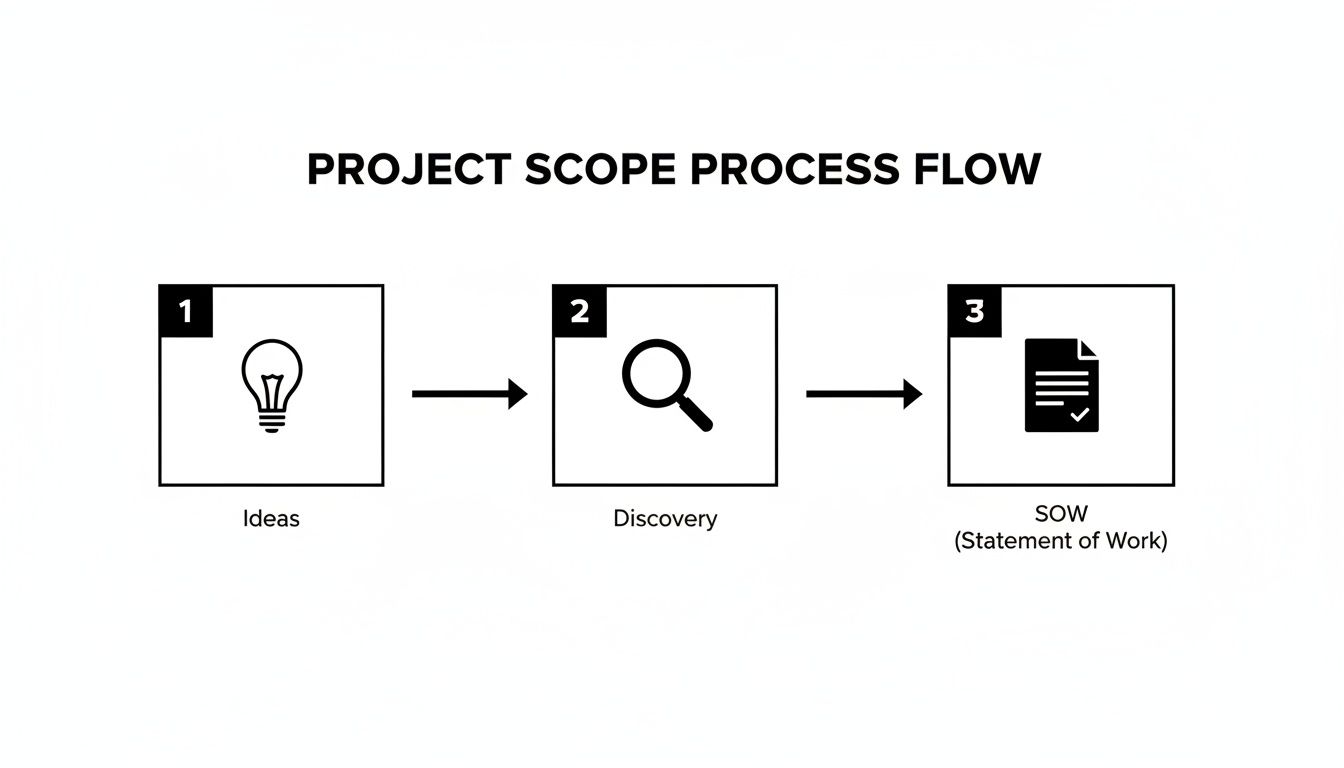
This just hammers home why a structured discovery phase is non-negotiable. It’s what turns abstract conversations into an actionable plan before you even think about bringing the full team on board.
Defining Roles and Responsibilities
Putting together the right team is about more than just finding talented people; it’s about building a cohesive unit where every single person knows their responsibilities inside and out. In web development, the roles are distinct but incredibly interdependent.
Here's a look at the key players:
- UI/UX Designer: This is your user's advocate. They’re responsible for the wireframes, mockups, and prototypes that make the site intuitive and visually on-brand. Knowing how to choose a web designer who gets both aesthetics and usability is a huge first step.
- Front-End Developer: They're the ones who bring the static designs to life. Working with HTML, CSS, and JavaScript, they build everything the user sees and interacts with in their browser.
- Back-End Developer: This person works behind the scenes, building the server-side logic, databases, and APIs that power the site. They handle everything from user accounts to form submissions.
- QA Tester/Analyst: Their mission is simple: find bugs before the client or their customers do. They rigorously test the site across different browsers and devices, looking for anything that’s broken, slow, or just plain weird.
Documenting these roles in a project charter or kickoff deck isn't just bureaucracy; it eliminates confusion. The designer knows exactly when to hand off assets, and the developer knows who to bug about an API endpoint.
A project without clearly defined roles is like a ship without a crew manifest. Everyone might be on board, but no one is certain who is steering, who is managing the sails, and who is watching for icebergs.
Selecting Your Project Management Methodology
There’s no single "best" way to run a web project. The right approach really depends on the project's specifics. While a rigid Waterfall methodology might work for projects with locked-in requirements, most modern web development demands more flexibility.
This is where hybrid models really shine, especially in an agency environment. Here's a quick look at the main options:
Comparing Project Management Methodologies For Web Development
| Methodology | Best For | Pros | Cons |
|---|---|---|---|
| Waterfall | Projects with fixed scope, budget, and timeline where requirements are known upfront. | Simple to manage, clear milestones, well-documented. | Inflexible, slow to adapt to change, testing happens late in the process. |
| Agile | Complex projects where requirements may evolve. Ideal for continuous improvement. | Highly adaptable, encourages client collaboration, delivers value faster in small increments. | Can lead to scope creep, less predictable timelines and budgets, requires a highly engaged client. |
| Hybrid | Most agency projects that need both a solid plan and the ability to adapt. | Combines upfront planning (Waterfall) with flexible execution (Agile), balances structure with agility. | Can be complex to manage, requires a team comfortable with both methodologies. |
For most of our projects, we lean toward a hybrid approach. We use a Waterfall-style process for the initial discovery, scoping, and design phases to get a firm handle on the foundation and budget. Once we move into development, we switch to Agile sprints. These short, iterative cycles allow us to build, test, and get feedback on features, giving us the freedom to adapt without blowing up the whole project.
Choosing the Right Tools for the Job
Your blueprint and methodology are only as good as the tools you use to execute them. They act as the project's central nervous system, keeping communication flowing, progress tracked, and documentation organized.
It's no surprise the project management software market is set to hit $7.24 billion in 2025. High-performing projects are 77% more likely to use these tools for a reason—they can boost productivity by 50% and slash costs by 20%.
An agency's core toolkit usually looks something like this:
- Communication Hub: A tool like Slack or Microsoft Teams for instant conversations and updates.
- Task Management: A platform like Jira, Asana, or Trello to assign tasks, manage deadlines, and visualize progress.
- Version Control: A system like Git is absolutely essential. We manage ours through platforms like GitHub or Bitbucket to keep our code collaborative and clean.
By starting with a clear blueprint, building a team with well-defined roles, and giving them the right tools and methodology, you create an environment built for success. This structure is what keeps everyone aligned and moving forward, even when the inevitable complexities of web development pop up.
Keeping the Project on Track: Communication, Quality, and Rhythm
This is where the rubber meets the road. All the planning, scoping, and strategizing come to life during the execution phase. The key to navigating this critical stage isn't about micromanaging every detail; it's about establishing a solid rhythm, fostering clear communication, and maintaining an almost obsessive focus on quality.
Without a reliable process for communication and QA, even the most brilliant plans can unravel. A simple misunderstanding over client feedback can easily burn through weeks of development time, and a single critical bug that slips through the cracks can shatter a client's trust right before launch. This is the time to be proactive, transparent, and meticulous.
Finding Your Groove with Agile Ceremonies
Even if your agency runs on a hybrid project management model, borrowing a few key ceremonies from Agile frameworks like Scrum can work wonders. These aren't just more meetings to fill the calendar; they are structured touchpoints that drive clarity, alignment, and efficiency.
- Sprint Planning: Before diving into a one- or two-week sprint, the entire team huddles up to look at the project backlog. Together, they decide which features or tasks to tackle next, breaking down bigger user stories into manageable sub-tasks. This ensures everyone starts the sprint on the same page, knowing exactly what success looks like.
- Daily Stand-ups: This is a quick-fire, 15-minute meeting each morning. It's not a status update for the project manager. Instead, each person answers three simple questions: What did I get done yesterday? What am I working on today? What's getting in my way? This simple ritual brings blockers to the surface immediately, so small snags don't turn into major delays.
- Sprint Review/Demo: At the end of the sprint, it's showtime. The team demonstrates the actual working software they've built to the client and other stakeholders. This is an incredibly powerful feedback loop. Showing a client a tangible, working feature is infinitely more effective than trying to describe it in an email.
This steady cadence creates momentum you can feel. It reframes a massive project from a daunting marathon into a series of smaller, winnable races, which is great for team morale and keeps clients feeling connected to the progress.
Building Trust Through Proactive Communication
Great communication is the lifeblood of any successful web project. This goes way beyond just sending a weekly status report. It's about anticipating questions, managing expectations, and consistently translating technical jargon into clear business outcomes for your client.
When a client sends feedback, the absolute worst thing you can do is leave them hanging. Acknowledge it right away. A simple, "Got it, thanks! The team is reviewing this and we'll get back to you by the end of the day," shows that you're responsive and that their input matters.
For those inevitable scope change requests, you need a formal change request process. When a client asks for something new, document it immediately. Then, assess its impact on the timeline and budget and present them with a few clear options. This transforms a potentially awkward conversation into a collaborative, strategic decision.
Instead of saying, "Sorry, that's out of scope," try this approach: "That's a fantastic idea. To do that right, it would add about X hours to the project. Would you like us to swap it with another feature we haven't started, or should we scope it out as a separate add-on?"
This language validates the client's idea while gently reinforcing the project's boundaries. It protects your team's focus and helps the client understand the trade-offs.
The Non-Negotiable QA Checklist
Quality Assurance (QA) isn't a final step you rush through before launch; it’s a discipline that needs to be woven into every single sprint. A robust QA process is more than just clicking around to see if the site breaks. It's a systematic check to ensure the final product is functional, fast, accessible, and looks professional across the board.
We learned this lesson the hard way on a big e-commerce project years ago. Our structured QA process caught a nasty bug in the payment gateway just days before the site was set to go live. A very specific user flow—buying a product with a certain type of discount code—was failing. Finding that before launch saved our client from what would have been thousands in lost sales and a huge hit to their brand reputation.
Here’s a look at the foundational QA checklist your team should be running through constantly:
- Cross-Browser & Device Testing
- Does the site look and work perfectly on the latest versions of Chrome, Firefox, Safari, and Edge?
- How does it feel on both iOS and Android phones and tablets?
- Check all responsive breakpoints: mobile, tablet, desktop, and extra-large monitors.
- Functional Testing
- Are all internal and external links pointing to the right place?
- Do all forms submit correctly? Is the data being captured where it needs to go?
- Test every interactive element—buttons, dropdowns, sliders, accordions, you name it.
- Performance Testing
- How fast does the site load? Use tools like Google PageSpeed Insights to get a baseline.
- Are all images optimized for the web?
- Is the CSS and JavaScript minified to keep file sizes small?
- Accessibility Testing
- Can you navigate the entire site using only a keyboard?
- Is there enough color contrast for users with visual impairments?
- Do all images have descriptive alt tags for screen readers?
By making this kind of rigorous testing a core part of your development cycle, you build quality in from the start. This systematic approach is your project's ultimate safety net, ensuring the website you deliver isn't just "done," but truly well-crafted.
Navigating The Launch Handoff And Post-Launch Support
The final push before a website goes live is one of the most nail-biting, yet critical, phases of any project. It’s so much more than just flipping a switch. A successful launch is a carefully choreographed event that needs both technical precision and crystal-clear communication. If you drop the ball here, you risk undermining months of hard work with broken links, security holes, or a client who feels completely lost.
At this stage, your team’s focus has to shift from building new things to hardening what you’ve already built. This is the time for final checks, double-checks, and triple-checks. We need to make sure every single piece of the puzzle is locked in place before the rest of the world gets to see it.
The Ultimate Pre-Launch Checklist
Think of a pre-launch checklist as your project's final safety net. It’s what turns a potentially chaotic scramble into a systematic, predictable process. Instead of just hoping you remembered everything, you're working off a clear, actionable plan that leaves nothing to chance.
Your checklist has to be comprehensive, covering every angle from the back-end tech to client-facing details.
- Final SEO Audit: Run one last check for any glaring issues. Are all the meta titles and descriptions in place? Is there a
sitemap.xmlready for Google? Crucially, is yourrobots.txtfile accidentally blocking search engines from crawling the new site? (You’d be surprised how often this happens). - Security Hardening: Confirm your SSL certificate is installed correctly and is forcing HTTPS across the entire site. It's also a good idea to run a quick security scan for common vulnerabilities and ensure all admin passwords are rock-solid.
- Content Migration Check: Do a final sweep of all the migrated content. Hunt for broken images, weird formatting glitches, or missing pages. This is especially vital for large sites where an automated script might have missed a few edge cases.
- DNS Propagation Plan: You need a solid game plan for updating the DNS records. Let the client know ahead of time that there will be a propagation window where some users might see the old site while others see the new one. Managing expectations here is key.
A smooth launch is the direct result of a meticulous pre-launch process. The work you do in the final 48 hours before going live is what separates a professional deployment from a frantic, stressful scramble.
Executing An Effective Client Handoff
Once the site is live and stable, the next move is to empower the client to actually use it. A great handoff isn't just about emailing over a username and password. It's about giving them the training and documentation they need to manage their new digital home with genuine confidence.
I always schedule a live training session, either in person or over a video call, and I always record it. During the session, I walk them through their content management system (CMS), showing them how to handle common tasks like updating text, adding a blog post, or managing their store’s inventory.
Alongside the training, provide simple, clear documentation. This doesn't need to be a 100-page manual nobody will ever read. A straightforward guide with screenshots and step-by-step instructions for core tasks is far more effective. This becomes their go-to resource, which dramatically cuts down on the "how do I do this again?" emails you'll get later.
Setting Up For Post-Launch Success
The project isn't over just because the site is live. To really prove the value of your work, you have to show how it's impacting the client’s business goals. This is where Key Performance Indicators (KPIs) come into play.
Before you even started building, you should have worked with the client to define what success looks like. Now’s the time to start tracking those metrics.
- Conversion Rate: Are more visitors filling out contact forms or making purchases?
- Site Speed: Use tools like Google PageSpeed Insights to keep an eye on performance. A fast site is a successful site.
- Bounce Rate: Are users sticking around longer and digging deeper into the site?
- Organic Traffic: Is the new site attracting more visitors from search engines?
Tracking these KPIs gives you hard data to prove a clear return on investment (ROI), but it also paves the way for future work. By spotting areas for improvement, you can propose ongoing optimization and support retainers, turning a one-off project into a long-term partnership. Our detailed website maintenance checklist is a great resource for figuring out what to include in a retainer package. This structured, data-driven approach to post-launch support is what separates a good agency from a great one.
Answering the Tough Questions in Web Project Management
Even the most meticulously planned web project will throw a few curveballs your way. It’s just the nature of the beast. Being able to handle these moments confidently is what really sets experienced project managers apart. Let’s dive into some of the questions that come up time and time again, for both the agency team and the client on the other side of the table.
Think of this as your playbook for those tricky situations. The goal isn't just to solve the immediate problem, but to make smart decisions that keep the project moving forward successfully.
How Do You Handle Scope Creep After a Project Starts?
The best way to deal with scope creep is to have a rock-solid plan before it even has a chance to happen. That plan is your Statement of Work (SOW). It’s your single source of truth.
When a stakeholder inevitably asks for a "small tweak" or a new feature mid-sprint, your first move is to hit the pause button. Go back to the SOW together.
If the request is genuinely outside of what was agreed upon, it’s not an automatic "no." Instead, you frame it as a change request. This isn't about creating red tape; it's about protecting the project's health. The process looks like this:
- First, you document exactly what the new request is.
- Then, you figure out how it will affect the timeline, budget, and your team's workload.
- Finally, you present the client with clear, straightforward options.
For instance, you might explain that adding the new feature will push the launch date back by two weeks and require an additional budget. Or, you could suggest parking the idea for a "Phase 2" to be tackled after the main site is live. This keeps you in control, shows the client you value their ideas, and maintains total transparency.
What's the Best Way to Keep Non-Technical Clients in the Loop?
When you're talking to stakeholders who don't live and breathe code, your two most important tools are clarity and consistency. Drop the jargon. It doesn't make you sound smart; it just creates confusion. Instead of talking about the process, talk about the outcome and what it means for them and their users.
Instead of this: "We've deployed the new API integration to the staging server."
Try this: "Good news! The new contact form is ready for you to test. Just click the demo link we sent over and give it a try. We'd love to know what you think!"
Set up a predictable rhythm for updates, whether it's a quick email every Friday or a 15-minute call every Tuesday morning. Use that time to show progress against the big milestones everyone agreed on. Visuals are a massive help here. A screenshot, a quick screen recording, or a link to a staging server will always be more powerful than a long-winded email.
Should I Use Agile or Waterfall for My Web Project?
Ah, the classic methodology question. The honest answer is: it depends entirely on your project. There's no silver bullet, but you can make an educated choice based on a couple of key factors.
A pure Waterfall approach, where you do everything in a strict, linear sequence, can work well for smaller projects where the scope is 100% locked in from day one. If you know exactly what you need to build and there's virtually no chance of it changing, Waterfall offers a simple, predictable path from A to B.
For most modern web projects, though, a hybrid approach is where the magic happens. You get the best of both worlds:
- Upfront Structure (Waterfall): You use a more traditional, planned-out process for the initial discovery, strategy, and design phases. This is crucial for locking down the core vision, budget, and high-level timeline.
- Flexible Building (Agile): Once development kicks off, you switch to iterative sprints. This lets the team adapt to feedback, make adjustments, and tackle complex features without blowing up the entire project plan.
This blended model gives clients the financial and timeline security they need while empowering your development team with the flexibility to build a truly great product.
At Sugar Pixels, we transform complex web development challenges into successful, high-performing digital experiences. Our structured yet flexible management process ensures your project stays on track, on budget, and aligned with your business goals from start to finish. Learn more about how we can bring your vision to life.