

A smart internal linking strategy is so much more than just dropping a few links between pages. It's the secret sauce for spreading authority across your site, making navigation a breeze for users, and giving your most valuable content the spotlight it deserves. The whole idea is to strategically link from your heavy-hitting, high-authority pages to those that need a little SEO boost, creating a logical website structure that both people and search engines can actually understand.
Why Internal Linking Is Your Untapped SEO Superpower
Too many people treat internal linking as an afterthought. You know the drill: throw a couple of links into a blog post right before hitting publish and call it a day. But that’s a huge missed opportunity. You're ignoring one of the most powerful, controllable, and downright cost-effective SEO tools you have at your disposal.
A well-thought-out internal linking plan isn't just about ticking an SEO box. It's about making your entire website work smarter for you. It takes a random collection of pages and transforms them into a cohesive, interconnected web of information. This structure tells search engines what your most important content is, builds your topical authority, and guides visitors on a journey that keeps them engaged and moving toward conversion.

The Strategic Advantages of a Cohesive Linking Plan
When you start linking your content with real purpose, you unlock some serious benefits that directly affect your search visibility and your bottom line. Think of it as creating a network of pathways that funnel value all across your website.
A solid strategy really boils down to a few critical goals:
- Improved PageRank Distribution: You can channel link equity from your strongest pages (like your homepage or a viral blog post) to newer or less-visible pages, giving them a much-needed lift in the search results.
- Enhanced User Experience (UX): It’s all about guiding your visitors to other relevant, helpful content. This keeps them on your site longer, which naturally lowers your bounce rate and sends positive signals to Google.
- Accelerated Content Discovery: Internal links create a roadmap for search engine crawlers, helping them find and index your new content way faster. This prevents important pages from becoming "orphaned" and lost in the depths of your site.
To put it simply, here’s a quick overview of what a great internal linking strategy accomplishes.
Core Goals of an Internal Linking Strategy
| Strategic Goal | Primary SEO Impact | Business Outcome |
|---|---|---|
| Distribute Link Equity | Boosts the authority and ranking potential of target pages. | Higher search rankings for key commercial pages. |
| Improve Site Architecture | Establishes a clear, logical hierarchy for content. | Easier navigation for users and faster crawling for bots. |
| Decrease Bounce Rate | Guides users to more relevant content on your site. | Increased user engagement and time on site. |
| Increase Crawlability & Indexation | Helps search engines find and index content more efficiently. | More of your pages appear in search results, faster. |
| Establish Topical Authority | Interlinks related content to signal expertise on a subject. | Stronger rankings for a cluster of related keywords. |
As you can see, the impact goes way beyond just connecting a few dots. It’s a foundational piece of your entire SEO puzzle.
A well-executed internal linking strategy is your site's central nervous system. It sends signals of importance, connects related concepts, and ensures every part of your website communicates effectively with both users and search engines.
The results speak for themselves. I've seen businesses that get serious about their internal links achieve ranking improvements between 25–60%. It doesn't stop there. A focused plan can lead to up to 30% more indexed pages and a staggering 40–80% growth in organic sessions.
Setting the Foundation for Success
Of course, to really turn internal linking into your SEO superpower, you need a solid foundation. This starts with high-quality content built on SEO content writing best practices. After all, your links need to point to something valuable.
Likewise, it helps to have a clear understanding of what search engine optimization is (https://www.sugarpixels.com/what-is-search-engine-optimization/) to frame your efforts. With great content and a clear SEO mindset, your internal links become the architectural beams that support your entire site, turning a collection of scattered pages into a powerful, rank-driving asset.
Laying the Groundwork: Your Foundational Internal Link Audit
Before you can build a powerful internal linking strategy, you have to know what you're working with. Just like a contractor inspects a building's foundation before starting a renovation, you need a clear blueprint of your site's current link structure.
Jumping straight into adding new links without this map is a recipe for chaos. A thorough audit is the diagnostic tool that reveals hidden opportunities, critical flaws, and the real flow of authority across your website. This isn't just about spotting problems; it's about gathering the data that will inform every strategic move you make from here on out.
First, Hunt for Critical Linking Errors
Your first job is to find and fix the most common and damaging internal linking mistakes. These technical glitches can absolutely tank your SEO by wasting your crawl budget, diluting page authority, and just plain frustrating your users.
Tools like Ahrefs or Semrush are your best friends here, as they can crawl your site and flag these issues automatically. Even Google Search Console can point you in the right direction.
Here’s what you’re looking for:
- Broken Internal Links: These are the worst offenders—links that point to a page that doesn't exist (404 errors). They create dead ends for users and search engine crawlers, immediately stopping the flow of any link equity.
- Internal Redirects: While sometimes necessary, linking to an old URL that then redirects to the final page creates an unnecessary hop for crawlers. It’s a small but significant drain on your crawl budget.
- Redirect Chains and Loops: These are the nightmare versions of the above. A chain forces a crawler through multiple redirects to get to the final page, while a loop traps them in an endless circle, preventing them from ever reaching your content.
Fixing these technical issues is almost always the quickest win you can get from an audit. For a more exhaustive checklist that goes beyond just internal links, our guide on how to do an SEO audit walks you through the entire process.
The most powerful pages on your site can't pass authority if their links lead to nowhere. Fixing broken links and redirects is like patching leaks in a dam—it ensures that valuable link equity flows exactly where you intend it to go.
Next, Find Your Isolated and Under-Linked Pages
With the technical cleanup done, it's time to find the pages that are structurally stranded. This is where you can uncover some serious hidden potential.
Orphaned pages are the most extreme example—these pages have zero incoming internal links. Unless they have some powerful external backlinks, they're practically invisible to search engines. Imagine a SaaS company publishes an amazing case study but forgets to link to it from their blog or resources page. That case study is now an island, completely cut off from the rest of the site.
You also need to find important pages that simply have weak link support. An e-commerce store, for instance, might launch a new high-margin product category but only link to it from a single, deeply buried blog post. That page, despite being commercially critical, has no shot at ranking without stronger internal signals.
Finally, Analyze Crawl Depth and Link Distribution
The last piece of the audit is understanding how easily search engines can actually find your most important content. We measure this with a metric called crawl depth, which is just the number of clicks it takes to get from your homepage to any other page.
As a rule of thumb, your most important "money pages"—your service pages, product categories, or lead-gen landing pages—should be within three clicks of the homepage.
Anything buried four, five, or more clicks deep is often seen by Google as less important and gets crawled less frequently. During your audit, you might discover a critical software feature page is six clicks deep, hidden behind a maze of menus and archives. That's a huge problem.
This analysis gives you a clear roadmap for architectural changes. By identifying these deep pages, you can plan to create more direct links from high-authority pages (like your homepage or main navigation) to instantly signal their importance to Google.
Designing a Powerful Site Architecture for SEO
A smart internal linking strategy starts long before you add a single link. It begins with your site's architecture—the very blueprint of your website. Think of it this way: you can't just start building hallways (your links) without a logical floor plan for the rooms (your pages).
Without a well-thought-out structure, you're just linking reactively, hoping something works. A deliberate design ensures that authority flows where you want it to go, topical signals are crystal clear, and your most valuable content is always easy to find. This architectural approach is what elevates internal linking from a simple SEO chore to a massive strategic advantage.
An audit often reveals just how messy an unplanned structure can get, uncovering problems like orphaned pages or important content buried way too deep.
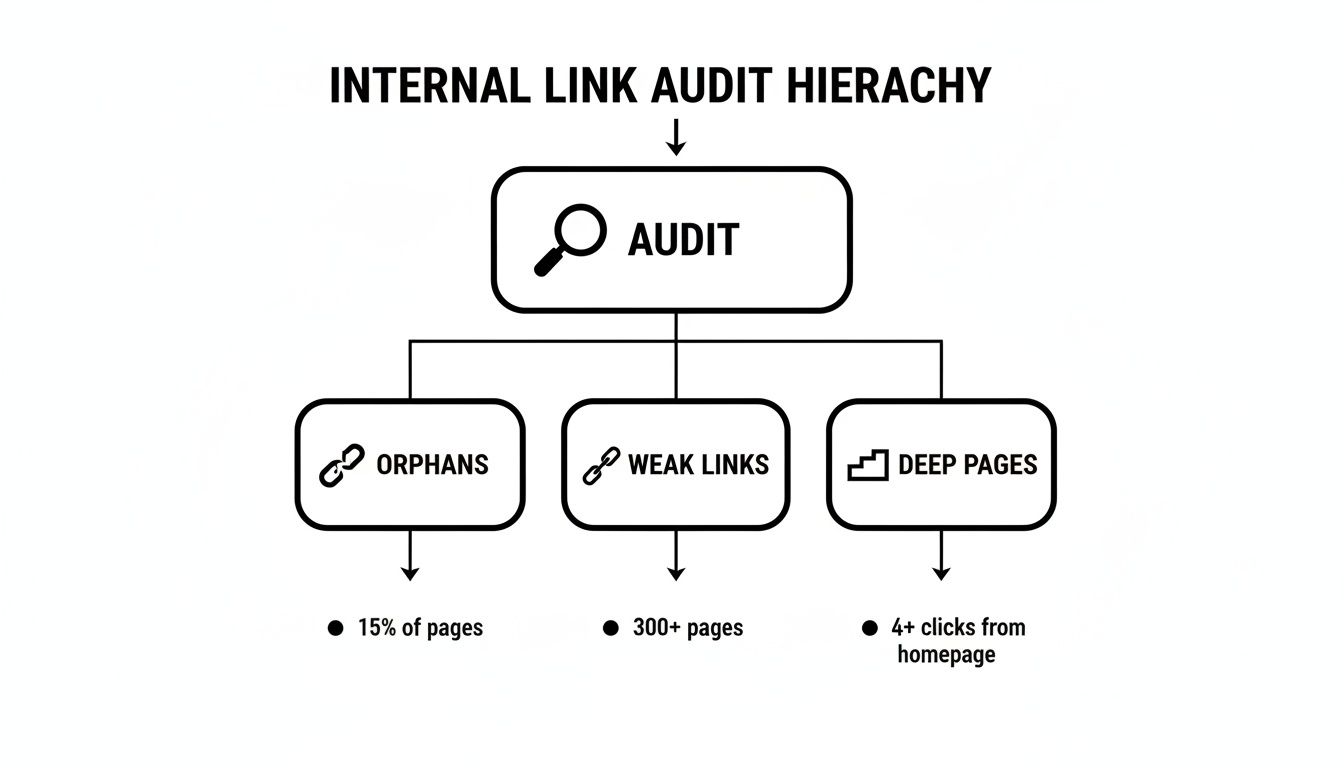
This kind of hierarchy helps you spot the weak points in your foundation, showing you exactly where authority is failing to flow across your site.
The Hub-and-Spoke Model for Topical Authority
One of the most effective structures I've seen for building topical authority is the hub-and-spoke model, often called topic clusters. This isn't just theory; it’s a proven way to organize your content around core themes, sending powerful expertise signals to search engines.
It's a pretty intuitive setup:
- The Hub (Pillar Page): This is your big, comprehensive guide on a broad topic. For a SaaS company, this might be a pillar page like "The Ultimate Guide to Email Marketing Automation." It covers everything but at a 10,000-foot view.
- The Spokes (Cluster Content): These are the deep-dive articles that branch off from the hub, exploring specific subtopics. For our email marketing hub, spokes could be "How to Write Subject Lines That Get Opened," "A/B Testing Your Email Campaigns," or "Advanced List Segmentation Tactics."
Crucially, every spoke page links back up to its central hub. This creates a closed loop that tells Google, "Hey, this 'Email Marketing Automation' guide is our definitive resource, and we have a whole library of supporting content to prove it."
Content Siloing for a Clean Structure
Content siloing takes this a step further. The idea is to create distinct, thematic sections on your website and—this is key—to keep links from crossing between different silos as much as possible. This concentrates link equity and relevance within a specific category, making your site's focus incredibly clear to crawlers.
Let's say you run an affiliate site reviewing kitchen gear. A clean silo structure would look something like this:
- Silo 1: Espresso Machines: The hub is your "Best Espresso Machines of 2024" roundup. It links out to individual reviews, guides on pulling the perfect shot, and tutorials for descaling machines. All links stay within the coffee world.
- Silo 2: Blenders: A completely separate hub on the "Best High-Speed Blenders" connects to its own spokes—smoothie recipes, Vitamix vs. Blendtec comparisons, and so on.
By keeping these categories tidy, you avoid sending mixed signals. A random link from a blender review to an espresso machine guide just doesn't make much sense contextually, and it dilutes the topical focus you've worked so hard to build.
A well-designed site architecture is like a meticulously organized library. Each section is clearly defined, and related books are grouped together, making it easy for visitors to find exactly what they need and for the librarian (Google) to understand the library's entire collection.
Prioritizing Crawl Depth
Finally, let's talk about crawl depth. This is simply how many clicks it takes to get from your homepage to any other given page. Your most important pages—the ones that make you money or establish your authority—should never be buried deep in your site's structure.
As a rule of thumb, I always aim to keep all key commercial pages and pillar content within three clicks of the homepage.
Pages that are four, five, or even six clicks deep send a signal to Google that they're less important. As a result, they get crawled less often and have a much harder time ranking. A flatter, more accessible architecture is a direct signal of what you value most on your site. This deliberate structure is what makes an internal linking strategy truly work.
Once you’ve got your site architecture mapped out, it’s time to get into the nitty-gritty. This is where the real SEO magic happens—mastering the art of anchor text and deciding which pages get the most link equity. Think of it as the detail work, where every single link you add has a clear, strategic purpose.
Effective internal linking is so much more than just connecting pages. It’s about using the right words in those links to give clear signals to both users and search engines. This is where anchor text, the clickable text in a hyperlink, becomes your most valuable tool. It tells everyone what to expect before they even click.

Choosing the Right Anchor Text for the Job
Not all anchor text is created equal, and using a healthy mix is key to making your linking profile look natural. Shoving the same keyword into every link is an outdated tactic that can actually hurt you. A balanced approach always wins.
Here's a breakdown of the different types of anchor text you'll work with:
- Exact-Match: The anchor text is the precise keyword you want the destination page to rank for. Think linking to a page about coffee makers with the anchor "best coffee makers." Use these sparingly but with surgical precision on your most important links.
- Partial-Match: This includes a variation of your keyword, making it feel more conversational. For instance, linking to that same page with "our favorite coffee maker models."
- Branded: Using your brand name as the anchor, like "check out the options at Sugar Pixels." This is great for building brand recognition and linking to core pages like your homepage or about us page.
- Generic: Vague anchors like "click here" or "read more." Steer clear of these. They offer zero contextual value to search engines and aren't very compelling for users either.
- Naked URL: Simply pasting the URL as the link, like
https://www.sugarpixels.com/services/. It's rarely the best choice, but it can look natural in specific contexts, like when citing a source.
Choosing the right anchor text is a crucial skill. A well-crafted anchor gives Google a strong hint about the linked page's content, while a poor one is a missed opportunity. The table below breaks down when and where to use each type for maximum impact.
Anchor Text Type Comparison
| Anchor Text Type | Best For | SEO Impact Example |
|---|---|---|
| Exact-Match | Driving authority to a key "money" page for its primary target keyword. | Linking "best running shoes" to your top-level running shoe category page. |
| Partial-Match | Creating natural, context-rich links within blog content to related pages. | Using "our guide to trail running" to link to a sub-category page from a blog post. |
| Branded | Linking to your homepage or other top-level brand pages to reinforce brand entity. | "See why Sugar Pixels is the leading choice…" linking to the homepage. |
| Generic | Call-to-action buttons where the surrounding text provides all necessary context. | Using "Download Now" on a landing page for a specific e-book. Avoid in-text. |
| Naked URL | Citations, source lists, or when you want the URL itself to be visible. | Including https://www.example.com/study in a footnote or resource section. |
By diversifying your anchor text, you signal a natural, editorially-driven linking pattern to search engines, which is exactly what they want to see.
Funneling Link Equity to Your Money Pages
Okay, let's talk strategy. Not every page on your site holds the same business value. A smart internal linking strategy seo plan is all about identifying your most important pages and methodically sending authority their way.
First, you need to sort your pages into two main buckets:
- Money Pages: These are your conversion-focused pages—the ones that directly drive revenue. Think product pages, service pages, and contact forms.
- Support Pages: This is your informational content, like blog posts, how-to guides, and case studies. They attract traffic but don't typically close the deal on their own.
The game plan is simple: use your high-traffic support pages to prop up your money pages. A blog post that’s ranking well is an SEO goldmine, and it’s your job to distribute that authority where it will make the biggest impact.
For example, imagine you have a blog post on "10 Social Media Tips for Small Businesses" that gets a ton of traffic. That’s a powerful support page. Your goal is to pass its authority over to your "Social Media Management Services" page, which is a money page.
Instead of just dropping a random link at the bottom, you find a perfectly relevant spot within the blog post. A sentence like, "Implementing these tips can be time-consuming, which is why many businesses turn to professional social media management services to handle the heavy lifting," creates a seamless and valuable pathway for both users and search crawlers.
As you get deeper into link implementation, it's helpful to understand the wider SEO context. This includes knowing the nuances of different link types, which is why I often point people toward detailed guides that offer insights on link attributes and cloaking for SEO.
How This Looks in the Real World
Let's ground this in a couple of practical scenarios.
For an e-commerce store, a popular blog post on "How to Choose the Right Running Shoes" should be packed with strategic internal links. It could link to category pages like "trail running shoes" and "road running shoes" using partial-match anchors. It might also link directly to a high-profit product like "the new AlphaFly 3 running shoe" with an exact-match anchor.
For a SaaS company, a guide on "Improving Team Productivity" should intelligently link to specific feature pages. When the article talks about managing tasks, it’s the perfect opportunity to link directly to the "Task Automation Tool" feature page. This does more than just pass authority—it guides qualified readers deeper into your product funnel.
When you start treating your internal links as deliberate pathways for authority and relevance, you stop linking randomly and start building a powerful, results-driven strategy.
Measuring and Refining Your Linking Strategy
An internal linking strategy isn't a "set it and forget it" kind of project. Think of it as a living, breathing part of your website's ecosystem—it needs regular care and attention. Once you've rolled out your architectural changes and sprinkled in those new contextual links, the real work begins: measuring what happened and making smart adjustments.
This is where a good strategy becomes a great one. You need a feedback loop. By keeping an eye on the right numbers, you’ll know what’s working, what’s flopping, and where you should focus your energy next. Without data, you’re just guessing.
Defining Your Key Performance Indicators
To know if you're winning, you have to define what winning looks like. A vague goal like "get more traffic" won't cut it. You need to zero in on a few Key Performance Indicators (KPIs) that show your internal linking efforts are actually moving the needle.
Here are the big ones I always track:
- Keyword Ranking Changes: Are your "money pages" climbing the SERPs for their target keywords? This is the most direct signal that your new links are passing the authority you intended.
- Organic Traffic to Target Pages: Don't just look at sitewide traffic. Dig deeper. Are your pillar pages and key commercial pages seeing a lift in organic visitors? If so, you're on the right track.
- Pages Per Session: When this number goes up, it’s a great sign. It means people are clicking your internal links and exploring more of your site instead of bouncing.
- Reduced Bounce Rate: Seeing your bounce rate drop is another win. It means a visitor landed, and instead of leaving, they clicked on one of your well-placed internal links to keep reading. That's a huge engagement signal for Google.
Tapping into Analytics and Search Console
Your two best friends for this job are Google Analytics and Google Search Console. They give you the raw data to see how both search engines and actual humans are responding to your new link structure.
Google Search Console is your go-to for the technical side. Head over to the "Links" report. In the "Internal links" section, you should see your pillar pages and money pages rising to the top of the list. This is Google telling you, "Yep, we see that these pages are important now." It's direct confirmation.
Your internal linking strategy is only as good as the data you use to refine it. Check your analytics to see if users are actually clicking your new links. If they aren't, it could be a sign of weak anchor text, irrelevant links, or poor placement in the content.
Over in Google Analytics, you get the human side of the story. You can see how people behave on the site. When you see metrics like pages per session and average session duration trending up for specific pages, you know your internal links are guiding users effectively. It's solid proof that you're creating a better user journey.
Creating a Continuous Improvement Loop
This isn't a one-and-done audit. You need to build a cycle of implementing, measuring, and refining. I recommend setting a recurring task—maybe monthly or quarterly—to dive into your KPIs and ask some tough questions.
During your check-in, ask yourself:
- Did our target pages get the ranking boost we were hoping for?
- Are people clicking on the new links we added to those blog posts?
- Have we accidentally created any new orphan pages since the last audit?
- Are there any new, high-performing articles we can use to pass link equity to other important pages?
This ongoing process ensures your site's structure grows right alongside your content. As you publish new material, you can plug it directly into your strategy, linking it to the right hubs and money pages from day one. There are some great platforms that can make this easier; our guide on SEO tools for small businesses can point you to some helpful options.
By treating internal linking as a dynamic system, you build a powerful engine for SEO growth that keeps getting stronger over time.
Answering Your Burning Internal Linking Questions
Even the best-laid plans run into tricky situations. When you start actually implementing your internal linking strategy, specific questions are bound to pop up. Let's clear the air and tackle some of the most common ones I hear from clients and colleagues.
How Many Internal Links Should I Put On A Page?
Honestly, there's no magic number. You might have heard the old SEO rule of thumb about keeping links under 100, but that advice is seriously outdated. Today, the focus is squarely on user value, not hitting some arbitrary quota.
Instead of counting, ask yourself this: does this link actually help my reader? Does it clarify a point, offer a next logical step, or provide useful, related information? A massive, 3,000-word pillar page could easily have 25 highly relevant internal links that improve the experience. On the other hand, a snappy 500-word product description might only need two or three.
The golden rule is relevance. A link should feel like a natural part of the conversation you're having with the reader. If you have to shoehorn it in, it probably doesn't belong there.
Bottom line: a few well-placed, high-impact links will always beat a hundred forced, low-value ones. Quality over quantity, every time.
What Is The Difference Between Internal And External Links?
This is a foundational concept, but it's amazing how often people get them mixed up. The difference is simple—it’s all about where the link is going.
- Internal Links: These are links that point to another page on the very same website. Think of them as the hallways connecting the rooms of your house. When your blog post links to your services page, that's an internal link. They're your tool for guiding users and search engines through your own content.
- External Links: Sometimes called outbound links, these point to a page on a completely different website. You'd use one to cite a statistic, recommend a tool, or reference a source.
While both are vital for good SEO, your internal linking strategy is all about building a powerful, interconnected web within your own domain.
Should I Ever Use Nofollow For Internal Links?
The short answer here is a hard no. For 99% of cases, putting a rel="nofollow" tag on an internal link is a major SEO mistake.
Think about it: the whole point of internal linking is to pass authority (or "link equity") and crawling signals between your pages. A "nofollow" tag is like putting up a roadblock. It tells Google, "Don't follow this path and don't pass any authority through." It completely defeats the purpose of the link in the first place.
The only time you might even consider it is for links you absolutely don't want search engines to crawl or associate with your main content—things like a private login portal or an admin page that got linked by mistake. For all your actual content, leave them as standard "dofollow" links and let that authority flow.
Ready to stop guessing and start building a powerful, results-driven website? The team at Sugar Pixels combines expert web design with strategic SEO to create online experiences that convert. Let's build your digital presence together.