
Before diving into advanced security tactics, let's get the fundamentals right. You can't build a fortress on a foundation of sand, and the same goes for your website. Getting these core measures in place from day one is the single most important thing you can do to protect your business, your customers, and your reputation.
Building Your Digital Fortress with Core Security Measures
Think of it like securing your home. You'd lock the front door and windows before you even think about installing a fancy alarm system. For your website, these foundational "locks" are what stand between you and the most common, opportunistic cyberattacks.
Too often, especially when you're a startup or small business eager to get online, these basics are overlooked in the rush to launch. But ignoring them is like leaving your front door wide open. It’s an open invitation for trouble.
Getting this right isn't just about avoiding a disaster. It’s a smart business move. A secure website builds immediate trust with visitors, safeguards their sensitive information, and even gives you a boost in search engine rankings. Google has been very clear for years: they prefer secure sites.
Encrypt Everything with SSL and HTTPS
Your absolute first step is to install a Secure Sockets Layer (SSL) certificate. This is what puts the 'S' in https:// and adds that little padlock icon in a user's browser bar. It encrypts all the data flowing between your website and your visitors.
Without HTTPS, any information someone submits—passwords, contact details, credit card numbers—is sent in plain text. It’s like sending a postcard with your bank details written on the back for anyone to see.
For any modern website, especially an e-commerce store, HTTPS is completely non-negotiable. It’s the universal symbol of trust online. A missing padlock can send your bounce rate through the roof as savvy users will just leave rather than risk their data.
This simple diagram shows how these first few pieces fit together. You encrypt, you secure your hosting, and you back everything up. It’s a simple but powerful trifecta.
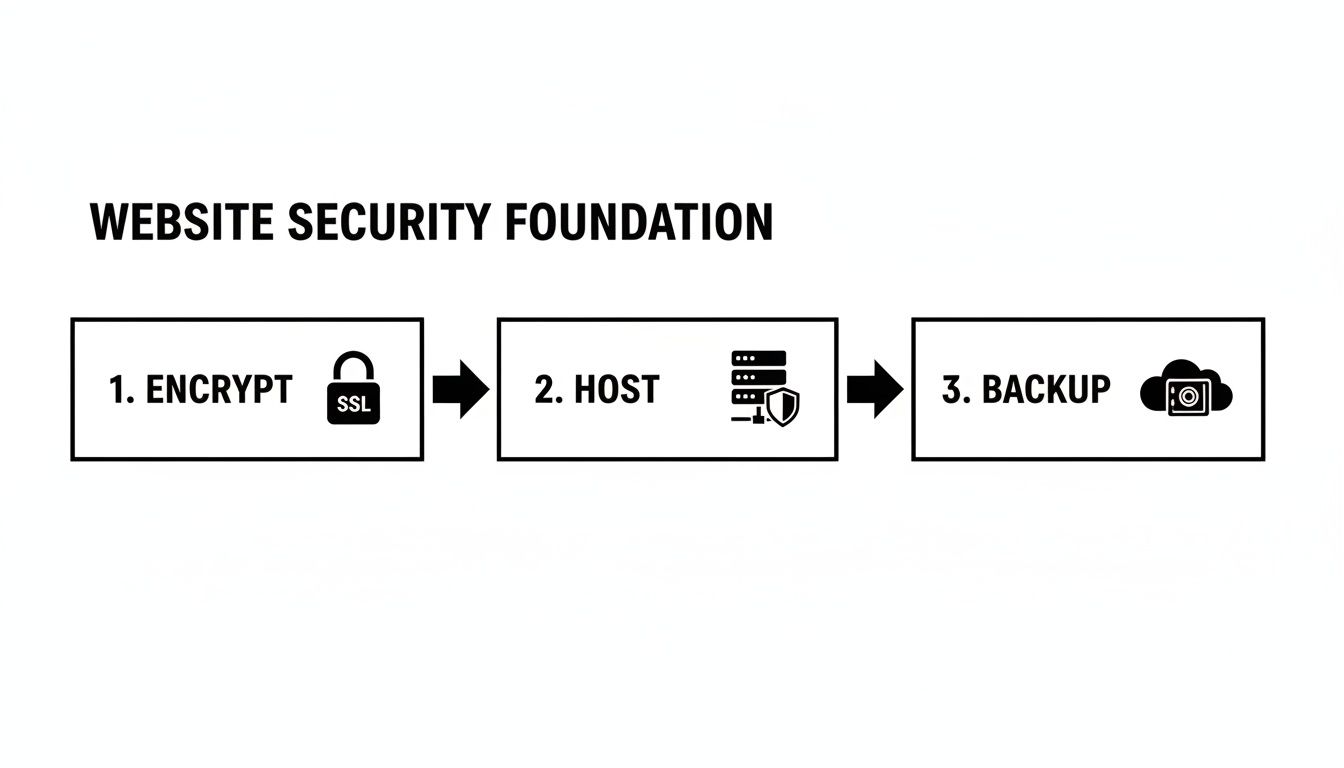
Each one builds on the last, creating a layered defense that forms the bedrock of your site's security.
Choose a Secure Hosting Provider
Your web host is the digital landlord for your website. Just like you wouldn't rent an apartment in a building with no locks on the doors, you can't afford to host your site with a provider that skimps on security. That cheap hosting plan might save you a few bucks a month now, but it could cost you everything if a breach happens on their end.
So, what should you look for?
- Server-Side Firewalls: These act as a bouncer, blocking malicious traffic before it even gets to your website's front door.
- Proactive Malware Scanning: Good hosts are constantly on the lookout for suspicious code on their servers, stopping infections before they spread.
- DDoS Protection: Distributed Denial-of-Service attacks are designed to knock your site offline by flooding it with junk traffic. A quality host has systems in place to absorb these attacks.
- Automated Backups: We'll get into this next, but a host that handles this for you provides a massive safety net.
Maintain Regular Updates and Backups
Outdated software is one of the biggest and most easily exploited vulnerabilities out there. This isn't just about your CMS, like WordPress, but also every single theme and plugin you have installed. When developers release an update, it’s often to patch a security hole they’ve found. If you don't update, you’re basically leaving a known backdoor unlocked.
Make it a habit. Set a recurring calendar reminder to check for and apply updates at least once a week. Many managed hosting providers can even automate this for you, which is a huge time-saver.
Just as critical is your backup strategy. A clean, recent backup is your ultimate undo button. If your site gets hacked, infected with malware, or just breaks during an update, you can restore a working version and get back online fast. Make sure you have backups stored in more than one place—ideally, with your host and on a separate, off-site location like a cloud drive.
For a more detailed look at building out your security plan, check out these website security best practices that cover a wider range of preventative measures.
To wrap this up, let's quickly summarize why these foundational pillars are so crucial for your business's survival and growth.
Core Security Pillars for Your Website
| Security Pillar | Primary Purpose | Business Impact if Neglected |
|---|---|---|
| SSL/HTTPS Encryption | Protects data in transit between users and your server. | Loss of customer trust, data theft, negative SEO impact, and potential legal fines. |
| Secure Hosting | Provides a protected server environment with built-in defenses. | Increased risk of server-level breaches, downtime from DDoS attacks, and slow support response. |
| Regular Updates | Patches known software vulnerabilities before they can be exploited. | High probability of being compromised through common, automated attacks. |
| Consistent Backups | Creates a safety net for rapid disaster recovery. | Catastrophic data loss, extended downtime, and potentially having to rebuild from scratch. |
Getting these four things right isn't just a recommendation—it's the cost of entry for doing business online today. They are your first, and best, line of defense.
Hardening Your Application Against Common Attacks
Once you've got the foundational pieces like HTTPS and secure hosting locked in, it's time to zoom in on the interactive parts of your website. I'm talking about the login forms, contact pages, and shopping carts—the very places where most vulnerabilities are found. The application layer is where your users engage, which also makes it a prime target for anyone trying to steal data or cause trouble.
Think of it like this: your hosting and SSL are the strong walls and locked doors of your digital storefront. Application hardening is about securing the windows and intercoms that people actually use. If those points of entry aren't secure, it doesn't really matter how strong the outer walls are.
This means we need to scrutinize every single way a user can send you data and make absolutely sure those inputs can't be twisted into something malicious.
Fortifying User Access and Authentication
The most direct route for an attacker to compromise your site is simply by stealing a user's login details. I've seen it time and time again: broken authentication and weak password policies are recurring themes in major security breaches.
A classic mistake is letting users create flimsy passwords like "123456" or "password." An attacker can tear through those in seconds with automated brute-force attacks. You have to enforce strong password policies right from the start.
Here's what that looks like:
- Minimum Length: Insist on at least 12-14 characters for every user password.
- Complexity: Require a healthy mix of uppercase letters, lowercase letters, numbers, and symbols.
- Password Blacklisting: Use a service to block notoriously common and previously breached passwords from being used.
But strong passwords are just the beginning. The single most effective security upgrade you can make is implementing multi-factor authentication (MFA). MFA asks users to provide a second piece of evidence—like a one-time code from an app or a text message—to prove it's really them. Even if a password gets stolen, the attacker is stopped cold without that second factor.
Multi-factor authentication is no longer a "nice-to-have" reserved for banks. For any e-commerce site or platform holding user data, it should be a standard offering. It's proven to reduce the risk of account takeover by over 99%.
Preventing Injection and Scripting Attacks
Some of the most devastating attacks I've ever seen happen when a website blindly trusts what a user types into a form. Attackers exploit this trust by "injecting" malicious code into search bars, login fields, or even the URL itself. This is where input validation becomes your best friend.
SQL Injection (SQLi) is the textbook example. An attacker might enter a snippet of SQL code into a username field, trying to trick your database into spilling sensitive data. Imagine they type something like ' OR '1'='1'. If your code isn't prepared for this, the database might see this as a universally true statement and grant them access without a valid password. It's a disaster.
Similarly, Cross-Site Scripting (XSS) involves injecting malicious scripts (usually JavaScript) into your website that then run in the browsers of other users. This can be used to hijack their sessions, redirect them to phishing sites, or just deface your pages.
To shut these attacks down, you need to live by the mantra of input validation and output sanitization:
- Validate on the Server-Side: Never trust data coming from a user's browser. Always check it on your server to make sure it's in the expected format (e.g., an email address actually looks like one).
- Use Parameterized Queries: Instead of stitching together database queries with user input, use what are called prepared statements. This technique ensures user input is always treated as plain data, never as executable code, which completely neutralizes SQL injection threats.
- Sanitize Your Output: Before you display any user-generated content back on a page, scrub it clean. This means encoding or removing any potentially dangerous HTML and script tags so they can't do any harm.
The cybersecurity landscape shows why this is so critical. OWASP's Top Ten consistently flags injection flaws and broken authentication as web security's biggest villains, contributing to data leaks in 36% of incidents globally. And with 72% of executives now seeing rising risks from AI-enhanced attacks, the threat to small businesses has never been greater. For a deeper dive into these trends, you can read the full threat intelligence report from IBM.
To really get this right, you should build security into your process from day one. Adopting a secure system development life cycle (SDLC) integrates security checks at every stage of development, rather than tacking it on as an afterthought. When you build securely from the ground up, you systematically close the loopholes attackers love, making your website a much, much tougher target.
Fortifying Your Infrastructure Against Malicious Traffic
Okay, so your application code is locked down. That’s a huge win. But what about the actual infrastructure—the servers and networks—that keeps your site online? This is where you build your digital fortress, a perimeter that filters out bad actors and junk traffic before they can even get close to your front door.
Think of it this way: even the strongest lock on a door won't help if a massive, angry mob is battering down the walls of the building. This layer is your first line of defense against the kind of large-scale, automated attacks that aim to overwhelm your website and knock it offline. For most small businesses, this isn't something you build yourself; it’s a critical feature you get from your web host or a specialized security service.

Without these protections, you’re exposed to some of the most common and disruptive threats on the web.
Deploy a Web Application Firewall (WAF)
A Web Application Firewall, or WAF, is like having a really smart bouncer for your website. It stands between your server and the internet, inspecting every single visitor request for malicious intent. It’s not just looking for sketchy visitors; it’s actively scanning for known attack patterns like SQL injections, cross-site scripting (XSS), and other attempts to exploit vulnerabilities in your code.
Here's a real-world scenario: imagine a botnet suddenly starts hammering your login page with thousands of password guesses per minute. A good WAF will spot that abnormal activity almost instantly. It then automatically blocks the IP addresses behind the attack, stopping the brute-force attempt cold before it ever burns through your server's resources.
Many of the best hosting providers and security platforms include a managed WAF. "Managed" is the key word here—it means their security experts are constantly updating the WAF’s rulebook to defend against the latest threats, so you don’t have to.
A well-configured WAF is one of the most effective tools you can deploy. It’s a powerful shield that deflects a huge range of automated attacks, preserving your server's performance for real customers and significantly shrinking your attack surface.
Use a Content Delivery Network for Defense
Most people think a Content Delivery Network (CDN) is just for speeding up a website. While they’re great for that, their security benefits are just as crucial. A quality CDN gives you access to a massive, globally distributed network of servers that can absorb and neutralize even the largest Distributed Denial-of-Service (DDoS) attacks.
A DDoS attack is pure brute force. It tries to knock your site offline by flooding it with an insane amount of junk traffic from thousands of hacked computers. A single server can't handle that onslaught. It will crumble.
But a CDN can. It distributes the attack traffic across its entire global network, essentially soaking it up like a giant sponge. The impact is so dispersed that your actual web server never even feels the strain. The malicious requests are filtered out at the network's edge, miles away from your infrastructure.
Choosing Your Infrastructure Partners Wisely
The effectiveness of your WAF and CDN really boils down to the partners you choose. Your web host, in particular, plays a massive role here. A cheap, bare-bones shared hosting plan probably won't offer serious DDoS protection or a sophisticated WAF, leaving you wide open.
When you're shopping for a host, get specific with your questions.
- Built-in WAF: Do they include a pre-configured WAF to block common attacks out of the box?
- Integrated CDN: Do they have their own CDN or partner with a major provider like Cloudflare to shield you from DDoS attacks?
- Active Monitoring: Are they actively watching network traffic for suspicious patterns and will they alert you if something is wrong?
Getting this right from day one is absolutely critical. To dig deeper into the options, our guide on how to choose web hosting breaks down the specific security features you should look for in different types of hosting plans. Investing in a provider with a strong security track record is one of the smartest moves you can make.
Put Your Website on 24/7 Watch: Proactive Monitoring and Threat Detection
Great security isn't something you set up once and then forget. It's an ongoing process. You need to shift your mindset from reacting to problems after they happen to actively looking for them before an attacker gets a chance to strike.
This is where continuous monitoring comes in. Think of it as a round-the-clock security patrol for your website, constantly checking for unlocked doors, suspicious behavior, and the earliest signs of trouble. It’s about finding and fixing security holes before they turn into a full-blown crisis.

Make Security Scanning a Routine Habit
Automated security scans are your first line of proactive defense. These tools systematically check your website's code, plugins, and server setup against known vulnerabilities. The key is to run them consistently, not just when you remember. Bake it into your regular maintenance schedule.
For most businesses, there are two crucial types of scans:
- Vulnerability Scans: These check your site against a massive database of known security flaws. This could be anything from outdated software to a misconfigured server setting. It's like a routine check-up to catch the most common issues.
- Malware Scans: These are designed specifically to find malicious code that might have been injected into your site's files. It’s essential for catching infections that could otherwise fly under the radar for weeks or even months.
A weekly automated scan is a solid starting point for any small business. Many security plugins and services can handle this for you and send a report straight to your inbox. Consistency is everything when it comes to staying ahead of new threats. Our own website audit checklist can help you build these checks into a reliable routine.
Become a Detective: Keep an Eye on Your Logs
Every single action on your website is recorded in a log file—from a customer logging in to a bot trying to guess a password. These logs are an absolute goldmine of security information, but only if you actually look at them.
Of course, nobody has time to read through raw log files. That’s where a log management tool or a security plugin comes in handy. They can analyze the data for you and flag suspicious patterns.
You’re basically looking for red flags like:
- A sudden spike in failed login attempts: This is a classic sign of a brute-force attack.
- Requests for weird URLs: Attackers often scan for non-existent files or known vulnerable pages. If you see a lot of "404 Not Found" errors for strange-looking URLs, someone is probing your site.
- Traffic from unexpected places: If you're a local business but suddenly get a huge wave of traffic from another continent, it’s worth a closer look.
To help you get started, it's useful to understand the different tools available for scanning and what they're best suited for.
Security Scanning Tools Comparison
Choosing the right tool depends on your technical expertise, budget, and specific needs. Here’s a quick breakdown of the common types of scanners to help you decide.
| Tool Type | What It Does | Best For | Example Tools |
|---|---|---|---|
| WordPress Security Plugins | Scans themes, plugins, and core files for malware and known vulnerabilities directly from your dashboard. | Small businesses and individuals using WordPress who need an all-in-one, easy-to-use solution. | Wordfence, Sucuri Security, iThemes Security |
| Web Application Scanners (DAST) | Probes your live website from the outside, looking for vulnerabilities like SQL injection and XSS without needing source code access. | Businesses with custom web applications who need to test their live site's defenses against common attack vectors. | OWASP ZAP, Acunetix, Invicti (formerly Netsparker) |
| Static Code Analyzers (SAST) | Scans your application's source code line by line to find security flaws before the code is even deployed. | Development teams that want to catch vulnerabilities early in the software development lifecycle (SDLC). | SonarQube, Snyk, Veracode |
| External Vulnerability Scanners | Scans your server's network ports and services from the internet to find misconfigurations and known vulnerabilities. | Anyone running their own server or VPS who needs to ensure their network infrastructure is locked down. | Nmap, Qualys, Tenable Nessus |
Each tool offers a different layer of protection. For many small businesses, a good WordPress security plugin is the perfect place to start, but as you grow, incorporating other scanner types will give you much deeper security insights.
Get Real-Time Alerts for Critical Events
A weekly report is good, but for some things, you need to know right now. Real-time alerts are your digital tripwires. They notify you the moment something potentially dangerous happens, letting you react in minutes instead of days.
Don't underestimate the speed of modern attacks. An automated exploit can compromise an unpatched vulnerability in minutes. Real-time alerts close this window of opportunity, transforming your defense from passive to active.
You should set up instant alerts for high-priority events. This includes things like changes to core website files, a new plugin being installed, or a new user with admin privileges being created. These actions might be legitimate, but they always warrant immediate verification.
The threat landscape is always shifting, which is why this level of vigilance is so important. Ransomware, for example, infiltrated 44% of all data breaches worldwide. Many of those attacks were only discovered when the attackers announced themselves. Proactive monitoring is your best defense against these aggressive, fast-moving threats.
Securing Your Team and Business Processes
You can have the most hardened server and perfectly patched code, but your website's security often comes down to its weakest link—and that's usually a person. A single, accidental click on a malicious email can bypass even the most sophisticated firewalls. That’s why securing your team’s habits and internal processes is just as important as securing your application.
Attackers know this, which is why they’re increasingly targeting people instead of just servers. Recent data shows that 42% of organizations have seen a massive spike in phishing and social engineering attacks, many now supercharged by convincing AI deepfakes. These human-targeted tricks lead to credential theft in 45% of incidents, where attackers use stolen passwords to walk right into e-commerce backends. You can get a deeper look at the threat landscape in this full cybersecurity outlook report.
The takeaway is clear: you have to train your team to be your first and best line of defense.
Build a Human Firewall with Security Training
For any business with a team, regular, practical security training isn't just a good idea—it's essential. The goal is to build a culture of healthy skepticism, where an employee's first instinct is to pause and question a strange request before clicking or replying.
Your training doesn't need to be complicated, but it does need to be consistent and actionable. Focus on the big threats:
- Phishing Recognition: Teach everyone how to spot the classic signs of a phishing email—urgent or threatening language, generic greetings ("Dear User"), mismatched sender addresses, and weird links or attachments.
- Social Engineering Tactics: Go over how attackers use manipulation over the phone or email to impersonate a boss or vendor, trying to trick people into giving up sensitive information or access.
- Reporting Procedures: Create a dead-simple process for reporting anything suspicious. Make it clear that there's no penalty for a false alarm. It's always better to be safe.
Ultimately, you need to address the human factor in information security strategies. Investing in ongoing education turns your employees from potential targets into your most valuable security assets.
Enforce the Principle of Least Privilege
One of the most powerful things you can do to limit the damage from a breach is to control who has access to what. This is called the principle of least privilege (PoLP), and it's a simple but incredibly effective concept: every user should only have the minimum level of access they need to do their job. Nothing more.
An intern hired to write blog posts has no business accessing customer order data. A customer service agent shouldn't have admin rights to install or delete plugins. By limiting access, you ensure that if one account gets compromised, the attacker can't just wander through your entire system.
Make it a habit to regularly audit all user accounts on your website, CMS, and any other tools. If someone's role changes, update their permissions immediately. And when an employee leaves, their access should be revoked before they're out the door.
Vet Your Third-Party Integrations
Your website’s security is completely tied to the security of every theme, plugin, and third-party service you connect to it. A single vulnerability in a third-party tool can become a backdoor into your entire system. We call this a supply chain attack, and it’s a huge risk for small businesses.
Before you install any new plugin or integrate a new service, do your homework.
- Check for Recent Updates: When was the last time the developer pushed an update? An abandoned plugin is a ticking time bomb.
- Read Reviews and Ratings: Look for comments that specifically mention security, support, and reliability.
- Evaluate the Provider: Is the developer reputable? Do they have a clear security policy and a public process for handling vulnerabilities?
By hardening your team’s awareness, tightening up access controls, and carefully managing your third-party tools, you build a much more resilient security posture that protects your business from the inside out.
Your Website Security Questions Answered
Look, even with the best security plan, questions are going to pop up. Website security isn't a "set it and forget it" task; it's a living, breathing part of running your business online. Knowing how to react in common situations is half the battle.
Let's walk through some of the most common questions I hear from business owners trying to get a handle on their site's long-term security.
How Often Should I Run Security Scans?
For most businesses, consistency is your best friend. A weekly automated scan is the perfect starting point. It’s frequent enough to catch new vulnerabilities as they’re discovered and spot malware before it causes real headaches, all without flooding your inbox with alerts.
Think about layering your scanning strategy:
- Weekly Scans: Set up a comprehensive malware and vulnerability scan to run automatically every week. This should check all your core files, plugins, and themes against the latest threat databases.
- Daily Scans (for higher-risk sites): If you're running an e-commerce store or handling sensitive data, daily scans are a wise move. High-traffic, high-transaction sites are bigger targets, and the extra vigilance is well worth it.
- On-Demand Scans: Always run a full scan right after you make a significant change—like installing a new plugin, updating your theme, or tweaking code. This is your quick check to make sure you didn't accidentally leave a door unlocked.
A good way to think about it is this: your weekly scan is the routine security patrol. The on-demand scan is the targeted inspection you do after a contractor has worked on your property. You need both to keep your digital storefront safe.
Ultimately, a reliable, automated weekly scan you never have to think about is far more powerful than a massive deep-dive you only remember to do every few months.
Can I Make My Website Secure for Free?
Absolutely. You can make huge strides in your website's security without spending a cent, but you need to be realistic about where the free road ends. Free tools are fantastic for building a solid foundation, especially when you're just starting out or working with a tight budget.
There are some incredibly powerful, no-cost options out there.
High-Impact Free Security Measures
- Free SSL Certificates: Services like Let's Encrypt offer free, auto-renewing SSL certificates. There is simply no excuse not to have that padlock icon in the browser bar anymore.
- Reputable Security Plugins: Many of the best security plugins (like Wordfence or Sucuri Security for WordPress) have incredibly capable free versions. They often include a firewall, malware scanner, and tools to harden your login page.
- Cloudflare's Free Plan: Cloudflare is a game-changer. Their free plan gives you a CDN, basic DDoS protection, and a Web Application Firewall (WAF). This is easily one of the single most effective free security upgrades you can make.
- Smart Policies: It costs nothing to enforce strong passwords, use two-factor authentication, and limit user permissions to only what's necessary. These are pure process wins.
The catch? Paid services step in with more advanced features, faster support, and better automation. A premium WAF will have smarter rules to block new types of attacks, and a paid cleanup service guarantees an expert will fix your site if it gets infected. Free tools can get you 80% of the way there, but that final 20% is where professional-grade protection provides true peace of mind.
What Is the First Thing to Do If My Website Gets Hacked?
That moment you realize you've been hacked is pure chaos and adrenaline. It's stressful, but panicking is the worst thing you can do. You need a clear, methodical plan.
Your Emergency Action Plan
- Isolate the Site: First things first, take your site offline. Put up a simple maintenance page. This is a critical step that stops the infection from spreading, prevents hackers from digging deeper, and protects your visitors from malware.
- Change Every Single Password: Immediately change all credentials connected to your site. We're talking hosting account, CMS admins (like your WordPress login), database passwords, FTP/SFTP accounts—everything. Assume it's all been compromised.
- Call Your Hosting Provider: Your host’s security team has seen this before. They are an invaluable resource who can help confirm the breach, pull server logs, and might even help you pinpoint the malicious code.
- Scan and Assess the Damage: Use a trusted security scanner to find all the malicious files and compromised code. This gives you a map of the damage so you know what you're up against. Don't just start deleting files manually unless you're an expert—you could easily break your entire site.
- Restore from a Clean Backup: Once you've locked the hackers out and know the extent of the damage, the quickest path back to normal is restoring from a clean backup—one you know was taken before the breach happened. This is precisely why regular backups are non-negotiable.
Taking these steps immediately helps you regain control, limit the damage to your business and reputation, and puts you on the fastest road to recovery.
At Sugar Pixels, we believe a secure website is the foundation of any successful online business. From secure hosting and proactive maintenance to expert design that builds trust, we provide the tools and support you need to protect your digital presence. Explore our web design and security services today.