

A content calendar isn't just a schedule; it's the strategic backbone that turns random ideas into a cohesive plan. It's how you make sure every piece of content you create aligns with your business objectives and consistently delivers value to your audience.
Aligning Your Calendar with Business Goals

Before you even think about opening a spreadsheet or a fancy scheduling app, you need to do the foundational work. A content calendar is a tool, not a strategy. Its real magic comes from tying every blog post, video, and social update directly to what your business is trying to achieve.
Without this alignment, your calendar is just a to-do list of topics. You'll be busy, sure, but you won't see meaningful results. This groundwork ensures every piece of content has a purpose. You’re not just filling slots; you’re building an engine to drive your business forward.
Define Your Content Marketing Goals
First things first: what do you actually want your content to do? Goals like "get more traffic" are too vague to be helpful. You need to get specific with goals that are measurable and directly connected to business outcomes.
Think about the actions you want people to take. Are you trying to:
- Boost Brand Awareness? This is all about getting your name in front of people who have never heard of you. Success here is measured by things like social media reach, traffic from new visitors, and brand mentions online.
- Generate Qualified Leads? The focus here is on capturing contact information from potential customers. You'll be tracking metrics like newsletter sign-ups, demo requests, or how many people download your e-book.
- Improve Customer Loyalty? This goal is about nurturing the relationships you already have. You'll know you're succeeding if you see higher repeat purchase rates, more engagement in your community forums, or a steady stream of positive reviews.
Picking a primary goal acts as a filter for every content idea. If lead generation is your top priority, you'll naturally focus on content that solves a pressing problem and offers a downloadable guide as the next logical step.
Your content calendar is the bridge between your content marketing efforts and your business's bottom line. When every entry is tied to a specific goal, you stop guessing and start executing a plan with purpose.
Assess Your Available Resources
Now it’s time for a reality check. An ambitious plan you can't actually execute is far worse than a simple one you can stick to consistently. A brilliant strategy on paper is useless if you don't have the people, budget, or time to make it happen. This is a critical step in content marketing for small business, where resources are often tight.
Be honest about what you're working with in three key areas:
- Team Skills: Take stock of who's on your team. Do you have a great writer? A video pro? A design whiz? Play to your strengths. If no one on your team knows how to edit video, a video-heavy strategy is set up to fail.
- Budget: How much money can you put toward this? Your budget will determine if you can hire freelancers, buy stock photography, or invest in premium software.
- Time: Be realistic about how many hours your team can dedicate to content each week. Creating quality content—from drafting and editing to design and promotion—almost always takes longer than you think.
This honest assessment prevents burnout and helps you build a sustainable workflow. After all, consistency is far more valuable than creating a ton of content one month and then going silent for the next two. There's a reason 47% of B2B content marketers say a documented strategy is a key to their success—it forces you to be realistic.
Develop Detailed Audience Personas
Finally, who are you talking to? If your answer is "everyone," you're talking to no one. To create content that truly hits home, you need to know your audience on a much deeper level than just their age and where they live.
Go beyond the basic demographics and dig into what makes them tick. A solid audience persona should include:
- Pain Points: What problems are keeping them up at night? What are their biggest frustrations in your industry?
- Goals and Aspirations: What are they ultimately trying to achieve? What does success look like in their world?
- Information Sources: Where do they hang out online? Are they reading specific blogs, listening to certain podcasts, or active on LinkedIn?
For example, instead of targeting "small business owners," you might create a persona for "Sarah the Solopreneur." You'd know she struggles with time management and desperately needs marketing tips she can implement in an hour or less. This sharp focus makes it a thousand times easier to brainstorm topics that will genuinely help her, filling your calendar with content your audience can't wait to consume.
Choosing the Right Tools for Your Team
The secret to a great content calendar isn't finding the flashiest, most expensive software out there. It’s about finding a tool your team will actually use every single day. Forget the idea of a "one-size-fits-all" solution. The best tool is the one that fits your workflow, team size, and budget without creating more problems than it solves.
This is a make-or-break decision when you're figuring out how to create a content calendar that sticks. A clunky, complicated tool introduces friction, slows everyone down, and eventually gets abandoned. Your goal is clarity and collaboration, not a system that requires a week of training just to get started.
Start with Spreadsheets: The Humble Powerhouse
Never underestimate a simple spreadsheet. For solo creators, small teams, or anyone just dipping their toes into content planning, tools like Google Sheets or Airtable are brilliant. They're accessible, free, and you can customize them to your heart's content.
A basic spreadsheet can easily track the essentials:
- Content Title: The working headline for your blog post, video, or podcast.
- Target Keywords: Your primary and secondary SEO terms.
- Owner: Who is responsible for getting this piece done.
- Due Dates: Firm deadlines for the first draft, final review, and publication.
- Status: A simple dropdown (e.g., Idea, In Progress, Review, Published).
- Distribution Channels: A checklist of where it will be promoted.
The beauty here is the simplicity. There's no steep learning curve, and you can build a system that mirrors your exact process. As you grow, add more columns, use color-coding, or even dabble with formulas to automate things.
When to Upgrade to Project Management Tools
Spreadsheets are fantastic, but they do have a ceiling. Once your team grows to three or more people, or when your workflow involves multiple approval stages, it’s probably time to level up. This is where dedicated project management tools like Asana, Trello, or Monday.com really come into their own.
These platforms transform your static to-do list into a dynamic, collaborative hub. Instead of just listing tasks, you can assign them, set cascading deadlines, and attach all relevant files directly to a task card. The visual layout of a Trello board, for instance, lets everyone see exactly where a piece of content is in the pipeline with a single glance.
This move is less about just scheduling and more about managing the entire creation process from start to finish. The global marketing calendar software market was valued at USD 4.3 billion in 2023 and is projected to hit USD 9.6 billion by 2032, which shows just how essential these tools have become for modern teams.
Key Takeaway: Upgrade when communication becomes the bottleneck. If you're spending more time in email threads talking about content status than you are actually creating content, you've outgrown your spreadsheet.
Dedicated Content Calendar Software
For larger marketing teams or companies pumping out a high volume of content across many channels, specialized software like CoSchedule is a game-changer. These platforms are built from the ground up to solve the specific challenges of content marketing.
They often integrate content creation, social media scheduling, and performance analytics all under one roof. Imagine drafting a blog post, scheduling a month's worth of promotional social media posts for it, and then tracking the entire campaign’s performance—all without ever leaving the app. That level of integration saves a ton of time and gives you a much clearer picture of your content’s real-world impact.
If your strategy is heavy on social media, especially Instagram, using pre-built templates can be a massive help. Resources like these 12 Best Instagram Content Calendar Templates offer a structured starting point you can adapt, whether you're using a simple spreadsheet or a more advanced platform.
Content Calendar Tool Comparison for Different Team Needs
Picking the right tool can feel overwhelming, so I've put together a quick comparison of the most common options. This table breaks down what each type of tool is best for, its core features, and what you can expect to pay.
| Tool/Format | Best For | Key Features | Price Point |
|---|---|---|---|
| Spreadsheets (Google Sheets, Excel) | Solo creators, small teams, budget-conscious planners. | – Fully customizable grids – Basic collaboration – Conditional formatting |
Free |
| Kanban Boards (Trello, Asana Basic) | Small to medium-sized teams with visual workflows. | – Drag-and-drop cards – Task assignments & due dates – Checklists & attachments |
Free to ~$15/user/month |
| Project Management Tools (Asana, Monday.com) | Growing teams with complex, multi-step projects. | – Multiple views (Gantt, Calendar) – Automations & integrations – Team workload management |
~$15 to $30+/user/month |
| Dedicated Content Software (CoSchedule) | Large marketing teams, agencies, high-volume publishers. | – All-in-one publishing & scheduling – Social media integration – Performance analytics |
~$30 to $100+/user/month |
Ultimately, choosing the right tool is a balancing act. Start simple, figure out where your real pain points are, and only add complexity when it solves a genuine problem. The perfect tool feels less like a chore and more like a trusted assistant, keeping your team aligned and your content strategy moving forward.
Finding Content Ideas That Actually Stick
Now that you’ve got your goals locked down and your tools ready to go, we can get to the fun part: actually filling your calendar with great content ideas. This is where your strategy starts to feel real.
But here’s a common mistake I see all the time: people just throw a bunch of creatives in a room for an "unstructured brainstorm." They might walk out with one or two good ideas, but mostly it's a lot of dead ends. The secret to a calendar that works month after month is having a solid, repeatable system for finding topics your audience is hungry for.
Your calendar’s success really boils down to one thing: stop talking about what you want to talk about. Instead, focus on what your audience truly needs to hear. Get inside their heads, figure out what problems keep them up at night, and your content will become an indispensable resource, not just another ad.
Find Out What People Are Asking With Keyword Research
The most straightforward way to discover what your audience wants is to see what they’re already searching for. Keyword research isn't just some technical SEO chore; it's market research, plain and simple. It gives you a direct line into your customers' thoughts.
You can use tools like Ahrefs, Semrush, or even the free Google Keyword Planner to see the exact questions and phrases people are typing into their search bars.
I always tell my clients to hunt for long-tail keywords—those longer, more specific search phrases. A search for "marketing" is way too broad. But a search for "how to create a content calendar for a small business" tells you someone has a very specific problem you can solve. Answering these precise questions is the heart of great inbound marketing and content marketing because it brings the right people straight to your door.
When you're digging through keyword data, keep an eye out for these patterns:
- Questions: Look for anything starting with "how," "what," "why," or "where." These are gimmes.
- Comparisons: Keywords with "vs," "or," or "best" signal that someone is actively trying to make a decision.
- Problems: Phrases that include words like "fix," "issue," or "troubleshooting" highlight immediate pain points.
This data-first approach takes the guesswork out of the equation. You're not just hoping a topic will land; you're creating content that serves a proven demand.
See What’s Working for Your Competitors
Believe it or not, your competitors are doing some of your homework for you. Analyzing their content is a brilliant way to find topics that are already proven to work. More importantly, it helps you spot the gaps they've missed.
Don't just go and copy what they're doing. The goal is to find an opportunity to do it better or cover an angle they completely overlooked.
Start by looking at the top-ranking content for the keywords you want to target. As you review their articles or videos, ask yourself:
- Can I go deeper and create something way more comprehensive?
- Would a different format—like a video, checklist, or infographic—be more helpful?
- Can I bring a unique perspective or a fresh take to this well-worn topic?
- Are people in the comments asking follow-up questions that were never answered?
This isn’t about playing copycat. It's about strategic one-upmanship. When you find and fill these "content gaps," you position your brand as the definitive authority.
Expert Tip: Don't limit your research to direct competitors. I always check out what industry publications, influential bloggers, and even brands in adjacent niches are talking about. You'd be surprised how often their popular topics can spark a unique idea for your own market.
Talk to the People on Your Front Lines
Some of the absolute best content ideas will never show up in a keyword tool. They come from your own team.
Your sales and customer support folks are on the front lines every single day, talking to customers and prospects. They have an almost psychic understanding of your audience’s real-world frustrations and goals.
Make it a habit to check in with these teams regularly. Ask them simple questions like:
- What are the top 3 questions you get asked every single week?
- What’s the biggest misconception people have about our industry?
- What problem do our customers constantly struggle with right before they find us?
Creating content that answers these questions is a double win. First, it produces incredibly relevant material that speaks directly to your audience. Second, you’re building a library of resources that your sales and support teams can use to do their jobs better. It just makes sense.
If you really want to keep your content engine humming, you need a system. Learning how to brainstorm and generate great ideas is a skill, and combining insights from your internal teams with hard data from your research is the most reliable way to keep that calendar full for the long haul.
Building Your Production Workflow
An empty calendar is just a template. The real work starts when you transform that grid into a living, breathing production workflow—the system that takes an idea from a rough concept all the way to a published piece. This is the operational heart of your content engine, making sure everyone knows their role and deadlines are met without chaos.
This process is about more than just plugging in topics and dates. You're building a system that keeps your content consistent, prevents your team from burning out, and sets up every single article, video, or post for success from the get-go.
It all starts by pulling together insights from your keyword research, competitor analysis, and customer feedback to spark those initial high-potential content ideas.
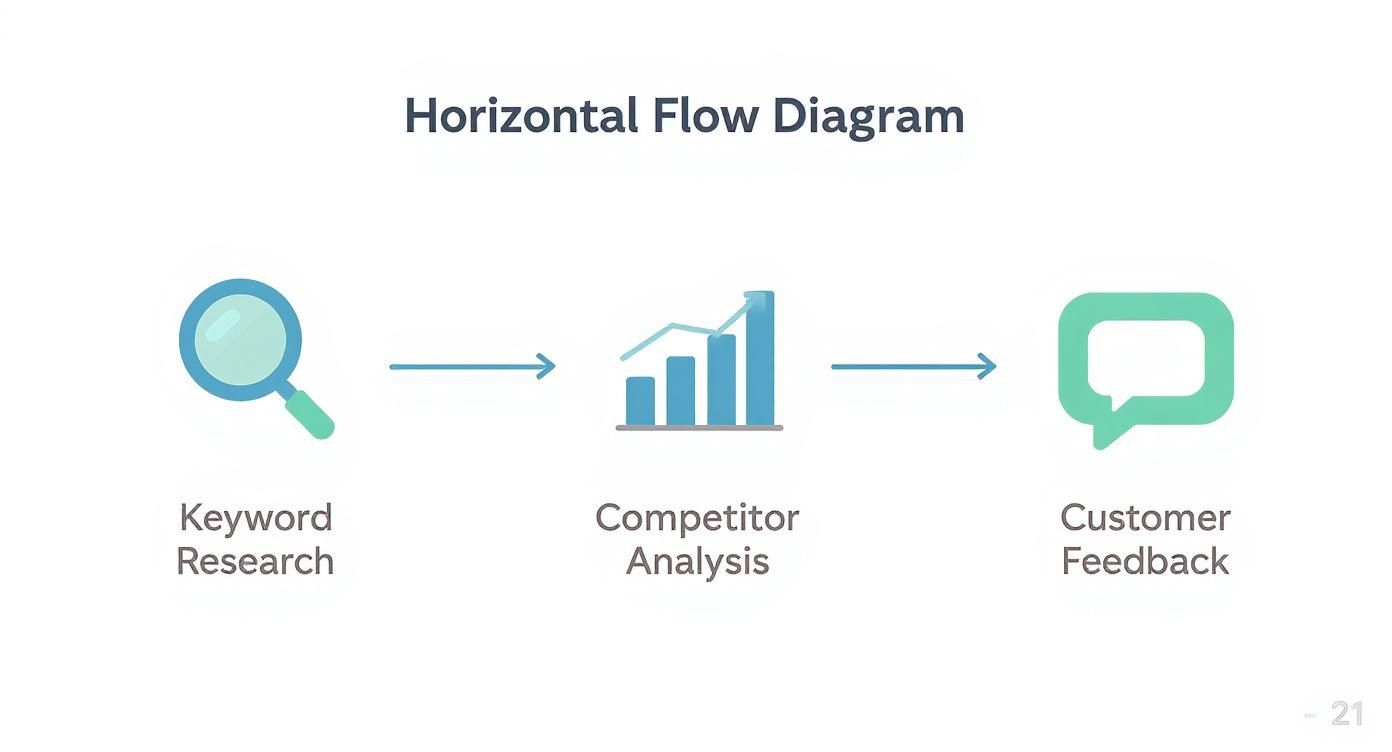
As this shows, the strongest content ideas don't just appear out of thin air. They're a direct result of blending data-driven research with what your audience is actually telling you, which creates a rock-solid foundation for your workflow.
Detailing Every Content Entry
To avoid confusion and missed steps, every item on your calendar needs a core set of details. Think of each calendar entry as a "job ticket" that contains everything someone would need to understand and execute their part of the task.
At a minimum, I’ve found that every effective content calendar entry needs to include:
- A clear, descriptive working title.
- The content owner—the one person responsible for seeing it through.
- The target keywords (primary and secondary) it's aiming to rank for.
- A simple status field (e.g., Idea, Drafting, In Review, Published).
- Key dates, including separate deadlines for the first draft, editing, and final approval.
This level of detail gets rid of so much ambiguity. When a writer picks up a task, they know exactly what's expected. When a designer gets an assignment, the context and deadline are right there—no need to chase down information.
A well-defined content calendar entry is a form of proactive communication. It answers questions before they are even asked, saving countless hours and preventing small misunderstandings from turning into major delays.
The demand for these kinds of organized systems is exploding globally. The digital calendar market, which includes all the tools we use for content planning, is seeing huge growth, particularly in regions like Asia-Pacific. For instance, that industry was projected to jump from USD 9.99 billion in 2021 to USD 12.23 billion by 2025. You can dig into these trends in the full calendar market report to see how this reflects the worldwide need for better scheduling.
To really nail this down, it helps to build your calendar around a set of non-negotiable fields. Here's a look at the essential data points I recommend for every single content piece to keep your workflow smooth from start to finish.
Essential Fields for Your Content Calendar
| Field Name | Description | Example |
|---|---|---|
| Topic/Title | The working title or a clear summary of the content piece. | "A Beginner's Guide to Container Gardening" |
| Content Owner | The single person ultimately responsible for the content's completion. | "Jane Doe" |
| Status | The current stage in the production workflow. | "In Review" |
| Content Type | The format of the content (e.g., blog post, video, infographic). | "Blog Post" |
| Target Keywords | The main SEO keywords the content is targeting. | "container gardening for beginners, small space gardening" |
| Target Audience | The specific persona or audience segment this is for. | "Urban apartment dwellers with no yard space" |
| Due Date | The final deadline for publication. | "2024-10-25" |
| Publish Date | The date the content is scheduled to go live. | "2024-10-28" |
| CTA | The primary call-to-action to be included in the content. | "Download our free planting guide" |
| Distribution Channels | Where the content will be promoted after publishing. | "Newsletter, Instagram, Pinterest" |
Having these fields standardized in your calendar tool—whether it's a simple spreadsheet or a platform like Airtable—is a game-changer for organization and clarity.
Establishing a Realistic Production Cadence
One of the fastest ways to kill a content strategy is by setting an unsustainable pace. Seriously. It’s far better to publish one high-quality blog post every single week than to pump out five posts one week and then go silent for a month. Consistency is what builds trust with your audience and favor with search engines.
To find your rhythm, you need to have an honest conversation with your team.
- Actually Track Your Time: For a couple of weeks, log how long it really takes to create different types of content. A deep-dive blog post might take 8 hours from ideation to publication, while a short-form video could take 20.
- Calculate Your Real Capacity: Based on your team's available hours, figure out how much you can realistically produce each month without sacrificing quality or causing burnout.
- Build in a Buffer: Always add a cushion. Unexpected projects pop up, people get sick, and creative blocks happen. A 20% buffer is a good rule of thumb to keep your schedule from derailing when life inevitably intervenes.
This isn't about limiting your ambition; it's about building a production schedule that's both ambitious and achievable. It turns your calendar from a source of stress into a reliable, predictable roadmap.
Clarifying Roles and Approval Processes
Without clear roles, tasks fall through the cracks. It's that simple. Your workflow needs to spell out exactly who is responsible for each stage of production. This isn't about micromanaging—it’s about empowerment. When people know what they own, they can take initiative and get things done.
A simple RACI (Responsible, Accountable, Consulted, Informed) model works wonders here:
- Responsible: The person doing the work (e.g., the writer drafting the post).
- Accountable: The person who owns the final outcome (e.g., the content manager).
- Consulted: Subject matter experts who need to provide input (e.g., a product lead).
- Informed: People who just need to be kept in the loop (e.g., the social media team).
Your review and approval process needs to be just as clear. Avoid the dreaded "approval by committee" where a piece of content needs five different people to sign off. A streamlined process with one or two key approvers is faster and way more effective. This gives you the quality control you need without creating a bottleneck that brings your entire publishing schedule to a halt.
Keeping Your Content Calendar Sharp for the Long Haul
https://www.youtube.com/embed/mM8-_uvt49U
Here’s something you learn pretty quickly: a great content calendar is never truly "done." It’s not some static document you create in January and then follow blindly for the next 12 months. The real magic happens when you treat it as a living, breathing part of your strategy—something that needs to adapt and evolve.
The commitment to this ongoing process is what separates a decent content plan from one that consistently drives results. It's all about checking in, seeing what’s hitting the mark, and having the courage to ditch what isn't. This mindset ensures your calendar remains a powerful tool, not just a glorified to-do list.
Set a Rhythm for Reviewing Performance
To figure out what’s working, you have to get comfortable with your data. Don't just wait until the end of the year and hope for the best. You need to set a regular, recurring time to review your content's performance. A monthly check-in is perfect for spotting emerging trends, while a more in-depth quarterly review is where you can make bigger, more strategic decisions.
During these sessions, you're not just glancing at traffic numbers. You're looking for the stories hidden in your key metrics:
- Engagement: Which topics are sparking conversations? Look for posts with the most comments, shares, and likes. That’s your audience telling you exactly what they care about.
- Conversions: Which articles are actually pushing people to sign up for your newsletter or book a demo? This is how you tie your content directly to business goals.
- Time on Page: Are people sticking around to read what you've written, or are they bouncing away in seconds? A high time-on-page is a great sign that you're delivering real value.
Analyzing this data creates a powerful feedback loop. You're using what you’ve learned from past performance to make smarter bets on future content, getting more effective with every piece you publish.
Build in Some Wiggle Room
Let's be honest, a rigid plan is a fragile one. The marketing world moves at a dizzying pace. You need to be able to react to a sudden industry trend, unexpected news, or even a viral meme format without throwing your entire strategy into chaos. Your calendar needs room for spontaneity.
One of the best ways I've found to do this is to build in a buffer. Don't schedule your calendar to 100% capacity. I always recommend leaving about 20% of your publishing slots open each month. This gives you the breathing room to:
- Jump on a trending topic with a timely article.
- Create reactive content that adds your voice to a larger conversation.
- Quickly address a common customer question that keeps popping up in support tickets.
This flexibility is what keeps you relevant. It transforms your calendar from a strict set of rules into a strategic framework that can capitalize on real-world opportunities as they happen.
A content calendar should provide structure, not a straitjacket. The goal is to guide your efforts while leaving enough space to seize unexpected moments of opportunity that can deliver outsized results.
Get More Mileage by Repurposing Your Content
Not every idea has to be a brand-new, monumental effort. Your best-performing articles, videos, and guides—what we call evergreen content—are incredibly valuable assets that you can and should give new life. Repurposing is simply a smart way to squeeze every drop of value out of the work you've already done.
Think about it: a single comprehensive blog post can easily be transformed into:
- A dozen social media graphics highlighting key stats and quotes.
- A script for a short, snappy video.
- A beautiful infographic that visualizes the main points.
- A new segment for your company's podcast.
This approach helps you fill your calendar with high-quality material without burning out your team. Better yet, it lets you reach different parts of your audience who might prefer watching a video over reading a long article. By regularly auditing your content library and looking for these repurposing opportunities, you make every asset work harder for you. This is also a huge part of understanding your content's financial impact. If you want to go deeper on this, we've got a complete guide on how to measure the ROI of your marketing.
Got Questions About Your Content Calendar?
Even the most seasoned marketers have questions when it comes to managing a content calendar. It’s totally normal to hit a few snags. Let's walk through some of the most common questions I hear and get you some clear, practical answers so you can keep things moving.
Think of this as your go-to FAQ for content planning. The goal is to get you unstuck and back to creating, without letting minor hurdles derail your progress.
How Far Out Should I Actually Plan My Content?
This is the classic balancing act between having a long-term vision and staying nimble enough to react. My rule of thumb? Plan your big-picture stuff one quarter at a time. This includes major campaigns, seasonal themes, and big cornerstone content pieces. It gives you a solid roadmap without locking you in too tightly.
For the nitty-gritty, day-to-day content, a monthly or bi-weekly schedule is far more realistic. This shorter timeline gives you the flexibility to jump on a trending topic, respond to a news story, or pivot based on what your audience is talking about right now. Remember, the calendar is a guide, not a cage.
Help! What if I Run Out of Ideas?
This is a fear I hear all the time, but trust me, it’s easier to avoid than you think. When you feel like you're scraping the bottom of the barrel, it’s usually a sign to go back to your roots.
Here's where I always look for fresh inspiration:
- Dig into Keyword Research: Pop open your favorite SEO tool and look for new long-tail keywords or check out the "People Also Ask" boxes on Google. You'll almost always find a new angle you haven't covered.
- Talk to Your People: Your customer service and sales teams are on the front lines. Ask them, "What are the top three questions you got from customers this week?" Goldmine.
- Scope Out the Competition: See what’s working for others in your niche. Don't copy them, but look for gaps. Can you create a more in-depth guide or offer a contrarian viewpoint on a popular topic?
When you feel stuck for ideas, it often means you've drifted a bit from your audience. Getting back in tune with their real-world problems and questions is the fastest way to get your creativity flowing again.
How Do I Deal With Last-Minute Changes?
Things go wrong. It’s a fact of life. A product launch gets pushed back, a key team member is out sick, or a major news event suddenly makes your planned content feel tone-deaf. A good content calendar isn't rigid; it's resilient.
The best defense is a good offense: build a buffer right into your schedule. I always advise against booking your calendar to 100% capacity. Try to leave about 20% of your schedule open as a flex zone.
This little bit of breathing room is a lifesaver. It lets you move deadlines, slot in timely content, or just press pause on a piece without throwing your entire strategy into chaos. It’s all about planning for the unexpected.
At Sugar Pixels, we know that a great content calendar is the backbone of any successful digital strategy. If you’re ready to turn that plan into a high-performing website, check out our web design and digital marketing services.