

Before you even think about colors, fonts, or fancy features, you need a solid plan. Seriously. The biggest mistake people make is jumping straight into the design phase. A successful website starts with a clear strategy: what’s its main job, who is it for, and what is the competition up to? Getting this foundation right ensures every decision you make from here on out has a purpose and pushes you toward real business results.
Laying the Groundwork for a Winning Website
Building a website without a strategy is like trying to build a house without a blueprint. You might end up with four walls and a roof, but it’s probably not going to be a place anyone wants to live in. Your website should be a hard-working asset, not just a digital brochure. Without this initial planning, you’re just guessing, and you risk pouring time and money into something that doesn't connect with visitors or help your bottom line.
Let's be clear: having a website isn't optional anymore. It's a fundamental part of doing business. By 2025, it was estimated that around 73% of small businesses in the U.S. had a website, and that number is only climbing. This shift is powered by a massive website builder market that makes getting online easier than ever. The commercial impact is undeniable—nearly one-third of U.S. shoppers admit to avoiding a business simply because it didn’t have a website. You can dig into more of these small business website statistics over at NetworkSolutions.com.
Define Your Website's Core Purpose
First things first: what do you want this website to do? Its primary mission will shape its entire structure, content, and design. You have to decide on the single most important action you want a visitor to take.
Are you trying to get them to sign up for your newsletter? Book a consultation? Buy a product right then and there? Each goal demands a completely different approach.
For example, a consulting firm’s website built for lead generation will need prominent contact forms and crystal-clear service descriptions. An e-commerce store selling handmade jewelry, on the other hand, is going to live or die by its high-quality product photos and a dead-simple checkout process.
Think about which of these common goals fits your business:
- Generate Sales Leads: The site’s job is to capture contact info from potential customers through forms, phone numbers, or a live chat widget.
- Sell Products Directly (E-commerce): The goal is straightforward—drive online sales. This requires a product catalog, a shopping cart, and a secure payment system.
- Establish Authority and Credibility: Here, the site acts as a resource hub, often featuring a blog or knowledge base to build trust with your audience and attract organic search traffic.
- Provide Customer Support: The website can become a first line of defense for customer questions, offering tutorials, FAQs, and help guides to reduce the load on your support team.
A website without a clear call-to-action is like a salesperson who never asks for the sale. Every single page should gently nudge the user toward the next logical step, whether that's making a purchase, signing up, or just learning more.
Understand Your Target Audience
Once you know your "why," you have to nail down your "who." Who are you actually talking to? Don't just guess. You need to create a detailed customer profile, often called a buyer persona. This is a semi-fictional character representing your ideal customer, and it will guide everything from your writing style to the color palette you choose.
To build this persona, use real data. Look at your current customers, check out the demographics of your social media followers, or even send out a quick survey. You need to get inside their heads to understand their biggest frustrations, their goals, and where they hang out online.
A really useful buyer persona includes details like:
- Demographics: Age, location, job title, income.
- Goals: What are they trying to accomplish in their life or work?
- Challenges: What problems are they struggling with that you can help solve?
- Online Behavior: Which social media platforms do they use? What blogs or publications do they read?
Analyze Your Competitors
Finally, it’s time to do a little recon. Sizing up your competition gives you a massive advantage. The point isn’t to copy what they’re doing, but to find where they’re dropping the ball so you can stand out.
Make a list of three to five of your closest competitors. Pull up their websites and put yourself in a customer's shoes. What are they doing really well? And more importantly, where are their weaknesses? Look at their site navigation, their key messages, and the overall feel of their site. This simple exercise will help you spot gaps in the market and position your website to offer something that's genuinely better.
Choosing the Right Platform and Domain
Alright, with your strategy mapped out, it's time to get your hands dirty and build the foundation of your website. This is where you'll make two of the most important decisions in the whole process: picking your website platform and locking down your domain name.
These choices are a big deal. They'll influence your site's cost, how it grows with your business, and, most importantly, how easily your future customers can find you online.
Nailing Your Domain Name
Think of your domain name as the digital address for your business—it's how people find you and it's a huge part of your brand. It needs to be memorable, easy to type, and give a hint about what you do.
Finding the perfect domain can feel like a treasure hunt, but here are a few things I've learned over the years that really help:
- Make It Brandable, Not Generic: Your domain needs to be unique. "BostonQualityPlumbing.com" is descriptive, sure, but it's forgettable. Something like "PlumbPerfectBoston.com" has more personality and is much easier to brand.
- Keep It Simple: Seriously, this is key. Steer clear of hyphens, numbers, or weird spellings. If you have to spell it out over the phone for someone to get it right, it’s way too complicated.
- Stick with .com if You Can: There are tons of new domain extensions out there these days (.io, .co, .ai), but .com is still the gold standard. People automatically trust it and type it by default. If your first choice isn't available as a .com, try a small variation before settling for a less common extension.
My Two Cents: Don't get paralyzed trying to find the "perfect" name. A good, available domain that clearly represents your business is all you need. Once you find one, grab it immediately before someone else does.
Comparing Website Platforms
Next up, you have to decide where your website is actually going to be built. This decision usually comes down to a choice between easy-to-use website builders and more powerful, flexible Content Management Systems (CMS).
There's no single "best" option here. The right choice completely depends on your budget, your technical skills (be honest with yourself!), and what you want your site to do in the long run.
Here's a quick look at the main players:
- Website Builders (Wix, Squarespace): These are made for beginners. They come with drag-and-drop editors, beautiful templates, and all-in-one packages that bundle everything, including hosting. They’re hands-down the fastest way to get a professional-looking site online without touching a line of code.
- Content Management Systems (WordPress): The powerhouse of the internet, WordPress.org powers over 43% of all websites. It offers almost limitless flexibility thanks to thousands of themes and plugins. The trade-off? It has a steeper learning curve, and you’re responsible for finding your own hosting and keeping everything updated.
For a much deeper dive, we have a whole guide on choosing the best website builder for a small business that breaks down the pros and cons of each.
To help you visualize the trade-offs, here’s a breakdown comparing the DIY route to hiring a professional.
Website Platform Comparison DIY vs Professional Help
| Factor | DIY Website Builders (Wix, Squarespace) | WordPress (Self-Hosted) | Hiring an Agency (e.g., Sugar Pixels) |
|---|---|---|---|
| Ease of Use | Very easy, drag-and-drop interface. | Moderate learning curve; requires some technical comfort. | Hands-off experience; the agency handles everything. |
| Cost | Low monthly subscription fee. | Low initial cost, but can increase with premium themes/plugins. | Higher upfront investment, but predictable costs. |
| Flexibility | Limited to the platform's features and templates. | Extremely flexible; endless customization with plugins. | Fully custom-built to your exact specifications. |
| Time Investment | Quick to launch, but design and content take time. | Requires significant time for setup, design, and maintenance. | Minimal time required from you; frees you to run your business. |
| Maintenance | Included in the subscription; platform handles updates. | You are responsible for all updates, security, and backups. | Fully managed by the agency, including all technical upkeep. |
Ultimately, the path you choose depends on how much time, money, and technical effort you're willing to invest.
Understanding Web Hosting
Every website needs a home. That's what web hosting is—a service that stores all your website's files on a server so people can access it on the internet. If you go with a builder like Wix, hosting is already included. If you choose WordPress, you'll need to buy a hosting plan separately.
With over one billion websites out there, the web hosting market is massive—projected to hit $157.9 billion by 2024. All those options can be overwhelming, but your choice directly impacts your site's speed, security, and reliability. A slow or insecure site will send visitors running.
Here are the most common types of hosting you'll encounter:
- Shared Hosting: The most budget-friendly option. You share server space with other websites, which is perfectly fine for brand-new sites with low traffic.
- VPS (Virtual Private Server) Hosting: A step up. You still share a server, but you get your own dedicated slice of it. It's a great middle ground when your business starts to outgrow shared hosting.
- Managed Hosting: The premium, hassle-free option. This service, often tailored for platforms like WordPress, takes care of all the technical headaches for you—security, backups, updates, you name it.
For those who are a bit more tech-savvy and want a free, secure option for a simple static site, it’s worth learning how to use GitHub Pages for your website. It's a fantastic, albeit more technical, solution.
Designing an Experience That Converts Visitors
A beautiful website that nobody can figure out how to use is just expensive digital art—it won't actually grow your business. Now that the technical bits are handled, the real work begins: designing the user experience (UX). This is all about crafting a smooth, intuitive path that guides people from the moment they arrive to the moment they become a customer.
Great UX isn't about flashy animations or trying to be trendy. It’s about clarity. A visitor needs to understand what you do, where to find what they need, and what their next step should be, all within seconds. If they have to hunt for your contact info or struggle to understand your services, they're gone.
Mapping a Clear Path for Visitors
Before you even think about colors or fonts, you need a blueprint for your website. This is often called a sitemap or information architecture. It’s a simple map showing how all your pages connect, ensuring everything flows logically.
Start with the essentials—Homepage, About, Services, Contact—and then build out from there. For instance, under your main "Services" page, you might have separate pages detailing each specific service. The goal is to create a hierarchy that feels natural and makes navigation completely effortless.
- Homepage: This is your digital front door. It has to quickly sell your value and point visitors in the right direction.
- About Page: Here’s where you build trust and tell your story. Don't be shy.
- Services/Products: Get into the specifics of what you offer and why it's the solution people need.
- Contact Page: Make it incredibly easy for potential customers to get in touch.
Once you have this structure, your navigation menu is its public face. Keep it clean. Keep it simple. Overloading visitors with too many options is a classic mistake that just leads to confusion and a quick exit.
This whole process starts with choosing the right platform, which often comes down to how comfortable you are with the tech side of things. This decision directly shapes how you'll approach the design itself.
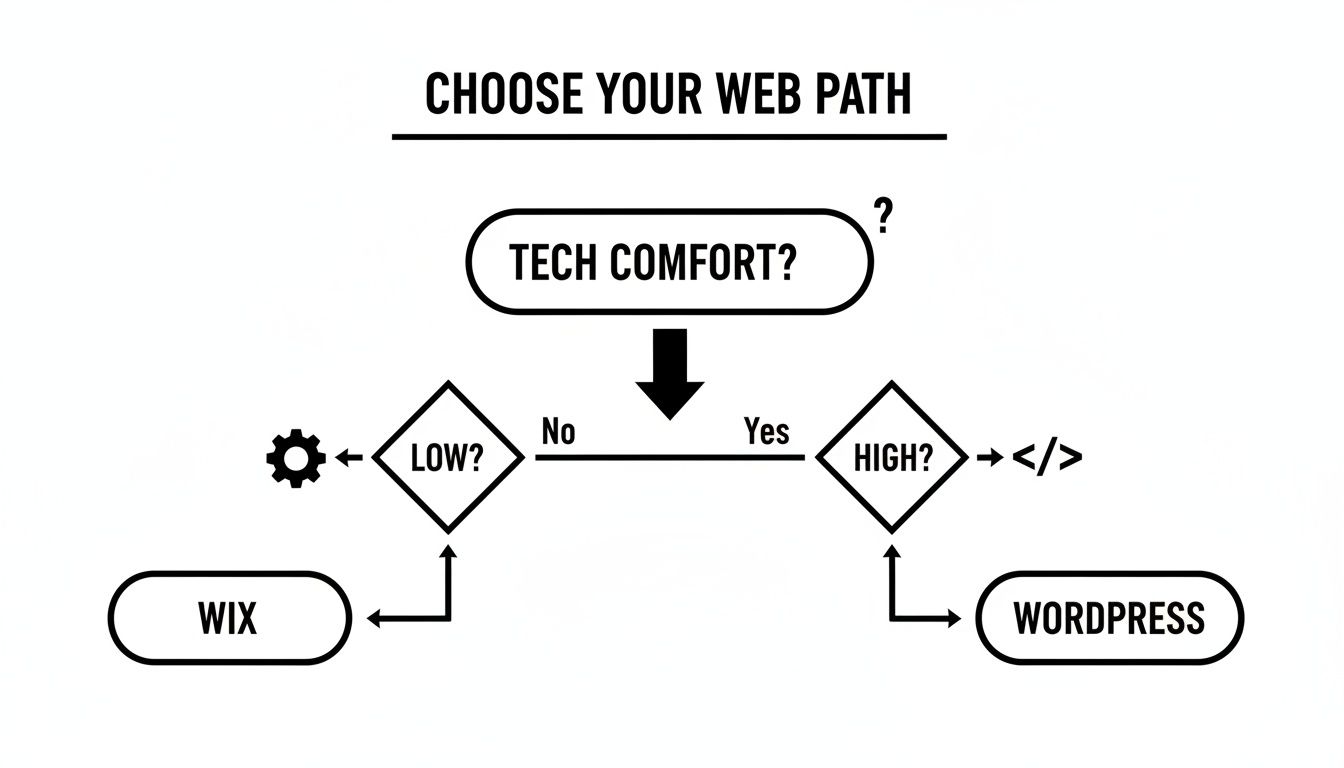
As the flowchart shows, tools like Wix are fantastic if you want a more guided, straightforward design experience. On the other hand, WordPress is the perfect blank canvas for those who want total creative and technical control.
Leveraging Visuals and Mobile Design
With a solid structure in place, you can finally focus on the fun stuff: the visual elements that create a professional and trustworthy first impression. This isn't just about making things look good; it's about using design to communicate and persuade.
Visual hierarchy is a critical concept here. It’s the art of arranging things on the page to show their importance. By using size, color, and placement, you can draw your visitor’s eye directly to the most important information, like your main headline or a "Book a Consultation" button. It’s how you make sure your key messages don't get lost in the noise.
Your website’s design is a silent salesperson. It communicates your brand’s personality, professionalism, and trustworthiness in a matter of seconds. A clean, modern design builds instant credibility, while a dated or cluttered one can drive customers away before they even read a word.
These days, designing for mobile isn't just an option—it's everything. With over 60% of all web traffic now coming from smartphones, a mobile-first design approach is the only way to go. This means you actually design the mobile version of your site first, then adapt it for bigger screens like desktops. This forces you to be ruthless about prioritizing your most important content and ensures a lean, fast experience for the majority of your users.
Great design also comes down to smart, simple choices.
- Pick a simple color palette that reflects your brand and stick to it. Consistency is key.
- Choose clean, readable fonts. You really only need two: one for headings and one for body text.
- Use high-quality images and videos. Authentic, professional visuals build trust far more effectively than generic stock photos ever could.
Ultimately, every design decision you make should serve the user's journey and push them toward conversion. For a much deeper look at this, check out our guide on how to improve your website's conversion rate; it’s packed with actionable tips.
Writing Content That Connects and Sells

A great design might get someone to your website, but it’s the words on the page that convince them to stay. Your content is your single most important sales tool—it’s how you turn a casual browser into a paying customer. Without it, the most visually stunning site is just an empty brochure.
Think of your website's copy as the script for a conversation with your perfect customer. It needs to be clear, persuasive, and genuinely helpful to build the trust you need to guide them toward a purchase.
Nailing the Copy for Your Core Pages
Every business website relies on a handful of essential pages, and each one has a distinct job. Your homepage, about page, and service pages are the foundation of your site. Getting the copy right here isn't just important; it's everything.
- Homepage: This is your digital handshake and elevator pitch rolled into one. You have maybe three seconds to grab a visitor’s attention and tell them what you do and who you help. Use direct, benefit-driven language right up front.
- About Us Page: This is your chance to connect on a human level. Forget the dry corporate timeline. Tell your story, show the faces behind the brand, and explain why you do what you do.
- Services/Product Pages: Here’s where you make the sale. Don't just list features. Focus on the problems you solve and the results your customers can expect.
My Two Cents: Write like you speak. Drop the corporate jargon and stiff, overly formal language. A natural, conversational tone makes your brand feel approachable, which is a huge advantage when you're trying to build a relationship with someone new.
Getting a Handle on On-Page SEO
Writing amazing content is one thing, but people have to be able to find it first. That’s where on-page search engine optimization (SEO) comes into play. It’s all about fine-tuning your content so it shows up higher in Google search results.
SEO isn't some mystical secret. At its core, it’s just about understanding what your potential customers are searching for and then creating the best content on the internet to answer their questions. It all starts with keyword research.
Once you know what terms people are using, you need to weave them into your content naturally. Here are the key places to focus your attention:
- Page Titles & Meta Descriptions: This is what people see in the search results. Make them compelling and be sure to include your main keyword.
- Headings (H1, H2, H3): Using keywords in your headings gives both search engines and human readers a clear roadmap of your content.
- Body Copy: Sprinkle your primary keyword and related phrases throughout your text, but never at the expense of readability. Your first priority is always the human reader.
- Image Alt Text: This description helps search engines "see" your images, giving you another great spot to place a relevant keyword.
To really dig in and make sure your content is set up to rank, brushing up on these SEO content writing best practices is a fantastic next step.
Planning Your Blog for Long-Term Growth
A website that never changes is a website that gets forgotten. A blog is hands-down one of the best ways to consistently add fresh, valuable content to your site—something search engines absolutely love. More importantly, it establishes you as an authority in your field.
Blogging isn't just for fun; it's a long-term traffic strategy. In fact, research consistently shows that businesses with active blogs generate far more leads than those without one. Every article you publish is a new opportunity to rank for different keywords and attract a new slice of your audience.
The key to success is consistency, and the best way to stay consistent is with a simple content plan, or editorial calendar. You don't need fancy software; a spreadsheet works perfectly.
| Column | Description | Example |
|---|---|---|
| Publish Date | When the post will go live. | October 28th |
| Topic/Title | The working title of the post. | 5 Ways to Prepare Your Garden for Winter |
| Primary Keyword | The main search term you're targeting. | winter garden prep |
| Target Audience | Who this post is for. | Novice gardeners |
| Status | The current stage of the post. | Writing |
This simple framework can keep you organized and on schedule. The goal isn't just to talk about your products; it's to solve real problems for your audience. When you give away genuine value, you build a loyal community that will eventually become your best customers.
Your Pre-Launch Checklist for a Flawless Debut
You’ve put in the hard work. The design is locked in, the content is written, and you’re just about ready to share your new website with the world. But hold on a second.
This final pre-launch phase is what separates a professional, smooth debut from a frustrating one riddled with glitches. It’s tempting to rush, but skipping these final checks is a classic recipe for broken links, error messages, and a terrible first impression. Think of this checklist as your final insurance policy against easily avoidable day-one problems.
Technical Sweeps and Performance Tuning
Before you even think about announcing your launch, it's time for a deep technical audit. This is the final inspection before you open your digital doors, ensuring every part of your site is working exactly as it should.
Here’s what you absolutely must check:
- Link Integrity: Go through and click every single link on your website. Seriously, every one—navigation menus, call-to-action buttons, links in your blog posts, and everything in the footer. A dead link is a dead end for a potential customer.
- Form Functionality: Find every form on your site and fill it out yourself. The contact form is the most obvious one, but don’t forget newsletter signups or quote requests. Did the submission go through? More importantly, did the notification actually land in your inbox? This is a shockingly common point of failure that can cost you real leads.
- Page Speed Analysis: Pop your URL into a free tool like Google's PageSpeed Insights to see how fast it loads. Slow websites are a primary reason people leave; even a one-second delay can tank your conversions.
Don't just test your site on your blazing-fast office Wi-Fi. Pull out your phone, turn off Wi-Fi, and see how it performs on a cellular network. This is how many of your visitors will experience it, and it often reveals surprising performance bottlenecks.
Device and Browser Compatibility Checks
Your website might look absolutely perfect on your 27-inch monitor running Chrome, but that’s just one of countless ways people will see it. It's so important to test how your site looks and feels across different devices and browsers.
Without this step, you risk alienating huge chunks of your audience with layout bugs, broken elements, or unreadable text.
- Cross-Browser Testing: At a minimum, open your site in the latest versions of Chrome, Firefox, Safari, and Edge. You'd be surprised how often things render differently from one browser to the next.
- Responsive Design Verification: This is probably the most critical check of all. Use your browser's developer tools to simulate different screen sizes, but also grab a real smartphone and tablet. Can you easily tap the menu? Is the text readable without pinching and zooming? Do the buttons work well on a touchscreen?
Getting Your Foundational Analytics in Place
Launching a website without analytics is like driving blindfolded. You need data from day one to understand who your visitors are, how they found you, and what they do once they arrive.
Setting up these two free tools from Google is non-negotiable before you go live:
- Install Google Analytics: This is the gold standard for tracking website traffic, user behavior, and conversions. It gives you incredible insight into which pages are performing well and where visitors might be getting stuck or leaving your site.
- Verify with Google Search Console: Think of this as your direct line of communication with Google. It tells you which keywords are bringing people to your site, alerts you to technical SEO problems, and lets you submit your sitemap to help Google index your pages faster.
With these final checks buttoned up, you're ready to go live and make that fantastic first impression. For a more detailed walkthrough, our guide on how to publish a website covers the entire process from start to finish.
Answering Your Top Website Questions
Building your first business website can feel like a huge undertaking, and it’s natural to have a lot of questions. We get it. From figuring out the budget to understanding timelines, getting straight answers is the first step. Let's tackle some of the most common questions we hear from business owners who are right where you are now.
Getting a handle on these basics will help you kick off your project with clarity and confidence.
How Much Does a Business Website Actually Cost?
This is the big one, and the honest answer is: it depends. The price for a website can swing wildly based on the path you take.
Your most budget-friendly option is the DIY route using a platform like Wix or Squarespace. For the first year, you can realistically expect to spend somewhere between $200 and $1,000. That number usually covers your domain, hosting plan, and a premium theme to make your site look sharp. A self-hosted WordPress.org site can start in a similar range, though costs can creep up if you start buying premium plugins for more advanced features.
If you bring in a freelance web designer for a polished, professional site, you're typically looking at a starting cost of around $1,000, which can go up to $5,000 for a more robust build. For a complete, strategy-first approach, a full-service agency like Sugar Pixels is the way to go. Our packages generally start around $5,000. While that’s a bigger investment upfront, it buys you a dedicated partner for strategy, custom design, SEO, and ongoing support—delivering real, long-term business value.
How Long Will It Take to Build My Website?
Just like the cost, the timeline is all over the map. It really boils down to how complex the site is and who’s doing the heavy lifting.
If you’re using a simple template on a website builder, you could honestly get a basic site live over a weekend. A more customized DIY project, where you're writing content and tweaking multiple pages, will likely take you anywhere from one to four weeks of focused work.
Working with a professional agency is a different ballgame. A typical project schedule with a team like ours runs between 6 to 12 weeks.
Why so long? It's not because we work slow—it's because we work smart. That timeline gives us room for proper discovery, custom design mockups, thoughtful content development, and rigorous testing. We make sure that when your site launches, it’s not just live, it’s ready to perform from day one.
What Pages Does My New Website Absolutely Need?
Every business is different, but there’s a core set of pages that pretty much every professional website needs to have right from the start. Think of these as the foundation. They're what visitors expect to find, and they’re crucial for building trust and guiding people to take the next step.
At a minimum, your site should launch with these pages:
- Homepage: This is your digital front door. It needs to grab attention and explain what you do in just a few seconds.
- About Us: People do business with people. This is your chance to share your story, show your face, and build a genuine connection.
- Services or Products: Get straight to the point. Clearly lay out what you offer, focusing on the problems you solve and the benefits you deliver.
- Contact: Don't make people hunt for your information. A clear, simple contact page is a must-have for generating leads.
- Blog or Resources: You might not need this for launch day, but a blog is one of the single best ways to boost your SEO and establish yourself as an expert over the long haul.
Do I Really Need to Know How to Code?
Nope! Not anymore. This is probably the biggest myth that stops people from building their own website. A decade ago, you absolutely needed to know code, but today’s tools have changed everything.
Website builders like Wix, Squarespace, and Shopify were designed from the ground up for non-coders. They use intuitive drag-and-drop editors that let you see exactly what you're building in real-time.
Even the powerhouse platform WordPress has become incredibly user-friendly thanks to page-builder plugins like Elementor and Divi. These tools let you create stunning, complex layouts without touching a single line of code. The only time you’d need coding skills is if you're after some highly specific, custom feature that you can't find in an existing plugin.
Feeling like this is a bit much to take on, or just want an expert to handle it right from the beginning? The team at Sugar Pixels lives and breathes this stuff. We build beautiful, high-performing websites designed to get you results. Let us worry about the tech, so you can focus on what you do best—running your business.
Learn more about our web design services and get started today!