

Before you even think about choosing a theme or taking product photos, you have to nail down the fundamentals. A successful online store starts with a solid plan: choosing a niche, figuring out who you're selling to, and drafting a simple business plan. This is the strategic foundation that will guide every single decision you make, from picking a platform like Shopify to spending your first marketing dollar.
Crafting Your E-commerce Blueprint
It's easy to get swept up in the creative side of things, but the most successful online stores aren't just pretty—they're built on a bedrock of careful planning. This initial phase is all about defining your "why" and "how" before you get to the "what." Forget a hundred-page formal document; think of this as a practical roadmap for your business journey.
This is your chance to carve out a unique space in a very crowded market. And the opportunity is massive. The global e-commerce market is set to hit an incredible USD 21.62 trillion in revenue, projected to climb to USD 75.12 trillion by 2034.
But with over 28 million e-commerce stores competing for the attention of 2.77 billion online shoppers, a well-defined strategy is what separates the winners from the noise. For a deeper look, check out these global e-commerce market trends to understand the full scope.
Finding Your Profitable Niche
One of the biggest mistakes new entrepreneurs make is trying to sell to everyone. Don't. The key is to focus on a specific niche—a specialized corner of the market where you can become the go-to expert.
To find yours, ask yourself these critical questions:
- What problem am I actually solving? Great products either solve a real pain point or fulfill a strong desire. Think about a store selling ergonomic desk accessories—it solves the literal pain in the neck for remote workers. That's a clear purpose.
- Who is my ideal customer? Get ridiculously specific. Are you selling to a 25-year-old urban cyclist or a 50-year-old suburban gardener? Knowing this informs everything, from the products you stock to the voice you use in your emails.
- What makes my store different? This is your unique value proposition (UVP). Maybe it’s your handmade quality, next-level customer service, sustainable sourcing, or a highly curated selection of products nobody else offers.
A shop selling handmade leather wallets, for example, has a much clearer audience and message than a generic "accessories store."
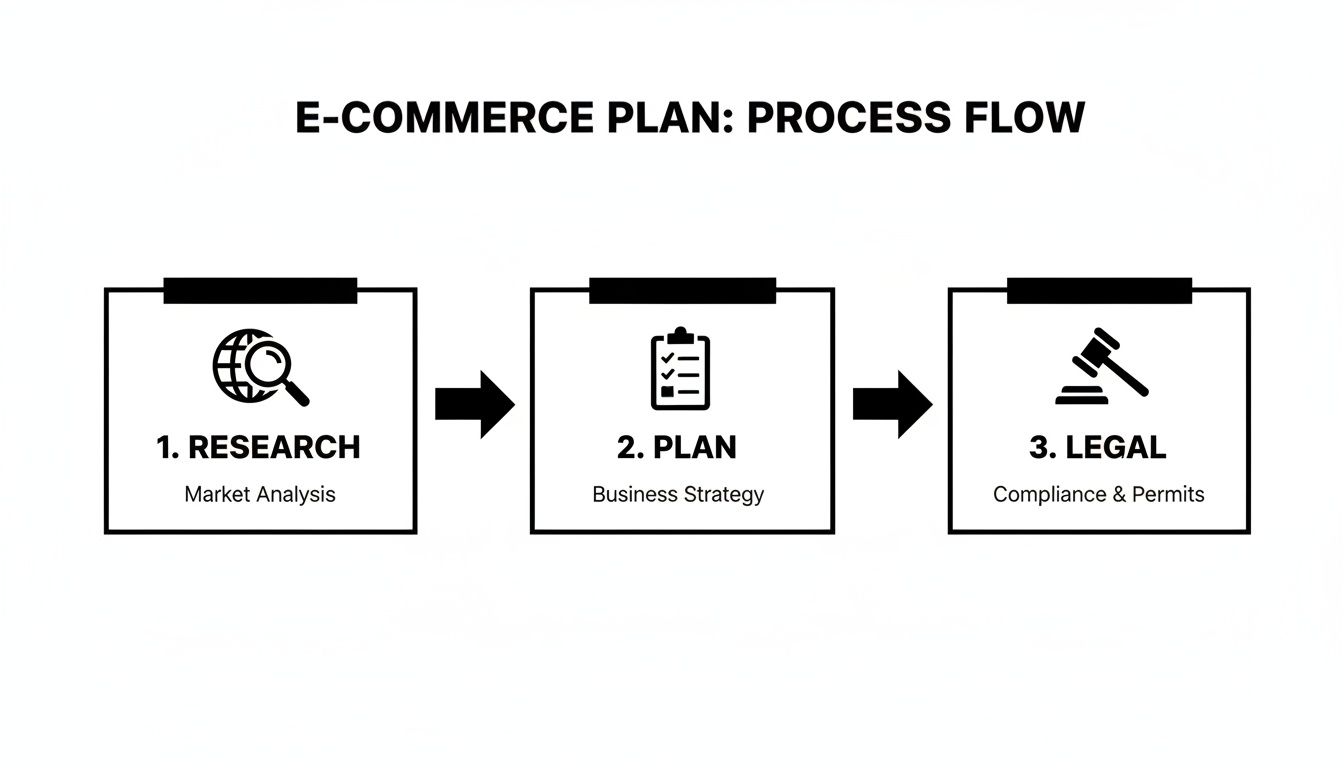
As you can see, a successful launch isn't random; it follows a logical path from research and strategy to getting your legal ducks in a row.
Outlining Your Business Plan
The term "business plan" can sound intimidating, but it doesn't have to be. At its core, it’s just a simple document that outlines your goals and how you plan to reach them. It forces you to get real about the operational and financial side of your great idea.
A business plan is the GPS for your entrepreneurial journey. Without it, you’re just driving around hoping to find your destination. It ensures your creative vision is backed by a viable financial and operational strategy.
For a practical, one-page plan, just focus on these key areas:
- Brand Identity: What's your business name? What will your logo and overall brand feel be?
- Product Sourcing: How will you get your products? Will you make them yourself, use a dropshipping model, or buy wholesale?
- Financial Projections: Be honest about your startup costs (platform fees, inventory, marketing). Then, set a realistic revenue goal for your first year.
- Legal Structure: Decide if you'll operate as a sole proprietorship, LLC, or another entity. Registering your business and figuring out your local sales tax obligations are critical first steps that will save you massive headaches later.
Choosing Your E-commerce Platform and Tech Stack
Picking the right e-commerce platform is arguably the biggest technical decision you'll make. This isn't just about software; it's the foundation of your entire online business. It dictates everything from how customers browse your products to how you manage inventory and process orders behind the scenes.
Think of it like choosing the physical location and layout for a brick-and-mortar shop. The choice you make today will directly impact your day-to-day operations and your ability to grow down the road. It’s a balancing act between your current budget, your team's technical comfort level, and your biggest business ambitions.
Hosted vs. Open-Source Platforms
Your first major fork in the road is the classic "hosted vs. open-source" debate. There's no single right answer, just a series of trade-offs in cost, control, and complexity.
A hosted platform, also known as "Software as a Service" (SaaS), is an all-in-one package. Think of pioneers like Shopify or BigCommerce. For a flat monthly fee, they give you the software, web hosting, security, and customer support. This is, by far, the quickest and easiest way to get an online store up and running, which is why it's a go-to for most beginners.
Imagine an artist selling custom prints. With a hosted solution, they could have a beautiful, secure, and fully functional store live in a single weekend—without touching a line of code. All their energy can go into creating art and marketing, not wrestling with server updates.
On the other side of the coin, you have open-source platforms like WooCommerce (which is a plugin for WordPress). Here, the core software is free, but you're on the hook for everything else. That means sourcing and paying for your own hosting, setting up security protocols, and handling all software updates and maintenance yourself.
So, why would anyone choose this path? Control. An open-source setup offers near-limitless customization. A rapidly scaling apparel brand that needs a highly specific inventory system or a unique "build-your-own" product feature might find a hosted platform too restrictive. WooCommerce lets them build exactly what they need. The price for that freedom is a much steeper learning curve and more hands-on technical management.
Your platform choice is a strategic one. A simple, hosted solution gets you to market faster, while an open-source system provides a foundation you can build on indefinitely. Match the tool to your current needs and future goals, not just the price tag.
The Essential Tech Stack Components
Your e-commerce platform is the main event, but a few other pieces of the puzzle are crucial for creating a professional and trustworthy online presence.
- Domain Name: This is your digital address, like
yourbrand.com. A great domain is short, memorable, and easy to spell. It’s a core part of your brand identity, so make it count. - Web Hosting: If you go the open-source route, you’ll need a place for your website's files to live. Don't skimp on hosting. A slow-loading site or one that crashes during a flash sale will kill customer trust and send potential sales to your competitors.
- Professional Email: Nothing says "amateur" faster than a generic Gmail address. An email like
[email protected]instantly builds credibility and makes your business look legitimate. Most domain and hosting providers offer affordable email packages.
Still weighing your options? It’s a big decision, and it pays to do your homework. To help you sort through the noise, we've put together a detailed ecommerce platforms comparison that digs into the pros, cons, and costs of the top contenders. This guide will help you line up your business needs with the right tech from day one.
Designing a Store That Converts Visitors into Customers

Think of your store's design as its digital body language. It's not just about a nice color palette; it's the first impression that tells a customer if you’re trustworthy, professional, and easy to do business with. A confusing or clunky website is the online equivalent of a messy, poorly-lit shop—people will walk right out.
Great design is what guides a curious browser smoothly from a product page to the checkout, making the whole experience feel effortless. To get this right, you need to lean on proven best practices for web design that focus on turning that initial interest into a sale.
Building Intuitive Navigation and User Experience
Have you ever walked into a store with no signs, cluttered aisles, and no one around to help? It’s frustrating, and you probably left. The exact same thing happens online. Clear, intuitive navigation isn't just a nice feature; it's the most critical element for keeping people on your site long enough to buy something.
Your main menu is the starting point. Keep it dead simple. Use the words your actual customers would use. "Men's Footwear" is instantly understandable; a creative label like "Sole Journeys" just creates confusion.
This logic should extend to every corner of your site. Here are a few non-negotiables for a solid user experience (UX):
- A Powerful Search Bar: Shoppers who know what they want will go straight for the search. Make it prominent and make sure it delivers relevant results, fast.
- Logical Categories: Group your products in a way that just makes sense. A clothing store, for instance, should have a clear path like
Dresses > Maxi Dresses. - Breadcrumb Navigation: This is that little text path you see at the top of a page (e.g., Home > Women > Tops). It shows people exactly where they are and lets them backtrack easily without mashing the back button.
A great user experience isn't about adding flashy features; it's about removing friction. Every click should feel logical and move the customer closer to their goal. If they have to stop and think about how to find something, you've already lost momentum.
The Critical Role of Mobile-First Design
Let’s be clear: optimizing for mobile is no longer an option. It’s the standard. A massive chunk of your customers will find you, browse your products, and make a purchase entirely on their phones. If your site is slow, hard to read, or forces them to pinch and zoom, you’re actively turning away sales.
The numbers here are staggering. Mobile commerce is on track to hit USD 2.51 trillion globally. This is happening alongside a huge boom in cross-border e-commerce, which is projected to leap from USD 551.23 billion in 2025 to over USD 2 trillion by 2034. To get a piece of that pie, your site absolutely must be fast and responsive on any screen.
A "mobile-first" approach simply means you design for the smallest screen first, then adapt the layout for tablets and desktops. This forces you to prioritize the most essential elements, leading to a cleaner, more focused design that works everywhere. You can find more great advice in these ecommerce website design tips to make sure your store delivers a flawless experience.
High-Quality Visuals and Compelling Product Descriptions
Once a shopper lands on a product page, two things do the selling: what they see and what they read.
First, high-quality product photography is non-negotiable. Your customers can't touch or feel the item, so your photos have to do all the work. Show multiple angles, include shots of the product in use, and offer a zoom feature. Selling clothes? Show them on a model so people can see the fit and drape.
Just as important are your product descriptions. This is your chance to be the helpful salesperson. Don't just list features; tell a story and answer questions before they're even asked.
- For a leather bag: Instead of "Genuine leather," try something like, "Crafted from full-grain Italian leather that develops a rich, unique patina over time."
- For a coffee blend: Don't stop at "Notes of chocolate." Go deeper: "A smooth, medium roast with rich notes of dark chocolate and toasted almond, perfect for your morning pour-over."
When you pair incredible visuals with copy that speaks directly to the customer's desires, that "Add to Cart" button becomes impossible to ignore.
Getting Your Store Ready for Business: Products, Payments, and Shipping
Alright, your storefront looks fantastic. Now it's time to handle the nuts and bolts—the stuff that actually turns a visitor into a customer. This is where we stock the shelves, set up the till, and figure out how to get products into people's hands.
Getting these backend details right is what separates a professional, trustworthy store from an amateur one. Let's dig in.
Building a Smart Product Catalog
Think of your product pages as your best salespeople. They need to be clear, compelling, and answer any question a customer could possibly have before they even think to ask it. A well-organized catalog is the key to preventing confusion and stopping those frustrating cart abandonments.
When you're creating listings, go beyond the basics. For example, if you sell t-shirts, don't just put "Small, Medium, Large." Give them a detailed sizing chart with exact measurements. This tiny bit of extra work saves you a mountain of returns and support emails later.
A big part of this is managing product variants. These are all the different options for a single item, such as:
- Size: S, M, L, XL
- Color: Red, Blue, Green
- Material: Cotton, Wool, Polyester
- Style: V-Neck, Crewneck
Each unique combination needs its own SKU (Stock Keeping Unit) and inventory level. This is absolutely critical for solid inventory management. It’s how the system knows not to sell a blue shirt you don’t actually have. Thankfully, most e-commerce platforms handle this tracking automatically once you set it up.
Integrating Secure and Trustworthy Payment Gateways
You can have the best products in the world, but if your checkout feels shady, you won't make a sale. A smooth, secure payment process is non-negotiable. To accept money online, you need a payment gateway—the service that securely handles credit card transactions between your customer and your bank.
The trick is to offer familiar, trusted names. Gateways like Stripe, PayPal, and Square are industry giants for a reason. They offer top-notch security, are instantly recognized by shoppers, and make the payment process incredibly simple on your end. Offering multiple well-known payment options can seriously boost your conversion rates.
Don’t make paying you the hardest part of the shopping experience. Pick a payment processor that’s well-known, easy to integrate with your store’s platform, and crystal clear about its fees. This decision directly impacts how much your customers trust you—and how much money you keep.
Nailing Down Shipping and Tax Rules
Shipping and taxes can feel like the most intimidating part of setting up shop, but they don't have to be a nightmare. The goal is to create a system that’s fair and transparent for both you and your customers.
First, define your shipping zones, which are simply the geographic areas you're willing to ship to. You might have one rate for domestic orders and others for international ones. From there, you can pick a pricing strategy that fits your business:
- Flat-Rate Shipping: A single, fixed price for all orders in a zone. Simple, predictable, and easy for customers to understand.
- Real-Time Carrier Rates: Your store automatically calculates the exact shipping cost from the carrier based on package weight, size, and destination. It's perfectly fair but can vary a lot.
- Free Shipping: An incredibly powerful marketing tool. Most stores tie this to a minimum order value, like "Free shipping on orders over $50," to encourage larger purchases.
When you're figuring out shipping, it's a good idea to consult local resources. For instance, a comprehensive guide to Australian parcel delivery can be invaluable for understanding costs and regulations down under. The same logic applies to any region you serve.
Finally, you have to get sales tax right. Most modern e-commerce platforms can automate these calculations based on the customer's shipping address. Make sure this is enabled and configured correctly from day one to avoid any nasty financial or legal surprises.
As you grow, fulfillment can become a huge bottleneck. It's no surprise the e-commerce fulfillment and logistics market is valued at USD 140.1 billion and is expected to hit USD 272 billion by 2030. This is why 60% of online retailers outsource some of their fulfillment, and 20% hand it all over to a third-party logistics (3PL) partner to manage everything. You can dive deeper into trends like this in a detailed report on Capital One Shopping.
Weaving Your Go-To-Market and SEO Strategy
You’ve built a beautiful, functional store. That’s a huge milestone, but it's really just the starting line. Now comes the real challenge: getting the right people to find it. Without a solid plan to bring in customers, even the most amazing online store is just a billboard in the desert.
This is where your go-to-market strategy comes into play. It’s not about flipping a switch and hoping for the best. It’s a deliberate plan that combines long-term search engine visibility with immediate tactics that turn casual browsers into loyal fans.
The Bedrock of E-commerce SEO
Search Engine Optimization (SEO) is your secret weapon for generating a steady stream of "free" traffic over time. It’s the art and science of making sure your store pops up at the top of Google when someone is looking for exactly what you sell.
It all begins with keyword research. You have to get inside your customer's head. What words and phrases are they actually typing into the search bar? Go beyond the obvious product name. If you sell sustainable running shoes, a potential customer isn't just searching for that. They might be looking for "eco-friendly athletic shoes" or "best recycled material sneakers."
Once you’ve got your list of keywords, you need to weave them into the fabric of your site where it counts:
- Product Titles: Keep them clear and descriptive, always including your main keyword.
- Product Descriptions: Write compelling copy that naturally includes your keywords while highlighting features and benefits.
- Image Alt Text: This is crucial. Describe your images for search engines and for visually impaired users.
- URL Slugs: Use clean, keyword-rich URLs. For example:
yourstore.com/eco-friendly-running-shoes.
Nailing your SEO from day one is non-negotiable. For a much deeper look at this, we've put together a comprehensive guide to online store SEO that covers everything from technical details to content strategy.
Turning Visitors into Customers with CRO
Getting people to your website is one thing. Getting them to actually buy something is another entirely. That’s the job of Conversion Rate Optimization (CRO). CRO is all about making small, data-driven improvements to your site that convince more visitors to click "add to cart" and complete their purchase.
Small changes can make a huge difference. For example, cart abandonment is the bane of every e-commerce owner's existence, and a clunky checkout is often the culprit. This is where A/B testing is your best friend. By showing two different versions of a page to different users, you can see which one actually performs better. Try testing a single-page checkout against a multi-step process—the results might surprise you.
Stop guessing what your customers want. Use data to find out for sure. A/B testing your headlines, button colors, or product images can uncover powerful insights that translate directly into more sales.
Your Multi-Channel Marketing Launch Plan
To make a splash at launch, you can't just put all your eggs in one basket. A powerful launch plan uses multiple channels working in harmony to reach your ideal customers wherever they hang out online.
Think about how these elements can work together:
- Email Marketing: Don't wait until launch day to start building your email list. Create a "coming soon" page and offer a small discount to anyone who signs up. Once you're live, email is perfect for announcing new products and building a real connection with your first customers.
- Social Media Marketing: Be strategic. Don't try to be on every single platform. Find the one or two channels where your audience is most active and go all-in there. If you sell beautiful handmade jewelry, Instagram and Pinterest are probably your best bet.
- Content Marketing: Create content that genuinely helps your audience and subtly introduces them to your products. For a home decor store, a blog post on "How to Style a Bookshelf" is a perfect way to attract the right people and establish your brand as an expert.
The magic happens when these channels support each other. Social commerce is projected to become a USD 2.9 trillion industry by 2026, as shopping gets baked right into platforms like TikTok and Instagram. Your SEO and email efforts are what will help you capture that social buzz and turn it into real revenue, especially in a market that has seen 55.3% e-commerce growth since 2021. You can explore more of these powerful e-commerce statistics on SellersCommerce.com. This integrated approach ensures you don’t launch to the sound of crickets but to an audience that’s been waiting to hear from you.
Your Pre-Launch Checklist for a Smooth Opening Day

The big creative decisions are behind you. Now, we're in the final stretch, and it's all about sweating the small stuff. This is your last chance to hunt down and fix those little glitches before they become big customer headaches on launch day.
Think of this as your store's final dress rehearsal. You wouldn’t open a brick-and-mortar shop without making sure the lights turn on and the registers work, right? The same logic applies here. The only way to spot a broken link or a clunky checkout process is to walk through the entire customer journey yourself, from start to finish.
The Essential Technical and User Experience Audit
First things first: a top-to-bottom site audit. You need to stop thinking like the owner and start thinking like a brand-new, slightly skeptical customer. This mindset shift is absolutely critical for spotting the friction points you’ve become blind to.
Here’s a non-negotiable checklist to get you started:
- Place Multiple Test Orders: Don't just place one. Use your payment gateway’s test mode to simulate several different scenarios. Buy a single item. Buy multiple items. Use a discount code. Test every payment option you offer, from credit cards to PayPal.
- Hunt for Broken Links: Click on everything. Seriously. Every navigation link, every footer link, every button, and every link you’ve embedded in your product descriptions. A 404 error on launch day screams unprofessional.
- Test Across All Devices: Your store has to work flawlessly on a phone. With more than 60% of people now searching on mobile, this isn't optional. Pull up your site on different smartphones (iOS and Android) and browsers to make sure images load correctly and buttons are easy to tap.
- Review Your Automated Emails: Go through the process of triggering every automated email your store sends—order confirmations, shipping updates, password resets, you name it. Check them for typos, broken formatting, and make sure the tone of voice is consistent with your brand.
A smooth launch isn’t an accident. It’s the result of systematically testing every function and flow, ensuring your customer’s first impression is one of professionalism and reliability. Don't skip this step.
Securing Your Store and Protecting Your Customers
Once the user experience feels solid, it's time to double-check your security. In e-commerce, trust is your most valuable currency, and a secure store is the foundation of that trust. No one is going to enter their credit card details if your site looks even remotely sketchy.
Before flipping the switch, confirm these security measures are active:
- Your SSL Certificate is Installed: This is what puts the little padlock icon in the browser's address bar. It encrypts the data between your customer and your server, and it's an absolute must-have.
- Fraud Prevention Tools are On: Most payment gateways have built-in fraud analysis that can flag suspicious orders (like when the billing and shipping addresses are on opposite sides of the country). Make sure you’ve enabled these features from day one.
- Admin Passwords are Strong: This one seems obvious, but it's often overlooked. Ensure every account with admin access is locked down with a strong, unique password.
Planning for Growth Beyond Day One
Launching isn't the finish line; it’s the starting line. The final piece of the puzzle is setting up the tools that will help you monitor your store's performance and grow intelligently. Because what gets measured, gets managed.
You need a way to track your key performance indicators (KPIs) from the moment you go live. Get Google Analytics installed or get familiar with your e-commerce platform’s built-in analytics dashboard. You'll want to keep a close eye on metrics like your conversion rate, average order value (AOV), and especially your cart abandonment rate.
This data is your roadmap for the future. A high cart abandonment rate might tell you your shipping costs are a problem. A low AOV could be a sign you need to start suggesting product bundles. This is how you build an online store that doesn't just launch, but actually thrives.
Got Questions? You're Not Alone.
Jumping into ecommerce for the first time brings up a ton of questions. It's completely normal. I've heard them all over the years, so let's tackle some of the most common ones head-on.
What's the Real Price Tag on an Online Store?
This is the million-dollar question, but the answer is usually much less. Your costs really hinge on the route you take.
If you go with an all-in-one platform like Shopify, you're looking at a predictable monthly fee, typically somewhere between $30 and $300. Just remember to factor in transaction fees and the cost of any special apps you might need to add.
Opting for an open-source solution like WooCommerce? The software itself is free, but you're on the hook for hosting, your domain name, and security measures. This usually means an upfront cost of $200 to $1,000, plus those ongoing monthly expenses. For a completely custom-built site from a development agency, the sky's the limit, with projects often starting in the thousands.
What's the Single Most Important Thing for Success?
It's not your logo, your product photos, or even your slick design—though all those things help. The absolute most critical factor is having a crystal-clear understanding of your target audience and a powerful unique value proposition.
You could build the most beautiful website in the world, but if it doesn't speak directly to the right people and solve a problem for them, it's just a pretty storefront on an empty street. Everything—your marketing, your copy, your customer service—flows from knowing exactly who you're for and what makes you different.
A beautiful store without a clear audience is like a ship without a rudder. Knowing your customer is the compass that guides every strategic decision you make on your journey to build an online store.
How Long Does It Actually Take to Launch?
The timeline can be anything from a weekend sprint to a six-month marathon, and it all depends on complexity.
Could you get a basic store live in a couple of days using a simple template on a platform like Shopify? Absolutely. But for a polished, professional launch—the kind with great product photography, compelling descriptions, and a smooth user experience—a more realistic timeframe is 4 to 8 weeks.
If you're going the custom route with unique features and integrations, you should budget for 3 to 6 months at a minimum. Good things take time.