

So, you're wondering about the cost to build a website. The honest answer is it can be anything from a few hundred dollars for a straightforward DIY site to well over $50,000 for a custom, feature-rich platform.
The final price tag really comes down to what you need it to do. It all depends on the complexity of your design, the specific features you want, and who you get to build it. Let's break down all the moving parts so you can get a realistic handle on the investment.
Your Quick Guide to Website Costs

Trying to pin down the cost of a website is a lot like asking, "How much does a car cost?" A basic sedan to get you from A to B is in a completely different league than a high-performance sports car. In the same way, a simple five-page brochure site for a local business has a very different price tag than a massive e-commerce store with thousands of products.
It’s helpful to stop thinking of your website as a line-item expense and start seeing it as a core business asset. It's your digital storefront, your marketing engine, and your brand's home base online. The investment you make should directly reflect the results you expect it to deliver for your business.
To give you a quick snapshot, here’s how the numbers generally break down based on who does the work.
Website Cost at a Glance by Build Method
| Build Method | Typical Upfront Cost | Ongoing Monthly Cost | Best For |
|---|---|---|---|
| DIY (Wix, Squarespace) | $100 – $500 | $20 – $50 | Hobbyists, freelancers, or very small businesses with simple needs and a tight budget. |
| Freelancer | $2,000 – $10,000 | $50 – $200+ | Small to medium-sized businesses needing a professional, semi-custom site without a huge budget. |
| Web Design Agency | $10,000 – $50,000+ | $300 – $1,000+ | Established businesses, e-commerce stores, and enterprises needing a custom, high-performance site with ongoing strategy and support. |
As you can see, the range is massive. The choice you make here will be the single biggest factor in your final budget.
Key Variables Shaping Your Budget
A few core elements will always drive the final cost up or down. Once you get a handle on these, you can start building a realistic budget. For an even more detailed look at current market rates, this guide on how much a website costs is a fantastic resource.
Here are the main factors that will shape any quote you get:
- Project Complexity: Is this a simple "about us" and "contact" site? Or does it need user accounts, custom dashboards, and complex integrations with other software? Every new feature adds development time, and time is money.
- Platform Choice: Using a simple website builder like Wix or Squarespace is almost always the cheapest route. Building on a more powerful, self-hosted platform like WordPress costs more upfront but gives you limitless flexibility to grow.
- Who Builds It: This is the big one. Doing it yourself saves you cash but costs you time (and a big learning curve). Hiring a freelancer is a great middle-ground, while a full-service agency offers a comprehensive, hands-off experience for a premium price.
A website is your 24/7 salesperson. Investing in its foundation ensures it works tirelessly for your business, attracting customers and driving growth even while you sleep.
Getting these basics down is the first step. In the next sections, we'll dig deeper into each of these cost drivers—from design and development to hosting and long-term maintenance—to give you a complete picture of your total investment.
So, What Really Drives the Cost of a Website?
Figuring out a website budget can feel like trying to solve a puzzle with a thousand tiny pieces. To get a clear picture, you have to understand what each of those pieces is and why it costs what it does.
Think of it like building a house. Some parts, like the foundation and frame, are non-negotiable. Others, like a gourmet kitchen or a home theater, are high-end additions that drive up the price. Your final website cost isn't a single line item; it’s the sum of several critical components all working together.
Just like a house needs an architect, a construction crew, and working plumbing, a website needs design, development, and a solid technical backbone. Let's break down where your money actually goes.
Design: The Blueprint of Your Digital Home
Website design is about so much more than picking pretty colors and fonts. It’s the architectural plan for your entire user experience (UX) and the interior design of your user interface (UI). It’s your site’s curb appeal and its intuitive floor plan, all rolled into one.
- User Interface (UI) Design: This is all about the visuals—what people actually see. We're talking layout, color schemes, typography, and imagery. A sharp, professional UI builds immediate trust and makes your brand look credible from the very first click.
- User Experience (UX) Design: This is about how the site feels. Is it a breeze to navigate? Can visitors find what they need without getting frustrated? Great UX design seamlessly guides people toward a goal, whether that’s buying a product or filling out a contact form.
You can get a basic design from a pre-made template, which might even be included in a website builder plan. But if you want a truly custom UI/UX design from a seasoned professional, you're looking at an investment that can easily run into the thousands. The more unique and user-focused you want it to be, the higher that investment will be.
Development: The Construction and Engineering
If design is the blueprint, development is the crew that brings it all to life. This is where developers write the code that turns a static picture into a functional, interactive website. This work is usually split into two key areas.
Front-End Development is everything your visitors see and interact with directly. Developers take those beautiful UI mockups and translate them into a live, clickable website using languages like HTML, CSS, and JavaScript. This part of the job ensures your site looks fantastic and works flawlessly on every device, from a giant desktop monitor to a tiny smartphone screen.
Back-End Development is the engine under the hood—the complex machinery your users never see. It’s the server, the database, and all the application logic that makes things happen. This is what powers user accounts, makes your contact forms send emails, and processes payments in an e-commerce store. A simple "brochure" site might have a very light back-end, but a full-blown online store requires a ton of it.
The complexity here is a massive factor in your total cost. For a more detailed look at how all these pieces fit into a final quote, check out our guide on website design costing.
Your website's design is its first impression, but its development is the foundation of its long-term performance. A beautiful site that constantly breaks is just as ineffective as a functional site that's impossible to navigate.
Features and CMS: The Appliances and Foundation
The specific features you need are like the custom appliances and rooms in your house—each one adds to the final bill. A simple blog is far less expensive to build than a site with an online booking system, a private customer portal, and full e-commerce capabilities.
This is where your Content Management System (CMS) comes into play. A CMS is the platform your website is built on, whether it's WordPress, Squarespace, or a completely custom solution. It's the framework that determines how easily you can add and manage your own content and features down the road.
One eye-opening stat shows that 61.5% of web design firms say features and functionality are the single biggest factor influencing a project's cost. Interestingly, 35.1% of companies quote between $1,000 and $1,500 for initial design work, proving there's an accessible starting point for many businesses. You can find more current website statistics that shed light on industry pricing.
Bottom line: the more custom features you need, the more you can expect your development costs to climb.
How Different Website Types Affect Your Budget
Not all websites are created equal, and their price tags are the first to prove it. The cost to build a website really boils down to its purpose and complexity. A local bakery’s online menu has completely different needs than a global retail giant, and that's reflected in the budget.
Think of it this way: you wouldn't use the same blueprint to build a garden shed and a skyscraper. Understanding the common "blueprints" for websites is the best first step to setting a realistic budget and making sure your investment actually lines up with your business goals.
The Simple Brochure or Portfolio Website
This is your digital business card. It's usually small, maybe just a handful of pages: a homepage, an "about us" section, a gallery of your work, and a contact form. The whole point is to plant your flag online, look professional, and give potential clients the basic info they need.
Since the functionality is straightforward, these sites are the most affordable to get up and running. There’s no need for complicated user accounts, payment systems, or heavy back-end coding.
- Average Cost Range: $1,000 – $5,000
- Typical Timeline: 2 – 5 weeks
- Best For: Freelancers, artists, consultants, and local shops that just need a clean, professional hub online.
The Small Business Website
This is a step up from a simple brochure. A proper small business website is built to be an active marketing machine that brings in leads. You’ll often find more pages, a blog for content marketing, more sophisticated design touches, and handy integrations with tools like email marketing services or appointment schedulers.
The extra cost here comes from creating a more engaging experience for visitors and connecting systems that help your business run smoother. While it’s not an online store, the added scope requires a bigger investment. A recent survey backs this up, showing the average cost to build a small business website typically falls between $1,000 and $7,000. In fact, 60% of web development firms quote within this popular range. You can see the full breakdown in this website construction cost survey.
This infographic gives a great visual of what goes into that final price tag.
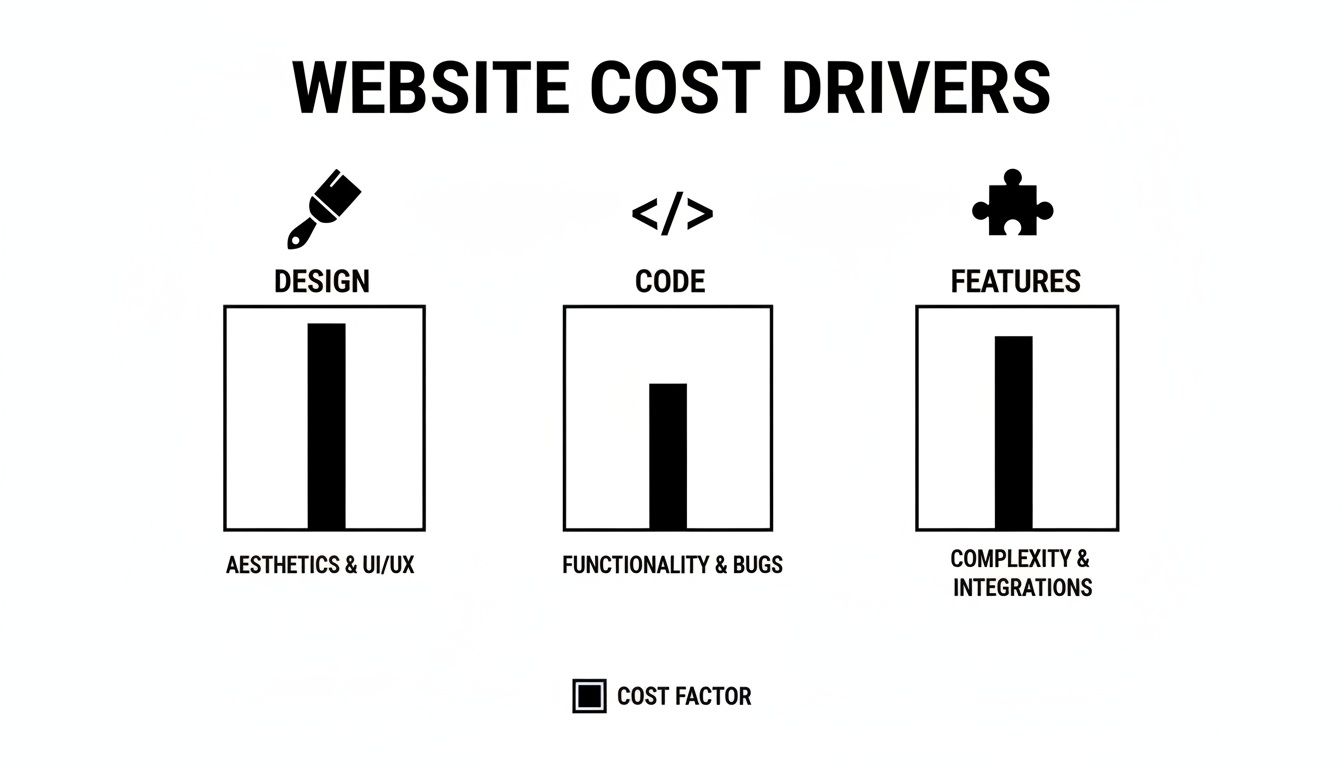
As you can see, the final cost is a blend of visual design, the complexity of the code, and the specific features you need to get the job done.
The E-commerce Website
An e-commerce website is a full-blown online store, and that’s where things get much more complex. It has to juggle product catalogs, track inventory, process payments securely, manage customer accounts, and handle all the logistics of shipping and fulfillment. The cost to build an e-commerce website can swing wildly depending on how many products you sell and how much custom functionality you need.
Building an e-commerce site is a lot like building a brick-and-mortar store. You need shelves (product pages), a cash register (payment gateway), a stockroom (inventory system), and top-notch security to protect both your customers and your business.
A few key things drive up the cost for e-commerce sites:
- Payment Gateway Integration: Securely connecting with services like Stripe or PayPal.
- Product Management: Creating user-friendly systems to add, update, and organize products.
- Shipping and Tax Logic: Programming complex and often-changing rules for different locations.
- Security: Heavy-duty security measures like SSL certificates and PCI compliance are absolutely non-negotiable.
Because of all these moving parts, the investment is significantly higher.
- Average Cost Range: $5,000 – $50,000+
- Typical Timeline: 8 – 20+ weeks
- Best For: Any business, big or small, that wants to sell products or services directly to customers online.
The Custom Enterprise Website
At the very top end, you have large-scale, custom-built websites and web applications for enterprise-level companies. These are highly specialized platforms built from the ground up to solve unique business problems. They often involve complex integrations with a company’s internal systems, like their CRM, ERP, and custom databases.
The scope is massive. A project like this requires months of planning, completely custom development, intense testing, and a dedicated team of specialists for ongoing support. The cost to build a website of this caliber reflects the incredible amount of custom work and expertise required.
Choosing Your Builder: DIY vs. Freelancer vs. Agency
Deciding who will actually build your website is one of the biggest calls you'll make. This decision directly impacts your final cost, the timeline, and the quality of what you get.
Think of it like building a house. You could grab a DIY kit, hire a specialized contractor for the framing and electrical, or bring in an architectural firm to manage the entire project from blueprint to final inspection. Each path gets you a house, but the cost, effort, and final result will be worlds apart.
Let's break down the three main routes you can take.
The DIY Route: The Hands-On Approach
Going the Do-It-Yourself (DIY) route means using a website builder platform like Wix or Squarespace. This is, without a doubt, the most budget-friendly option when you look at the initial price tag. For a small monthly fee, you get access to all the tools you need.
It's a lot like assembling furniture from IKEA. You get the box with all the pieces and a set of instructions, but you're the one who has to put it all together. While you save money, you pay for it with your time. You’ll be responsible for learning the platform, picking a template, writing every word, finding all the images, and figuring out the technical setup.
- Best For: Hobbyists, brand-new solo entrepreneurs, or anyone with a very simple website need, a shoestring budget, and plenty of time to learn the ropes.
- Cost Impact: The lowest direct cost, but it demands a heavy investment of your time, which has its own price.
Hiring a Freelancer: The Specialized Expert
Hiring a freelancer is the classic middle-ground option. This is like hiring a master carpenter to build custom cabinets instead of buying a generic set from a big-box store. Freelancers are specialists who often have deep expertise in one or two key areas, like WordPress development, user experience design, or setting up e-commerce stores.
This path often provides a fantastic balance of professional quality and manageable cost. You can get a polished, semi-custom website without the high overhead that comes with a larger agency. The catch? You're the project manager. Your project's success hinges on your ability to provide clear direction, give timely feedback, and keep things on track.
Choosing a builder isn’t just about the initial cost; it’s a trade-off between time, control, and expertise. The right choice aligns your financial resources with your capacity for project management and your long-term business goals.
Partnering with a Web Design Agency: The Full-Service Team
Working with a web design agency is the premium, all-inclusive experience. This is the equivalent of hiring a full-service architectural firm and construction crew to build your dream home. An agency doesn't just bring one person to the project—they bring an entire team. You'll have access to project managers, strategists, designers, developers, copywriters, and SEO specialists.
They don't just "build a website"; they craft a comprehensive digital strategy from the ground up. This holistic approach means they handle everything, allowing you to focus on your business. Of course, that level of service and expertise comes at the highest price. An agency is a serious investment in a long-term business asset built for growth.
If you're leaning this way, it pays to know how to choose a web design agency that truly fits your company's goals and culture.
The Hidden Costs of Website Ownership
Getting your website live feels like a huge accomplishment, but it’s really just the beginning of the journey. Think of it like buying a car—the sticker price is just your entry ticket. You still have to budget for gas, insurance, and regular maintenance to keep it on the road. Your website is exactly the same.
The initial build is a one-time project, but keeping that site healthy, secure, and performing well requires ongoing investment. If you don't account for these recurring costs from the start, you're setting yourself up for some nasty financial surprises down the line. These aren't just optional nice-to-haves; they're the essentials that keep your digital presence alive and kicking.
Foundational Recurring Expenses
No matter how simple or complex your site is, every single one has a few running costs that are completely non-negotiable. These are the absolute basics that keep your website visible and secure on the internet.
- Domain Name Renewal: This is your website's address (like yourbusiness.com). You typically pay for it once a year, and it usually runs between $15 to $25 per year for a standard
.com. If you forget to renew it, your site vanishes, and you risk someone else snagging your name. - Web Hosting: Think of this as the plot of land where your website lives. It’s a service that rents you server space to store your site's files. Basic shared hosting can be as cheap as $5 to $25 a month, but if you have a high-traffic site, you'll need something more powerful like dedicated hosting, which can cost $80 to $300+ per month.
- SSL Certificate: This little certificate encrypts the data flowing between your visitors and your site, showing that lock icon in the browser bar. It’s absolutely critical for security and user trust. Many hosts now offer a free one, but premium certificates with higher validation can cost anywhere from $50 to $200 per year.
These three things are the bedrock of your website's operational budget. Without them, your site simply doesn't exist online.
Software and Maintenance Costs
Beyond the bare essentials, the software that makes your site work needs regular attention, and that often comes with its own price tag. This is where a lot of people get caught off guard, underestimating what it takes to keep everything humming along smoothly.
Consistent maintenance is your best defense against security breaches, broken features, and glitches that pop up after software updates. You can try to handle this yourself, but many businesses find it's worth paying for a professional maintenance plan. If you want to go deeper, we've covered this in our guide on what is website maintenance and why it's so important.
A website is not a static brochure; it is a living piece of software. Neglecting updates and maintenance is like never changing the oil in your car—everything might seem fine for a while, until it suddenly isn't.
Here are the most common software and maintenance costs you should plan for:
- Premium Plugins and Themes: While you can get started with free tools, specialized features almost always require premium plugins or themes that have annual license fees. These can cost anywhere from $50 to $300 per year for each license. Paying this fee is what gets you access to critical security patches and support when you need it.
- CMS Updates: Platforms like WordPress are constantly being updated to close security loopholes and improve how they run. Keeping your core software, theme, and plugins up to date is your number one defense against hackers.
- Regular Backups: If your site ever crashes or gets hacked, a recent backup is your get-out-of-jail-free card. Automated backup services or plugins usually have a small monthly or annual fee, but they're worth every penny for the peace of mind.
Budgeting for these costs isn't just about "keeping the lights on." It’s about protecting the money you've already invested and making sure your website continues to be a secure and effective tool for your business.
Thinking Beyond Cost to Website ROI
It’s tempting to treat a new website like any other purchase, fixating on the price tag and trying to find the cheapest option. But that’s a shortsighted approach. Think of it this way: you wouldn't buy the cheapest engine for a race car. A great website isn't just an expense; it's the engine of your digital business, working around the clock to bring in leads, make sales, and build your brand.
The real key is to shift your mindset from "cost" to "Return on Investment" (ROI). Instead of asking, "How much will this set me back?" start asking, "How much revenue can this generate?" This simple change in perspective reframes the entire project. Your website becomes a strategic growth asset, not just another bill to pay. When you see it like that, a larger upfront investment that delivers a massive return down the line starts to make perfect sense.
Measuring What Matters Most
To really understand your website's financial impact, you have to track the right numbers. We're talking about Key Performance Indicators (KPIs) that tell the true story of your site's value. Forget vanity metrics like raw page views and focus on the data that ties directly to your bottom line.
- Conversion Rate: This is the big one. It’s the percentage of visitors who actually do what you want them to do, like buy a product or fill out a contact form. A high conversion rate is direct proof that your website is turning visitors into customers.
- Lead Generation: How many qualified leads is your website funneling into your sales pipeline every month? This metric shows you exactly how well your site is fueling business growth.
- Customer Acquisition Cost (CAC): How much do you spend to get a new customer through your website? A well-built site should drive this number down over time by attracting organic traffic and converting visitors more effectively.
Boosting Your Website ROI
Once you're tracking these KPIs, you can start making targeted improvements to boost your return. A high-performing website isn't a "set it and forget it" project; it's the result of ongoing, data-driven optimization. Simple things like improving the user experience to make checkout a breeze, investing in SEO to capture free organic traffic, and using analytics to patch up leaks in your sales funnel can make a huge difference.
A website's true value isn't measured by its launch price, but by its ability to consistently generate more revenue than it costs to build and maintain. It's a long-term asset, not a short-term expense.
Let’s look at a quick example. Say you invest $100,000 into a new website. If that site drives $250,000 in new revenue in its first year, you're already way ahead. Even after factoring in $20,000 for annual maintenance, that's an impressive 108% ROI in year one. This is exactly why upfront investments ranging from $12,000 to $150,000 are often a no-brainer for businesses serious about growth.
Ultimately, understanding the ROI of a modern website design is what separates a smart investment from a costly mistake. When you focus on the value it creates rather than the price you pay, you’re not just building a website—you’re building a foundation for sustainable success.
Frequently Asked Questions
Thinking about the cost of a new website brings up a lot of questions. Let's tackle some of the most common ones that business owners ask.
How Can I Reduce Website Costs Without Sacrificing Quality?
This is the million-dollar question, isn't it? The good news is, you absolutely can control costs without ending up with a cheap-looking site.
The smartest way is to start with a Minimum Viable Product (MVP). Think of it as your "launch version." Instead of building every single bell and whistle you can dream of, focus only on the core features your customers truly need right now. You can always add more advanced functionality later as your business grows and starts bringing in revenue.
Another huge money-saver is opting for a premium pre-built theme or template instead of a ground-up custom design. This can slash design and development time dramatically while still giving you a professional, high-quality foundation to build on.
Lastly, do your homework. Have all your content—text, images, branding guidelines, and videos—ready to go before the project kicks off. When a developer or agency has to wait on you for content, the clock is still ticking. Being prepared from day one prevents delays and avoids racking up extra billable hours.
How Long Does It Typically Take To Build A Website?
The timeline really hinges on the project's complexity. More pages, more custom features, and more integrations all add time to the calendar.
Here’s a rough guide to help set your expectations:
- Simple Brochure Site (1-5 pages): You can usually get this done in about 2-4 weeks.
- Small Business Website (5-15 pages, blog, basic forms): This is a bit more involved, so expect it to take 4-8 weeks.
- E-commerce Store (products, payments, customer accounts): Depending on the size of your catalog, this can take anywhere from 6-16 weeks.
- Large Custom Enterprise Platform: For a completely bespoke system with deep integrations, you're looking at 6 months or more.
Is A Monthly Fee Better Than A One-Time Project Cost?
This really comes down to your business's cash flow and how you prefer to manage your assets.
A one-time project fee means a larger chunk of cash upfront, but once it's paid, you own the website outright. Keep in mind, you'll still have separate ongoing costs for hosting, domain renewals, and any maintenance retainers.
A monthly fee often rolls the initial build, hosting, security, and ongoing support into a single, predictable payment. This is perfect for businesses that want an all-in-one, hands-off solution with an expert team always on call.
The subscription model essentially turns a big capital expense into a manageable operating cost. For many businesses, this makes budgeting way easier and eliminates the stress of surprise bills for updates or security fixes.
Ready to build a high-performance website without the guesswork? Sugar Pixels offers comprehensive web design, hosting, and digital marketing plans tailored to your business goals. Explore our solutions and start your project today at https://www.sugarpixels.com.