
If you're looking for a simple, get-it-done answer, Shopify is usually the go-to for small businesses that value ease of use and a fast launch. It's a complete package. But for those who want total creative control and aren't afraid to get their hands a little dirty, WooCommerce (which runs on WordPress) offers incredible freedom and can often be cheaper to start. Ultimately, the right platform comes down to your tech skills, budget, and where you see your business in a few years.
Choosing Your Ecommerce Foundation
Picking an ecommerce platform is one of the most critical decisions you'll make for your online business. This isn't just about choosing a a website; it's the very foundation of your store, dictating everything from its features and growth potential to how you'll manage it every day. Before you get lost in feature lists, take a moment to think about your bigger picture and how this platform will support your growth, including implementing some 10 potent small business growth strategies. This guide will walk you through the essential criteria to make a smart choice that actually fits your business.

Hosted Vs. Open-Source Platforms
Your first big decision is whether to go with a hosted or an open-source platform. Hosted solutions, also known as Software-as-a-Service (SaaS), give you everything you need in one neat package for a monthly fee. Think hosting, security, and customer support—it’s all handled for you, designed to get you selling as quickly as possible.
On the other hand, open-source platforms are free pieces of software you install on your own web hosting. This route gives you the keys to the kingdom, allowing you to customize every single aspect of your store. While that level of control is powerful, it also means you're on the hook for security, updates, and general maintenance. This choice is more than just technical; it fundamentally defines your role as a store owner. For more context on this, our guide on the best website builder for small business can shed some extra light.
The core difference comes down to convenience versus control. Hosted platforms sell you a service that simplifies selling online, while open-source platforms give you a powerful tool that you manage yourself.
Key Factors To Evaluate
As we dive into the top platforms, we need a clear way to measure them against each other. It’s not about who has the longest feature list but how those features actually help your business. We'll be looking at each one through the lens of a few crucial factors:
- Ease of Use: How quickly can someone with zero coding knowledge get a store online and manage daily orders?
- Design Flexibility: How much creative freedom do you really have over the look and feel of your storefront?
- Total Cost of Ownership: What's the real price tag? We'll look beyond the monthly subscription to include transaction fees and must-have apps.
- App Ecosystem: How big and how good is the library of third-party integrations for adding new features?
This approach will help you see past the marketing hype and find the platform that’s genuinely the right fit for what you need to do.
Quick Comparison of Top Ecommerce Platforms
To get started, here’s a high-level look at the leading contenders. This table breaks down their core strengths and the type of business they're best suited for, giving you a quick snapshot before we dive deeper.
| Platform | Best For | Pricing Model | Key Strength |
|---|---|---|---|
| Shopify | Beginners and rapid growth | Monthly Subscription | All-in-one simplicity and speed |
| WooCommerce | Full control and customization | Free Plugin (Hosting Costs) | Unmatched flexibility and ownership |
| BigCommerce | B2B and scaling businesses | Monthly Subscription | Advanced built-in features |
| Squarespace | Creatives and service-based businesses | Monthly Subscription | Stunning design templates |
Each of these platforms can be a great choice, but the "best" one really depends on your specific goals and resources.
Shopify: The Go-To for a Fast Launch and Easy Growth
If you want to get your online store up and running fast without a technical headache, Shopify is probably where you should start. It has truly perfected the all-in-one ecommerce system, letting entrepreneurs focus on selling products instead of fiddling with code and servers. This is why it’s often the first choice for small business owners who want to be making sales in hours, not weeks.
The real magic of Shopify is its guided setup and clean dashboard. The moment you sign up, it walks you through every step: adding products, connecting payment methods, and picking a theme. Its drag-and-drop editor makes it surprisingly easy to build a professional-looking storefront, no coding required.

This screenshot gives you a glimpse of the intuitive layout. Complex tasks like tracking inventory or fulfilling an order are broken down into simple, manageable steps, all from a single screen. The whole workflow is built to get you comfortable and confident in managing your store on your own.
It’s a Full Ecosystem, Not Just a Website Builder
Think of Shopify as more than just a tool to build a website—it's a complete commerce platform. You get its own secure payment gateway, Shopify Payments, and built-in shipping tools that give you discounted rates from major carriers. This unified approach means you aren't stuck trying to patch together a dozen different services to make your store work.
This integrated model is a huge reason for its popularity. Shopify currently holds a 21% global market share, with around 4 million active stores. It’s especially dominant in the U.S., where it accounts for 30% of the ecommerce software market. For a small seller, this means you're using a battle-tested platform ready to tap into a global market that has grown beyond $7.9 trillion.
Shopify's real value isn't just that it's easy to use; it's that it's reliable. It handles all the security, updates, and server maintenance for you, freeing you from the technical worries of a self-hosted platform.
Customize Everything with the Shopify App Store
While Shopify’s out-of-the-box features are great, the Shopify App Store is what truly unlocks its potential. With thousands of apps available, you can add almost any function you can dream up, allowing the platform to grow right alongside your business.
A few examples of what you can do with apps:
- Automate Your Marketing: Apps like Klaviyo let you set up powerful email campaigns that trigger based on what a customer does on your site.
- Sync Your Inventory: Connect tools that keep your stock levels updated across your website, social media, and any other place you sell.
- Build Customer Loyalty: Add a rewards program to give points and exclusive discounts to repeat customers.
- Start Dropshipping: Integrate directly with suppliers to automate order fulfillment without ever touching the inventory yourself.
As you grow, adding new features becomes critical. Once your store is humming, you might want to look at how paid ads can boost your sales. For a primer, check out our guide on PPC for ecommerce to learn how to bring in targeted traffic.
Pricing That Scales with You
Shopify’s pricing is tiered, so it can fit your budget whether you're just starting or already established. As you upgrade, you get more advanced features and, importantly, lower transaction fees.
- Basic Shopify: Perfect for brand-new businesses. It has everything you need to launch a fully functional store.
- Shopify: The best fit for growing businesses. You’ll get better reporting and more accounts for your team.
- Advanced Shopify: Designed for scaling businesses that need the best reporting tools and the lowest transaction fees to stay profitable.
This structure lets you start small and only pay for more powerful features when you actually need them. It makes Shopify a great partner from your very first sale all the way to global expansion.
WooCommerce: For Ultimate Customization and Control
If you're an entrepreneur who wants total ownership and isn't afraid to get your hands dirty, WooCommerce is your platform. It’s not a standalone service like Shopify; instead, it's a powerful, free plugin that bolts right onto WordPress, turning the world's most popular website builder into a full-blown online store.
This is a completely different way of thinking about e-commerce. With WooCommerce, you own everything—your data, your design, your customer list—without being locked into a monthly subscription. That level of freedom is something you just don't get with all-in-one, hosted platforms.

The image above really gets to the heart of the WooCommerce experience: building a unique storefront from the ground up that perfectly reflects your brand's vision. It’s for people who see their website as more than just a place to sell things—it's a core piece of their brand identity.
The Power of Open-Source Flexibility
The real magic of WooCommerce is its limitless flexibility. Since it's open-source, you can change literally anything. You're not stuck with a pre-set menu of features offered by a corporation. If you can dream it up, you can probably build it.
This freedom shines brightest when you look at its massive ecosystem of themes and extensions. There are thousands of designs to choose from, and the plugin library has a solution for almost any business need imaginable.
- Complex Product Options: Selling personalized goods? Easily create products with tons of variations, add-ons, and custom fields.
- Subscriptions and Bookings: Want to sell subscription boxes or let clients book appointments? Integrate recurring payments or a full booking system seamlessly.
- Membership Portals: You can even build out exclusive, members-only content areas to monetize your community and expertise.
- Advanced Shipping Logic: Need to set up tricky shipping rules based on location, weight, or specific items in the cart? No problem.
This is why WooCommerce is the undisputed king of e-commerce platforms, powering a staggering 37% of all online stores globally with over 6.5 million active shops. The potential for customization is nearly endless.
Understanding the True Cost of Ownership
Now, while the WooCommerce plugin itself is free, it’s important to look at the total investment. Because it’s a self-hosted solution, you're on the hook for a few key expenses.
With WooCommerce, you trade a set monthly fee for more direct operational costs. Your main expenses will be web hosting, a domain name, and any premium themes or plugins you need to get the job done.
Here’s a realistic breakdown of what you can expect to pay:
- Web Hosting: This is where your website's files are stored. Good shared or managed WordPress hosting will run you anywhere from $10 to $50 per month.
- Domain Name: Your site's address (like yourstore.com) typically costs about $15 per year.
- Premium Extensions: While thousands of plugins are free, highly specialized features often require paid extensions, which might be a one-time purchase or an annual subscription.
While this à la carte approach means you have more to manage, it also puts you in complete control of your budget. You only pay for what you actually need, which can often be far more cost-effective in the long run.
Who Should Choose WooCommerce?
So, is WooCommerce right for you? It's the perfect fit for business owners who value long-term control and deep customization over plug-and-play simplicity. It's ideal if you're already familiar with WordPress or you're willing to roll up your sleeves and learn.
If your business has unique needs that hosted platforms can't handle without expensive, clunky workarounds, WooCommerce gives you the freedom to build a solution that's tailored to you. For those who love this idea but feel intimidated by the technical side, partnering with an agency that focuses on ecommerce custom development can be the perfect solution, giving you a completely bespoke store without the steep learning curve.
A Head-to-Head Look at Platform Features and True Costs
Picking the right platform means digging deeper than a simple feature list. You need to understand how each choice will actually affect your day-to-day operations and, ultimately, your bottom line. We're going to compare the top contenders on the things that really matter to a small business owner: how easy they are to use, how much design control you get, and what they really end up costing.
This can feel overwhelming, but a simple decision tree can often point you in the right direction. It all starts with one core question.
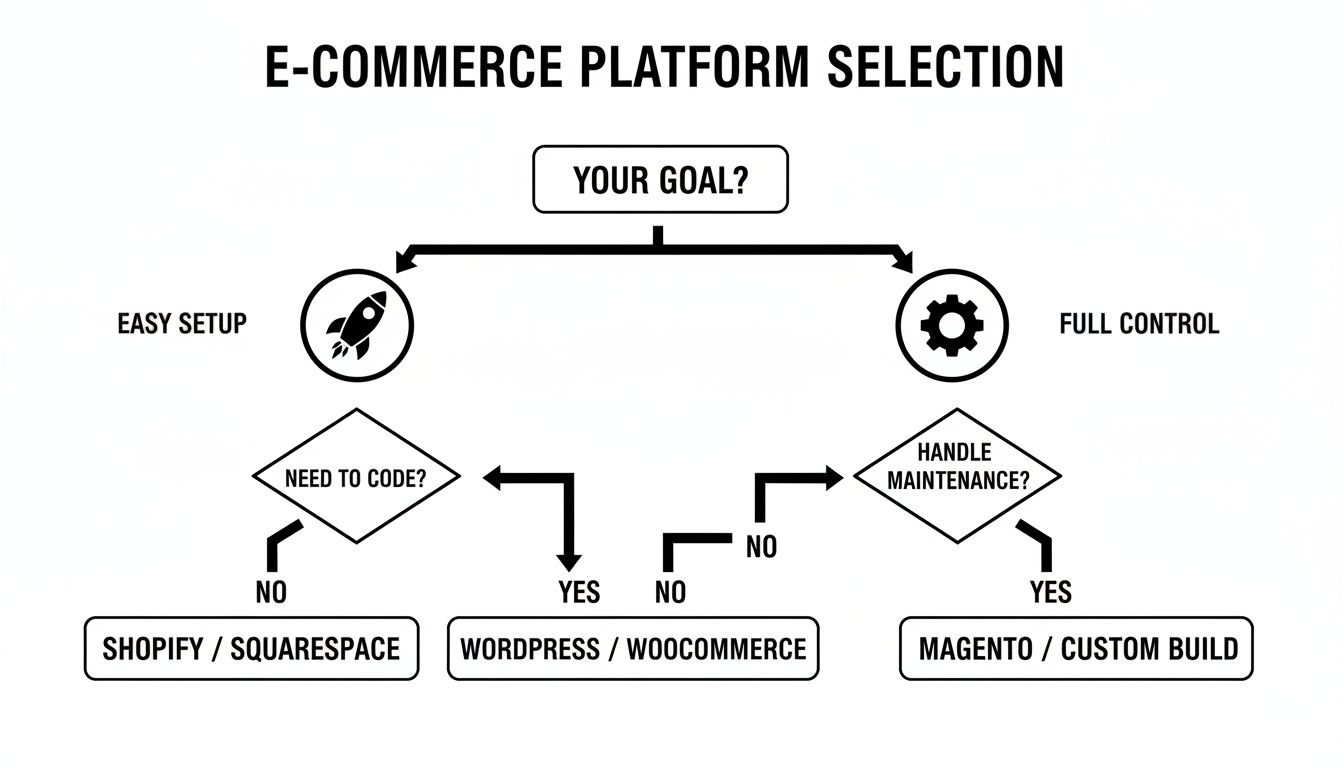
As the flowchart shows, the first fork in the road is deciding between a platform that prioritizes a quick, simple setup versus one that gives you complete, hands-on control. Your answer there will immediately narrow down the options.
Ease of Use and Daily Management
How you manage your store every single day is a huge deal. This is where the fundamental differences between hosted and self-hosted platforms really come to life.
Shopify is built from the ground up for simplicity. Its dashboard is incredibly clean and intuitive, practically holding your hand as you add products, track inventory, and ship orders. Everything you need is right where you expect it to be, which makes the learning curve surprisingly short.
WooCommerce, on the other hand, lives inside the WordPress ecosystem, which means it has a steeper learning curve. It's powerful, no doubt, but the interface can feel a bit disjointed. You might find yourself managing store settings in one area, products in another, and marketing tools somewhere else entirely. It takes more time to master, but the trade-off is much finer control once you know your way around.
Design Flexibility and Customization
Your store's look and feel is the first thing customers notice. The amount of control you have over that first impression varies wildly from one platform to another.
Shopify offers a curated marketplace of professional themes that are mobile-friendly and optimized for conversions right out of the box. You can tweak them with a user-friendly drag-and-drop editor, but if you want to make significant structural changes, you’ll need to learn their proprietary coding language, Liquid, or bring in a developer.
With WooCommerce, the sky's the limit. Because it's built on WordPress, you can choose from thousands of themes from countless developers. More importantly, it’s open-source, meaning you or your developer can change every single line of code. This gives you the power to create a completely unique shopping experience. This is the classic dilemma many businesses face, making a direct Shopify vs WordPress comparison a must-read.
Key Takeaway: Shopify offers guided customization within a safe, pre-built ecosystem. WooCommerce gives you absolute freedom, but with that freedom comes the full responsibility for the technical outcome of your changes.
Total Cost of Ownership
To find the best ecommerce platform for your small business, you have to look beyond the advertised price. The "cheapest" option on paper often isn't the most cost-effective in the long run.
Here’s a more detailed breakdown of what you can expect to pay for the top platforms.
Detailed Feature and Cost Breakdown
This table outlines the key operational and financial differences you'll encounter as you build and run your store.
| Feature | Shopify | WooCommerce | Other Contenders (e.g., BigCommerce) |
|---|---|---|---|
| Monthly Subscription | Fixed monthly fees (e.g., $29, $79, $299). Covers hosting, security, and basic features. | The core software is free, but costs are variable. | Similar to Shopify, with tiered monthly plans that often include more built-in features at each level. |
| Hosting Costs | Included in the monthly subscription fee. | Requires separate hosting, typically $15-$50+ per month for a reliable provider. | Included in the monthly subscription fee. |
| Transaction Fees | 0% if you use Shopify Payments. An additional 0.5% to 2.0% fee if you use a third-party gateway. | 0%. You only pay the standard fees charged by your chosen payment processor (e.g., Stripe, PayPal). | 0% on all plans. You only pay the standard processor fees. |
| Essential Apps/Plugins | Many features require paid apps from the App Store, adding to your monthly bill. | Crucial functions (e.g., advanced shipping, subscriptions) often require paid plugins, usually annual fees. | More core features are built-in, potentially reducing the need for as many paid add-ons. |
| True Cost Example (Basic) | $29/month plan + $15/month for a couple of key apps = ~$44/month. | $20/month hosting + $15/year domain + a few essential plugins = ~$40-$60/month. | $29/month plan often covers what requires paid apps on other platforms. |
As you can see, the "free" option isn't truly free, and the subscription plans have costs beyond the sticker price.
With Shopify, you get a predictable monthly bill that covers hosting, security, and support. But your total cost will grow as you add premium apps from their App Store to get the functionality you need.
WooCommerce follows more of an à la carte pricing model. The software itself is free, but you have several mandatory costs:
- Web Hosting: A good, reliable host will run you anywhere from $15 to $50+ per month.
- Domain Name: This is usually around $15 per year.
- Premium Plugins: Many features you'll likely need, like advanced shipping rules or subscription billing, come from paid extensions that can cost $50 to $200+ per year each.
This means a WooCommerce store loaded with features can sometimes cost more per month than a basic Shopify plan, but you're only paying for precisely what you use.
Payment Gateways and Transaction Fees
Getting paid is what it's all about. While both platforms integrate with all the major payment gateways, they handle the fees very differently.
Shopify strongly encourages you to use its in-house processor, Shopify Payments. If you do, they waive all platform transaction fees. However, if you opt for an external gateway like PayPal or Stripe, Shopify will charge you an additional fee between 0.5% and 2.0% on top of what the payment processor already takes.
WooCommerce doesn’t charge any of its own transaction fees. Period. You are only responsible for the processing fees from your payment gateway of choice (like Stripe, PayPal, or Square). As your sales grow, this can translate into very significant savings.
Matching the Platform to Your Business Model
Choosing the best e-commerce platform isn't about finding the one with the longest feature list. It's about finding the one that feels like a natural extension of your business—what you sell and how you sell it. A generic checklist won't tell you which dashboard will make your day-to-day life easier.
So, let's skip the abstract comparisons and dive into real-world situations. We’ll look at three common business models and pinpoint which platform is truly built to handle their specific challenges. This way, you can pick a tool that supports your workflow right from the start.
For Dropshippers and High-Volume Retailers
If you're in the dropshipping game, your entire business lives and dies by automation. You need a platform that connects to suppliers, syncs inventory in real-time, and automates order fulfillment without a hitch. The less manual work you have to do, the more time you have for marketing and actually growing the business.
For this, Shopify is pretty much the undisputed champion. Its App Store is a goldmine for dropshippers, with powerhouse apps like DSers, Spocket, and others that plug you directly into major supplier networks. Setting up automated order forwarding is a breeze, which is critical for minimizing errors as your sales volume climbs.
WooCommerce can be wrangled into a dropshipping machine with plugins, of course. But the setup often feels a bit piecemeal. You might find yourself needing to juggle several different extensions to get the same smooth automation a single Shopify app provides, which can sometimes lead to headaches and compatibility snags down the road.
Key Takeaway: Shopify is built for pure transactional speed. Its entire ecosystem is geared toward high-volume sales and hands-off fulfillment, making it the go-to for any business where automation is everything.
For Artists and Sellers of Unique Goods
When your products are handmade, one-of-a-kind pieces of art, your website has a different job to do. It needs to tell a story and showcase true craftsmanship. That means you can't compromise on high-resolution images, beautiful design, or tools for managing a limited, often single-item, inventory.
In this space, a platform like Squarespace really shines. It’s famous for its stunning, design-first templates that can make your products look like they belong in a gallery. It also makes it incredibly easy for creators to weave rich blog content and portfolio pages into their shop, helping build a powerful brand narrative around their work.
Between our two main contenders, WooCommerce also offers incredible creative freedom. Armed with thousands of themes and a page builder like Elementor, an artist can craft a truly bespoke digital storefront. It gives you far more detailed control over product variations and custom fields than Shopify, which is perfect if you're offering personalized or made-to-order items.
For Digital Products and Subscriptions
Selling digital downloads, online courses, or subscription boxes brings a whole new set of technical needs to the table. You need to think about secure file delivery, solid membership management, and a rock-solid system for processing recurring payments. The platform has to manage who gets access to what and automate billing cycles flawlessly.
This is where WooCommerce really pulls ahead. Its specialized extensions, like WooCommerce Subscriptions and WooCommerce Memberships, are the gold standard in this field. They offer incredibly deep functionality for managing complex billing schedules, creating tiered access levels, and even "dripping" content to members over time. This approach lets you build a powerful recurring revenue engine that’s tailored to your exact needs.
Shopify can handle subscriptions, but it relies on third-party apps to do the heavy lifting. While many of these apps work well, they can feel a bit bolted on compared to WooCommerce’s native solutions. Plus, the costs can add up fast as your subscriber base grows and you need more advanced management features.
When to Partner With an Ecommerce Agency
The incredible accessibility of DIY e-commerce platforms has opened the door for countless entrepreneurs to get started online. But there comes a point in every successful business’s journey where a template-based store starts to feel less like a launchpad and more like a cage.
When you're ready to evolve your store from a simple sales channel into a powerful, strategic asset, it’s time to consider partnering with a professional agency like Sugar Pixels. This isn't just about outsourcing; it's about making a strategic investment in future growth.
A tell-tale sign you need an expert is when your brand vision has completely outgrown your theme's capabilities. You’re no longer just tweaking colors and fonts; you’re dreaming of a fully bespoke design with a unique user experience that templates simply can't deliver. An agency can build a custom theme from scratch that not only looks stunning but is engineered for conversions.
Tackling Complex Technical Hurdles
Beyond the look and feel, a growing business often runs into technical roadblocks that require serious expertise. As your operations expand, the need to connect your store with other essential business systems becomes urgent.
These aren't just plug-and-play apps. We're talking about deep, custom integrations that ensure data flows seamlessly across your entire company. An agency takes on this heavy lifting, building the digital plumbing that prevents costly mistakes and frustrating data bottlenecks.
Common integrations that call for a pro include:
- Enterprise Resource Planning (ERP) systems to keep inventory, orders, and customer data perfectly synchronized.
- Customer Relationship Management (CRM) software to create a single, unified view of every customer interaction.
- Custom third-party APIs for specialized shipping logic, unique product personalizers, or proprietary internal tools.
Bringing in an agency is about more than just getting tasks done. It’s about gaining a strategic partner obsessed with performance. They’ll dive deep into site speed, mobile optimization, and advanced SEO—the kind of stuff that often gets overlooked when you’re doing it all yourself.
Executing a Flawless Platform Migration
Perhaps the most critical time to call in an agency is when you need to move your store from one e-commerce platform to another. This is a high-stakes operation. One wrong move could destroy your SEO rankings and wipe out years of valuable customer data.
An agency manages the entire migration with surgical precision. They ensure every last piece of product data, customer history, and order information is transferred securely. More importantly, they map out and implement a bulletproof SEO strategy with proper redirects, protecting your hard-earned search engine authority.
This meticulous planning ensures a smooth transition that’s invisible to your customers and keeps your business running without a hitch.
Frequently Asked Questions
Choosing an e-commerce platform is a big decision, so it's natural to have questions. Let's tackle some of the most common ones that pop up for small business owners.
Can I Switch Ecommerce Platforms Later?
The short answer is yes, you can always migrate. But it's a complicated and often risky process. Think of it less like moving houses and more like open-heart surgery for your business.
You're not just moving a theme; you're transferring product data, customer accounts, and years of order history. A botched migration can obliterate your SEO rankings, causing your organic traffic to plummet overnight. To protect your data and hard-earned search visibility, it's a job best left to professionals. A smarter move is to pick a platform you can grow into from the start, saving you a massive headache down the road.
How Important Is SEO for an Ecommerce Platform?
It's everything. Without strong SEO capabilities, you're essentially building a beautiful store in the middle of a desert with no roads leading to it. Organic search traffic from places like Google is the lifeblood of most online stores.
Your platform must give you direct control over the fundamentals. We're talking about:
- Page Titles and Meta Descriptions: Your digital storefront window in search results.
- Custom URLs: Clean, readable URLs that search engines and humans love.
- Image Alt Text: Crucial for getting your product photos to show up in image searches.
Platforms like Shopify have this baked right in. With WooCommerce, you can achieve the same level of control (and more) by adding a great SEO plugin. Either way, this is non-negotiable.
The best e-commerce platform isn't just a place to list products; it's a marketing engine. Native SEO features are a fundamental part of that engine, directly impacting your store's visibility and profitability.
Do I Need Technical Skills to Build My Store?
Absolutely not. You don't need to be a coding wizard to create a professional-looking and fully functional store these days. Modern platforms are built specifically for entrepreneurs, not just developers.
Shopify is legendary for its user-friendly drag-and-drop interface and stunning, mobile-ready themes. WooCommerce, built on top of the already intuitive WordPress, gives you access to thousands of themes and a familiar editing experience. While a developer can take things to the next level with deep customizations, these platforms give you everything you need to launch and manage a successful store on your own.
Feeling ready to build a store that truly stands out but want an expert touch? The team at Sugar Pixels specializes in creating custom, high-performance ecommerce websites that drive growth. Let us handle the technical details so you can focus on your business. Learn more about our custom ecommerce solutions.