

Figuring out the best ecommerce platform for SEO really comes down to your specific business. There's no single right answer. For most people getting started, Shopify hits that sweet spot between ease of use and powerful app integrations. If you're looking at serious growth and need more horsepower out of the box, BigCommerce is a fantastic choice. And for those who want to tinker with every last detail, WooCommerce on WordPress gives you absolute control.
This guide will dig into the nitty-gritty to help you see which platform truly shines in different situations.
Choosing Your Ecommerce Platform for SEO Success
Picking your ecommerce platform is one of the biggest decisions you'll make for your store. It’s way more than just picking a pretty theme or a payment gateway; it's the architectural blueprint for your online business and a massive factor in your long-term organic growth. Think about it: over 63% of all shopping journeys start with a search engine. Your platform's built-in SEO features aren't a "nice-to-have"—they're critical.
A platform that gets SEO right helps search engines like Google easily crawl, index, and make sense of your pages. This work behind the scenes leads directly to better rankings, more relevant traffic, and a steady stream of revenue that doesn't rely on the rollercoaster of paid ad spending. The wrong platform, on the other hand, can lock you into technical SEO problems that are a nightmare to fix down the road.
Key Evaluation Criteria
To really understand the differences, we need to compare the big three—Shopify, BigCommerce, and WooCommerce—on the SEO factors that actually matter day-to-day. This isn't just a feature checklist; it's about how each platform performs in the real world.
- Technical SEO Foundations: How solid is the platform's core architecture? We're talking about things like site speed, mobile-friendliness, and whether you can actually edit your URL structures.
- Content Capabilities: Can you even run a decent blog? A platform has to make it simple to create and optimize the high-quality content that search engines love.
- Scalability and Control: As your store grows, you'll need more advanced tools. We'll look at how each platform handles things like schema markup, canonical tags, and managing your sitemap.
To kick things off, here’s a quick look at how the platforms compare on the most important SEO features.
Quick SEO Feature Snapshot of Leading Ecommerce Platforms
This table gives you a high-level summary of where each platform stands. It’s a great way to get an immediate feel for their core strengths and weaknesses before we dive deeper into the specifics.
| SEO Feature | Shopify | BigCommerce | WooCommerce (WordPress) |
|---|---|---|---|
| Ease of Use | Excellent | Very Good | Good (Requires learning) |
| URL Customization | Limited | Good | Excellent (Full Control) |
| Built-in SEO Tools | Good | Excellent | Basic (Relies on Plugins) |
| Content/Blogging | Good | Good | Excellent (WordPress Native) |
| App/Plugin Dependency | High | Low | Very High |
| Best For | Startups & DTC | SMBs & Mid-Market | Full Customization |
As you can see, there are clear trade-offs. This table sets the stage for our detailed analysis, helping you start thinking about which platform’s pros and cons best match your technical skills, business goals, and overall ambition.
Why SEO Is Your Most Sustainable Growth Engine
Relying on paid ads is like renting your traffic. The second you turn off the spend, your visitors vanish. It’s a constant, unpredictable cycle that makes it incredibly difficult to build a stable, long-term business. For real, sustainable growth, you need an asset that appreciates over time, not an expense that disappears.
This is where Search Engine Optimization (SEO) comes in. Unlike paid ads that drain your budget, SEO is a direct investment in your brand's digital storefront. Every optimized product page and every technical tweak builds an organic traffic engine that works for you 24/7, bringing in customers who are actively looking for what you sell—for free.
The True Value of Organic Traffic
Let's be clear: traffic from search engines is fundamentally different. These aren't just passive scrollers; they're active problem-solvers. When someone finds you through Google, they arrive with a specific need or desire, making them far more likely to convert than someone who just happened to see your ad on social media. This intent is what makes organic traffic the lifeblood of ecommerce.
Think about the journey. A person typing "waterproof hiking boots for women" into a search bar is miles ahead in the buying process compared to someone just browsing their feed. Winning that moment is the whole game in ecommerce SEO, and it’s a competitive edge that grows on itself.
SEO isn’t just another marketing channel; it's a business moat. It builds brand authority, earns customer trust, and creates a predictable stream of revenue that protects you from skyrocketing ad costs.
The financial upside is massive. A deep dive into over 20,000 ecommerce sites uncovered a stunning reality about organic value. The average store ranks for 1,783 keywords, which brings in about 9,625 visits each month. If you were to buy that same traffic through paid search, it would cost you an estimated £11,790.58 every single month.
And it’s not just traffic; it's sales. With SEO driving 23.6% of all ecommerce orders worldwide, picking the right platform isn't just a technical decision—it's a critical financial one. You can dig deeper into these e-commerce SEO statistics to see the full picture.
Building an Asset, Not Just Running a Campaign
Every single SEO effort adds permanent value. Optimizing a product description or writing a genuinely helpful blog post creates an asset that can rank and pull in traffic for years with little to no ongoing cost. An ad, on the other hand, is gone the moment your budget dries up. That’s the real difference between building a business and just running a campaign.
Your ecommerce platform is the foundation for this asset. A system with solid, out-of-the-box SEO gives you the tools to:
- Create Optimized Content: Easily publish blogs and guides that capture customers early in their research.
- Control Technical SEO: Manage your URLs, meta tags, and schema markup to speak Google’s language.
- Guarantee High Performance: Deliver lightning-fast page speeds, a non-negotiable ranking factor that also keeps customers happy.
When you invest in SEO, you're building a more resilient business. While your competitors are stuck in an endless bidding war for clicks, you're creating a self-sustaining machine that turns visibility into profit. It's how a small shop can go head-to-head with the giants, making organic search its most reliable and profitable engine for growth.
A Head-to-Head SEO Comparison of Ecommerce Platforms
Choosing the right ecommerce platform is always a game of trade-offs. There’s no single “perfect” solution; the best ecommerce platform for seo for you will come down to your technical comfort level, your business goals, and just how much control you actually need. This is where we get past the marketing fluff and dive into a practical, head-to-head analysis of Shopify, BigCommerce, and WooCommerce on the SEO criteria that truly matter.
We're going to evaluate each platform on how it performs in the real world. That means looking at everything from URL structure control and built-in schema markup to site speed potential and the quality of their blogging systems. The goal here is to give you a clear, honest look at the strengths and weaknesses you’ll be working with day-to-day.
This image below breaks down the fundamental value of SEO. It connects the upfront investment to the organic traffic it generates and, ultimately, to the orders that fuel your growth.
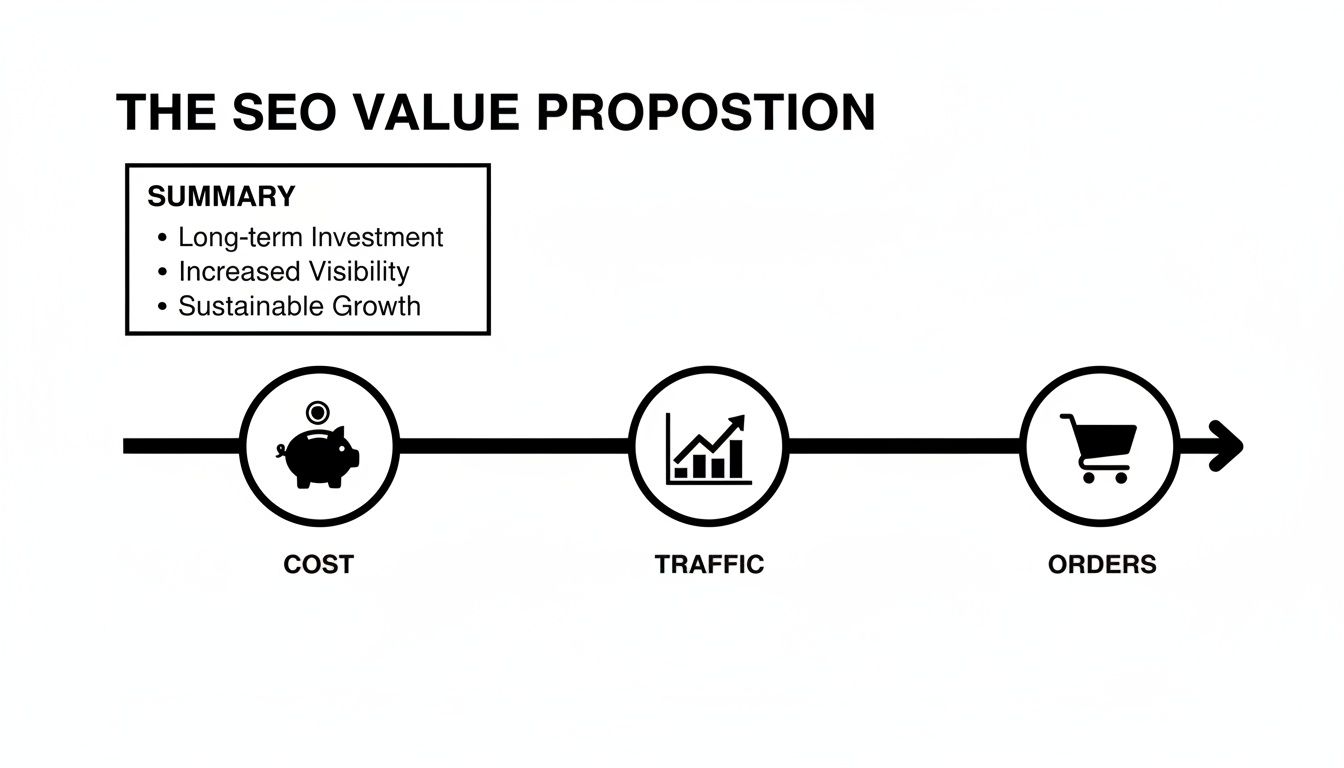
It’s a great visual reminder of how a smart investment in an SEO-friendly platform builds a sustainable revenue engine that doesn't rely on constantly paying for ads.
URL Structure and Customization
Your URL structure is one of the very foundations of technical SEO. Clean, descriptive URLs don't just help search engines understand your site's hierarchy; they also create a much better experience for your users.
- Shopify: Let's be frank: Shopify's URL structure is its most-debated SEO weakness. It forces a rigid format on you, adding
/collections/for category pages and/products/for product pages. You can't get rid of them. While it works, this is a real source of frustration for SEOs who want a flatter, cleaner URL architecture. - BigCommerce: Things are much more flexible over at BigCommerce. By default, its URLs can be a bit long and clunky, but it gives you a simple option to switch to a "short" format that's clean and keyword-rich. This gives you the control you need without having to be a developer.
- WooCommerce: As an open-source WordPress plugin, WooCommerce gives you complete and total control. You can tweak your permalinks to be as simple or as complex as your strategy demands. For pure flexibility, it’s the undisputed king.
Key Takeaway: If you want absolute control over your URLs, WooCommerce wins hands-down. BigCommerce offers a fantastic middle ground, while Shopify's rigidity is the price you pay for its simplicity.
Site Speed and Performance
Page speed isn't just a "nice-to-have" anymore. It's a make-or-break ranking factor and a massive driver of conversions. A slow site bleeds customers and sends bad signals to Google.
Here, Shopify and BigCommerce have a natural leg up because they are hosted solutions. They manage the entire server infrastructure for you, investing heavily in performance with things like Content Delivery Networks (CDNs) and optimized servers. This means you get great speed right out of the box. Your job is mainly to pick a fast theme and keep your images optimized.
WooCommerce, on the other hand, is self-hosted, which puts performance entirely in your court. Your site's speed is a direct result of your hosting provider, your theme, the number of plugins you've installed, and your own optimization efforts. It has the potential to be lightning-fast, but it can also become painfully slow if you don't manage it carefully.
Built-in SEO Features and App Dependency
How many native SEO features a platform has determines how much you’ll end up leaning on third-party apps, which can add cost and complexity.
- BigCommerce really shines in this area, offering a powerful suite of SEO tools right out of the box. Features like automatic 301 redirects when you change a URL, an editable robots.txt file, and rich schema markup are all included. This all-in-one approach is a huge plus for businesses that want advanced tools without juggling a dozen different apps.
- Shopify provides a solid SEO foundation, but for anything advanced, you’ll be heading to its app marketplace. Basic meta titles and descriptions are easy to edit, but implementing more complex schema or managing redirects in bulk will almost certainly require a paid app.
- WooCommerce is essentially a blank canvas. Its real power comes from the WordPress ecosystem and incredible plugins like Yoast SEO or Rank Math. These tools give you granular control over on-page SEO, sitemaps, and schema, but you are responsible for choosing, installing, and maintaining them.
Content Management and Blogging
Content is the engine of any great SEO strategy. A strong blog attracts customers early in their journey, builds your brand's authority, and creates invaluable internal linking opportunities.
This is where WooCommerce has a massive, undeniable advantage. It's built on WordPress, the world's best content management system (CMS), so its blogging capabilities are second to none. You get total control over your content layout, categories, and optimization, making it the clear winner for any brand that's serious about content marketing.
Shopify and BigCommerce both have built-in blogs that are perfectly functional for basic posts and company news. But they just can't compete with the flexibility and advanced features you get with WordPress. For a deeper look, check out this comprehensive ecommerce platforms comparison which covers content features alongside other key criteria.
Detailed SEO Feature Matrix
To really put these differences into perspective, the table below gives a side-by-side comparison of specific technical SEO features. Think of this as a cheat sheet for the nuanced trade-offs you'll be making.
| SEO Criterion | Shopify Analysis | BigCommerce Analysis | WooCommerce Analysis |
|---|---|---|---|
| URL Customization | Limited. Forced subdirectories like /products/ and /collections/ cannot be removed. |
Good. Offers a "short URL" option for clean, keyword-rich URLs. More flexible than Shopify. | Excellent. Complete control over permalinks through WordPress, allowing for any desired structure. |
| Schema Markup | Basic built-in. Relies on themes and apps for advanced schema types (e.g., FAQ, How-to). | Excellent built-in. Provides comprehensive schema for products and reviews out of the box. | Plugin-dependent. Requires plugins like Yoast or Rank Math for robust schema implementation. |
| Robots.txt Access | Limited. Only allows adding Disallow rules through the robots.txt.liquid file. No full edit access. |
Full access. Provides the ability to directly edit and customize the robots.txt file. | Full access. Can be edited directly via FTP or through a dedicated SEO plugin. |
| Sitemap Control | Automatic. A sitemap is generated automatically, but you have no direct control over its contents. | Automatic. Generates the sitemap but offers more control over which pages are included. | Full control. SEO plugins provide extensive options for customizing the sitemap. |
| App Dependency | High. Advanced SEO functions almost always require installing a third-party application. | Low. Most essential SEO features are built directly into the platform's core. | Very High. Core functionality is minimal; relies entirely on plugins for SEO optimization. |
This breakdown makes it obvious that the best ecommerce platform for seo isn't a simple answer. For businesses considering WooCommerce that also deal with regulated products, it's worth looking beyond just SEO at its shipping compliance tools, including a comparison of the best shipping restriction plugins for WooCommerce. Each platform is built for a different type of user with a different set of priorities.
Matching the Right Platform to Your Business
A side-by-side feature list is a decent start, but it won't tell you what you really need to know: which platform is the right fit for your business? The honest answer is that the best ecommerce platform for seo isn't a one-size-fits-all solution. It’s all about matching a platform’s core strengths to your specific goals, your budget, and how comfortable you are with the technical side of things.
This is where context is everything. A feature that's a must-have for a massive, established brand could just be a costly distraction for a startup trying to get its first product out the door. Let’s look at this through the lens of real-world business scenarios to find your perfect match.
For Startups and DTC Brands: Shopify Is the Clear Choice
If you need to get to market fast and want to avoid technical headaches, it’s hard to argue against Shopify. For most new direct-to-consumer (DTC) brands, solo entrepreneurs, and small businesses, Shopify's greatest advantage is that it lets you focus on selling your products, not managing servers.
Shopify takes care of all the behind-the-scenes work—hosting, security, and performance. You never have to worry about applying a security patch or your server going down in the middle of a sale. Just sign up, pick a theme, and start building. This simplicity is a massive advantage when you’re just starting out and resources are tight.
Yes, its URL structure is a bit rigid, and you'll rely heavily on apps for more advanced SEO functions. But for the speed and stability you get in return, those are often trade-offs worth making. The huge app ecosystem also means you can bolt on new features as you grow.
Situational Fit: Go with Shopify if you're a startup, DTC brand, or any small business that values a quick launch and ease of use over deep technical customization. It gets your store online fast without needing a developer.
For Growing Businesses Needing Scalability: BigCommerce Leads the Pack
Once your business starts to take off, your needs evolve. You might feel boxed in by a simpler platform, and the monthly cost of all those third-party apps can start to add up. This is exactly where BigCommerce comes into its own, bridging the gap between easy-to-use platforms like Shopify and developer-heavy solutions like Magento.
BigCommerce packs a ton of advanced functionality right into its core platform. Things that often require paid apps elsewhere—like detailed schema markup, flexible URL structures, and powerful product filtering—are all built-in. This makes it an incredibly powerful and cost-effective option for mid-market businesses poised for growth.
It hits that sweet spot of giving you more advanced SEO control without saddling you with the responsibility of managing your own hosting and security. For many businesses, it’s the logical next step when they've outgrown the basics and need more horsepower. To see how it compares for smaller operations, check out our guide on the best ecommerce platform for small business.
For Full Control and Content-Driven Stores: Choose WooCommerce
If your entire business strategy revolves around content marketing, or if you absolutely must have total control over every aspect of your site, then WooCommerce is for you. As a plugin for WordPress, it’s built on the most powerful content management system in the world. No other e-commerce platform even comes close when it comes to blogging and content creation.
This makes WooCommerce the go-to choice for brands that drive sales through articles, guides, and tutorials. Think niche stores, affiliate marketers, or any business that needs to educate its customers. Your content and your store live together perfectly.
Of course, there's a major trade-off: you are responsible for everything. From picking a host to handling security, updates, and performance optimization, the technical load is all on you. This freedom is incredibly powerful if you have the technical expertise (or the budget to hire it), but it can quickly become a liability if you don't.
Recommendation Breakdown
To put it simply, let your business model and long-term goals guide your decision:
- Shopify: The best choice for getting started quickly with minimal technical drama.
- BigCommerce: The ideal platform for scaling businesses that need more power out of the box.
- WooCommerce: Unmatched for content-focused stores and anyone demanding 100% customization.
By looking at your own needs through these specific scenarios, you can choose a platform that not only works for you today but also supports your SEO success for years to come.
Your Post-Launch SEO Action Plan

Getting your ecommerce platform picked out is a massive step, but honestly, it’s just the starting line. The real marathon of building a powerful online presence starts the second you go live. To make sure your new store becomes a genuine growth engine, you need a clear, actionable SEO plan from day one.
This isn't about getting lost in the weeds of complex algorithms. It's about laying a foundation so solid that search engines can't help but understand and reward your site. Your first priorities should be nailing the technical setup, optimizing your pages, and getting your monitoring in place.
The Universal SEO Fundamentals
It doesn't matter which platform you chose—some SEO tasks are simply non-negotiable. These fundamentals make sure Google can see you and that you can track your performance accurately. Think of it as your essential pre-flight check before you even think about driving traffic.
Your initial moves should always cover these bases:
- Google Search Console Integration: This is your direct hotline to Google. Getting your site verified lets you watch your indexing status, spot crawl errors, and see the actual search queries people are using to find you.
- Google Analytics Setup: You can't improve what you don't measure. Setting up Google Analytics with ecommerce tracking is absolutely critical for understanding how users behave, pinpointing your most valuable pages, and, of course, tracking revenue.
- Sitemap Submission: Once you're connected to Search Console, submit your XML sitemap. It’s like handing Google a map of your site, which helps it find and index all your important pages much faster.
Platform-Specific First Steps
Beyond the universal basics, your immediate game plan will change a bit depending on your platform. Each system has its own ecosystem of tools built to fill gaps or amplify its native strengths. Focusing on the right additions right away will save you a ton of time and headaches down the road.
A Shopify store owner, for instance, should head straight to the app marketplace. Apps like SEO Manager or Plug in SEO can help manage bulk redirects and add more sophisticated schema markup that isn't available out of the box. This is a crucial step to work around some of Shopify’s built-in limitations.
On the other hand, if you're running on WooCommerce, your very first move should be installing a heavy-hitting SEO plugin. Tools like Yoast SEO or Rank Math are essential; they give you the core controls for everything from meta tags to sitemaps. Without one, you're pretty much flying blind. BigCommerce users get a bit of a head start since many of these features are built-in, but they should still take the time to configure key settings like URL structures and AMP for product pages.
A common mistake is assuming the platform handles all SEO automatically. While platforms provide the tools, success depends on your strategic implementation from day one. Your goal is to build a comprehensive online store SEO strategy, not just launch a website.
Optimizing Your Core Pages
With the technical groundwork in place, it’s time to shift your focus to the on-page optimization of your most valuable assets: your product and category pages. This is where you connect what you sell with the exact terms your customers are searching for.
Start by optimizing these three things:
- Meta Titles and Descriptions: Write unique, compelling titles and descriptions for your top categories and best-selling products. Weave your primary keywords in naturally.
- Product Descriptions: Ditch the manufacturer's copy and write original, helpful descriptions. Using stock text is a fast track to duplicate content problems.
- Image Alt Text: Add descriptive alt text to every single product image. This not only helps you rank in image searches but also makes your site more accessible.
As part of this initial push, improving ecommerce conversion rates through visuals can give you a nice boost, too. Better visuals keep users engaged, which sends positive signals to search engines. By consistently knocking out these foundational steps, you build immediate SEO momentum and ensure your new store doesn't just launch—it thrives.
Frequently Asked Questions About Ecommerce SEO
After digging into the pros and cons of these platforms, you're probably wrestling with some specific questions. Choosing the best ecommerce platform for SEO is one thing, but living with that choice and making it work is another. Let's tackle the questions I hear most often from store owners.
Can I Migrate My Store Without Losing SEO Rankings?
Yes, but you have to be incredibly careful. The goal isn't to avoid any and all ranking fluctuations—a small, temporary dip is pretty common. The real mission is to protect your long-term traffic and the authority you've spent years building.
It all comes down to a rock-solid 301 redirect strategy. You need to meticulously map every single old URL to its new counterpart. This tells search engines where to send the "link juice" and ensures customers don't hit dead ends. Skipping this step is, without a doubt, the #1 reason migrations fail and traffic tanks.
What Is the True Cost of SEO Apps on Each Platform?
Don't let the sticker price fool you. The monthly fee for the platform is just the starting point. The real costs, especially for essential SEO apps and plugins, can pile up quickly and vary a lot between platforms.
- Shopify: You'll be leaning heavily on the app store for anything beyond the basics. A good setup for managing schema, bulk redirects, and image optimization will likely run you an extra $30 to $100+ per month.
- WooCommerce: The platform itself is free, but you'll absolutely need premium plugins. Things like Yoast SEO Premium or Rank Math Pro, plus caching and image compression tools, will set you back $100 to $300 annually.
- BigCommerce: This is where you'll see the lowest "hidden" costs. BigCommerce bakes most of the crucial SEO features right in, so you're far less reliant on third-party apps. Its advertised price is much closer to what you'll actually pay for SEO tools.
Is a Custom-Built Store Ever a Better Choice for SEO?
For most businesses, the answer is a hard no. A custom build gives you absolute control over everything, from unique URL structures to fine-tuning server configurations. That sounds great in theory, but it comes with a massive price tag and a ton of responsibility.
When you build from scratch, you're on the hook for everything: security patches, performance optimization, updates, and PCI compliance. Development costs can soar into the tens of thousands, and that’s before you even factor in ongoing maintenance. Unless you're a massive enterprise with very specific technical demands, a platform like BigCommerce or a self-hosted WooCommerce gives you a much smarter balance of control and cost.
At the end of the day, the right platform is the one that lets you execute your SEO plan without getting bogged down by technical headaches or surprise expenses.
Ready to build an online store that actually ranks? At Sugar Pixels, we specialize in creating high-performance ecommerce websites with SEO at their core. Let us handle the technical details so you can focus on growing your business. Get started with a custom ecommerce solution today.
