
Ever placed an online order and immediately checked your inbox for a confirmation? That’s a transactional email in action.
Think of them less like a marketing newsletter and more like a helpful, automated update. These are the one-to-one messages your business sends out automatically right after a customer does something specific—like making a purchase, signing up for an account, or asking to reset their password.
The Foundation of Customer Communication
When someone interacts with your business, they have immediate questions. Did my payment go through? When will my package arrive? Did that password change work? Transactional emails step in to answer those questions instantly, acting as the digital backbone of great customer service. They are purely functional, always timely, and directly tied to an action the user just took.
These emails are the unsung heroes of your communication strategy. People not only expect them, they actively look for them. This is why their open rates are so incredibly high—you're reaching customers at the very moment they are most engaged with your brand.
Key Characteristics of Transactional Emails
At their core, these messages are all about delivering crucial information that helps a customer along their journey with you. They stand apart from other emails because of a few key traits:
- Triggered by User Action: They never go out unprompted. A user has to do something first, whether it’s buying a product, creating an account, or requesting information.
- Highly Personalized: Each email is for a specific person and their specific action. It will contain unique details like an order number, a shipping address, or a personal password reset link.
- Informational, Not Promotional: The main job is to inform, confirm, or help someone complete a process. It’s not about selling something new.
- Expected Communication: Your customers are waiting for these emails. They often need the information inside to take the next step, making on-time delivery an absolute must.
A transactional email is more than just a notification; it's a promise kept. It confirms that an action was successful and tells the customer what to expect next, building a foundation of trust from the very first interaction.
Once you really get what transactional emails are and how they work, you can turn these simple, automated messages into powerful tools for building customer loyalty. They aren’t just a technical requirement; they are a critical touchpoint in your relationship with every single customer.
Why Transactional Emails Actually Get Opened
The real magic of a transactional email isn't about slick marketing or clever copy. It’s much more fundamental than that. It taps directly into a powerful human emotion: anticipation.
Think about it. The moment a customer clicks "buy" or "reset password," they're actively looking for a response. They expect to hear from you. This creates a rare moment where your message isn't an interruption; it's a welcome confirmation they’re waiting for.
From Anxiety to Assurance
We’ve all felt that tiny flicker of doubt after placing an online order. Did it go through? Did they get my payment? A well-timed order confirmation email erases that worry in an instant. It’s like a digital handshake, assuring the customer that everything worked perfectly.
This isn’t just a simple notification; it's a crucial emotional touchpoint. By delivering the right information at the right time, you turn a moment of potential stress into one of security and trust. Each email that says "We got it" or "It's on its way" reinforces the idea that your brand is dependable.
When you send a shipping notification or an account alert, you're doing more than just completing a task. You're actively making the customer experience better and building a stronger relationship with them, one helpful message at a time.
Turning a Notification into a Conversation
Because customers already expect these emails, they give you a golden opportunity to provide value that goes beyond the basic details. Their power comes from consistently meeting, and even exceeding, those expectations.
Here’s why these simple notifications are such powerful tools for engagement:
- They Calm Nerves: A quick password reset confirmation or a shipping update provides instant peace of mind. No more wondering if it worked.
- They Validate the Purchase: A clean, well-designed receipt doesn't just show the numbers. It makes a customer feel good about their decision to buy from you.
- They Guide the Next Step: A welcome email is the perfect way to show a new user what to do next, kicking off a smooth and successful onboarding.
Once you understand what transactional emails are and why they matter, you'll stop seeing them as just automated receipts. They are essential conversations at the most important moments of the customer journey. Each one is a chance to prove you’re reliable, build confidence, and turn a first-time buyer into a loyal fan.
Transactional vs. Marketing Emails
It's easy to get transactional and marketing emails mixed up, but the difference boils down to something simple: one is a conversation, and the other is an announcement.
Think of a transactional email as a personal, one-to-one message that lands in your inbox because of something you just did—like placing an order or resetting a password. A marketing email, on the other hand, is more like a digital flyer sent out to a whole list of subscribers at once.
A classic example of a transactional message is that order confirmation you get right after a purchase. You're expecting it, you're looking for it, and it has details meant only for you. A "25% Off Flash Sale" email is pure marketing—it’s a broadcast designed to get a group of people to take a new action. This core difference in purpose is what truly sets them apart.
The Purpose Defines the Message
The easiest way to tell them apart is to ask why the email was sent. Is it a necessary part of a process you started, or is it trying to kickstart a new one?
Transactional emails are all about function. They deliver critical information tied to your account or a recent action. Marketing emails are built on persuasion, aiming to convince you to buy something or check out a new feature. If you want to dive deeper into crafting those persuasive messages, understanding the basics of lead generation emails is a great place to start.
This is where transactional emails really shine. They meet the customer at a moment of high engagement, building on their existing momentum.
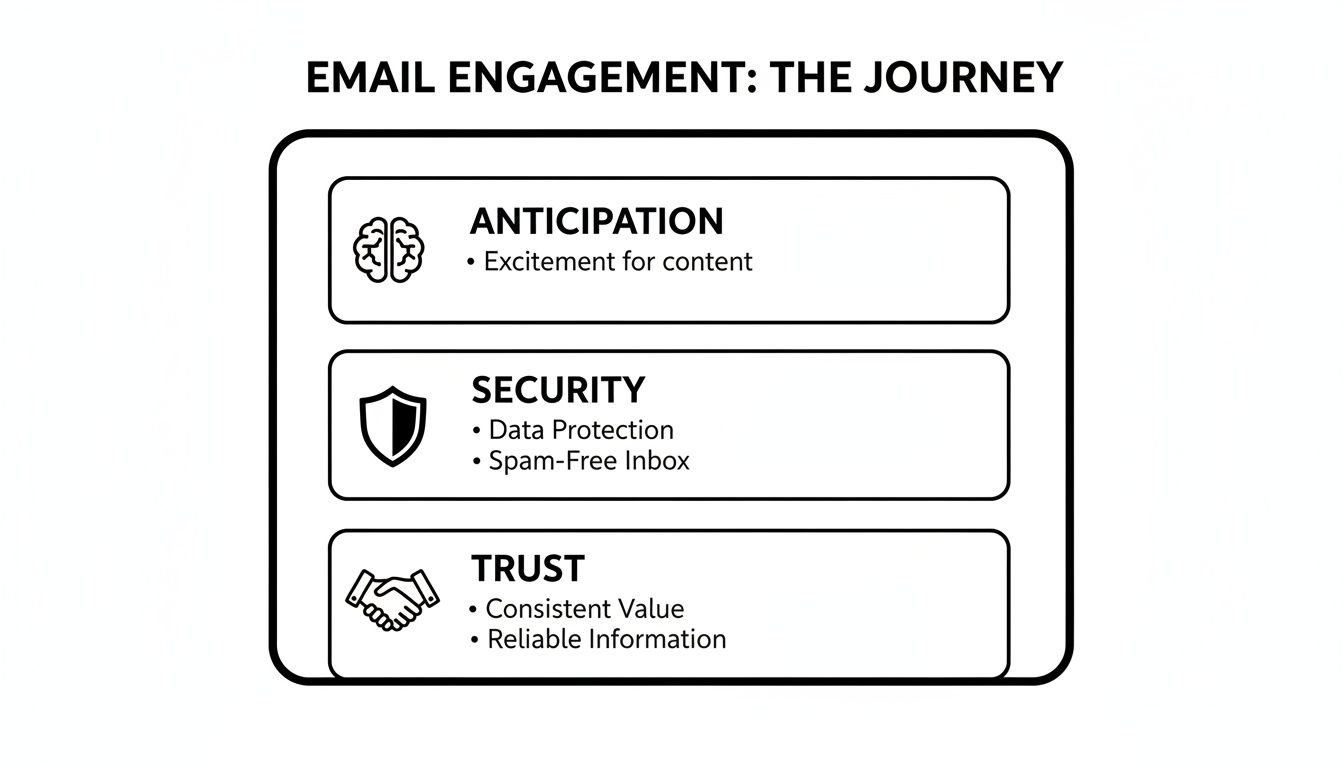
As you can see, these messages tap directly into a user's anticipation, provide a welcome sense of security, and ultimately forge a stronger sense of trust with your brand.
Transactional vs Marketing Emails At a Glance
Because they serve such different functions, email providers and even legal regulations handle them very differently. Getting this right is absolutely critical for making sure your most important messages always land in the inbox.
Here’s a simple table to break down the key differences at a glance.
| Characteristic | Transactional Emails | Marketing Emails |
|---|---|---|
| Primary Goal | To inform or confirm a specific action for one person. | To promote a product, service, or brand to many people. |
| Trigger | A direct user action (like a purchase or password reset). | A marketing schedule or a planned campaign. |
| Audience | One-to-one and highly personal. | One-to-many, sent to a list or segment. |
| Legal Rules | Governed by service agreements and often exempt from marketing laws. | Must comply with regulations like CAN-SPAM and GDPR, requiring an opt-out. |
The numbers don't lie, either. While typical marketing email open rates hover between 25.1% and 43.46%, transactional emails generate 8x more opens and clicks than any other type of email.
It's not just about opens. Their value is immense. Nailing this distinction is the first, most important step toward building an email strategy that both works for your business and respects your customers.
The Most Common Types of Transactional Emails
Now that we have a clear line drawn between transactional and marketing emails, let's get into the specifics. We're talking about the real workhorses of customer communication—the automated messages your customers actually expect to receive.
These aren't just emails; they're critical touchpoints that guide a user's journey with your business. Each one has a distinct job, whether it's confirming a new order or keeping an account secure. Nailing these is fundamental to building a communication strategy that feels genuinely helpful and reliable.
Order Confirmations and Shipping Updates
If you run an e-commerce store, these are your bread and butter. The order confirmation is the very first thing a customer looks for after hitting "buy." It's instant reassurance, validating their purchase and kicking off the entire post-sale experience on the right foot.
Right on its heels come the shipping updates. These emails are brilliant because they keep the customer in the loop and dial down the "I wonder where my package is" anxiety. You're turning a passive waiting game into a transparent, interactive process, which dramatically reduces the number of "Where is my order?" support tickets.
A solid order confirmation email isn't complicated. It just needs to include:
- A clear order number for quick reference.
- An itemized list of the products purchased, preferably with images.
- The total cost breakdown, including taxes and shipping fees.
- The shipping address so the customer can double-check it.
Account Management and Security Alerts
This bucket holds all the essential emails that keep a user's account safe and functional. Think of them as the digital gatekeepers of your platform or service.
The classic example is the password reset email. When someone is locked out, this message is their lifeline. It has to arrive instantly, period. Similarly, welcome emails, sent the moment a user signs up, confirm that their account was created successfully and can offer a gentle nudge on what to do next.
Security alerts, like a notification about a login from a new device, are another crucial type of transactional email. They aren't just a nice-to-have; they're a powerful trust signal that shows you're actively protecting your users' accounts and data.
Important Notifications and Legal Updates
Beyond the usual account and order emails, you’ll also need to send other critical, non-promotional information. These messages are often required to maintain a transparent and legally sound relationship with your customers.
This group covers a few key areas:
- Receipts and Invoices: These are official financial records. They confirm payment and provide a detailed breakdown for a customer's personal records or company expense reports.
- Legal or Policy Updates: When you update your Terms of Service or Privacy Policy, you have an obligation to let users know. A transactional email is the perfect, no-fuss way to do it.
- Support Ticket Confirmations: After a user reaches out for help, an automated email confirming you've received their ticket is a simple way to manage expectations and assure them that help is on the way.
Every single one of these messages reinforces your brand's credibility. By delivering clear, straightforward information right when it’s needed most, you turn standard notifications into powerful opportunities to build real, lasting customer loyalty.
7 Best Practices for High-Impact Transactional Emails

It’s easy to think of transactional emails as just another automated message, but they're so much more than that. These are emails your customers are actively waiting for—and that anticipation is a golden opportunity to make a great impression and reinforce their trust in your brand.
With a few thoughtful touches, you can turn a basic receipt or shipping alert into a genuinely helpful and memorable interaction. The numbers back this up, too. Transactional emails see 8x higher open rates and pull in 6x more revenue than typical marketing blasts. This isn't just a niche tool; the market is projected to grow from $1.39 billion to over $3.8 billion, showing just how critical these emails have become. You can dig into the data in this detailed report on the Transactional Email Software Market from 360researchreports.com.
1. Nail the Subject Line
When it comes to transactional emails, clarity trumps cleverness every time. Your customer is looking for specific information, so your subject line needs to deliver it instantly. Forget the marketing fluff; get straight to the point.
A rock-solid transactional subject line is:
- Instantly Recognizable: Start with your brand name so they know who it’s from. For example, "Your Sugar Pixels Order Confirmation [#12345]."
- Highly Specific: Including an order number or ticket ID is a game-changer. It helps people find what they need in a crowded inbox.
- Action-Oriented (When Needed): If you need them to do something, tell them directly. "Reset Your Password" or "Please Confirm Your Email Address" leaves no room for confusion.
For more ideas on crafting the perfect first impression, check out our guide on email subject line best practices.
2. Maintain Brand Consistency
Your transactional emails shouldn't feel like they came from a different company. When a customer receives an email that looks and sounds completely different from your website, it's jarring and can even feel a bit suspicious.
Every single email, whether it's a welcome message or a shipping update, should use your brand's familiar colors, fonts, and logo. This isn't just about looking good; it's about building trust and recognition through a cohesive experience.
This goes for your tone of voice, too. If your website is fun and conversational, don't send an order confirmation that reads like a legal document. Keeping that voice consistent makes your brand feel authentic and solidifies your relationship with the customer.
3. Prioritize Mobile Optimization
Let's face it: most of your customers are opening emails on their phones. They might be checking a shipping status while waiting in line for coffee or confirming a password reset on the bus. If your email is a jumbled mess on a small screen, you've created a frustrating experience.
Your email templates must be responsive, meaning they automatically adjust to look great on any device, from a giant monitor to a tiny smartphone. That means big, tappable buttons and text that’s easy to read without pinching and zooming. Designing for mobile first ensures a smooth, professional experience for everyone. In fact, how you start an email on mobile can make or break engagement, and the same principle applies here.
How to Automate Your Transactional Emails
Putting your transactional emails on autopilot is one of the smartest moves you can make to scale your business. After all, you can't be at your keyboard 24/7 to manually send every single password reset or shipping update. Automation is the only way to handle it.
The first thing to understand is that your standard email account, like Gmail or Outlook, just isn't cut out for this job. It's fine for one-on-one conversations, but it lacks the power and reliability needed for high-volume, critical messages. This is where specialized email services step in.
Choose the Right Automation Platform
Think of a dedicated transactional email service as a special-delivery courier for your most important messages. Platforms like SendGrid, Postmark, or Amazon SES are built from the ground up to do one thing exceptionally well: get your emails into the inbox, instantly.
They manage all the technical heavy lifting—like maintaining high sender reputations and optimized servers—so you don't have to. These services are the engine that drives your communication, giving you the power to send thousands of emails without a hiccup. To get a better sense of how these systems work, it’s worth exploring what email marketing automation is all about.
Integrate and Set Up Your Triggers
Once you’ve picked a service, the next step is to connect it to your website, app, or online store. This is usually done with an API (Application Programming Interface), which is basically a messenger that lets your website talk to the email platform. We dive deeper into this in our guide on email automation for small business.
Now for the magic part: setting up triggers.
A trigger is simply the specific user action that kicks off an automated email. Think of it as a cause-and-effect relationship. A customer completes a purchase, and boom—an order confirmation email is automatically sent.
You define these triggers inside your e-commerce platform or website's backend. Some of the most common ones include:
- A user creates a new account (triggers a welcome email).
- A customer clicks the "Forgot Password" link (triggers a password reset email).
- An order’s status is updated to "shipped" (triggers a shipping notification).
With your triggers in place, you’ll then design branded HTML templates for each type of email. This ensures that every automated message looks professional and feels like a natural part of your brand, turning a technical necessity into a fantastic customer experience.
Common Questions About Transactional Emails
Even with a solid plan in place, a few practical questions always seem to pop up when you start setting up transactional emails. Let's walk through some of the most frequent sticking points so you can handle the details like a pro.
Can I Put Promotional Content in Transactional Emails?
Technically, yes—but you have to be very careful. The main reason for the email has to be transactional to stay on the right side of laws like CAN-SPAM. The moment it starts feeling more like a sales pitch, you've crossed into marketing territory and need to follow all the rules that come with it, like providing a clear unsubscribe link.
A good rule of thumb is to keep any promotional content small and highly relevant. Think about adding a "You might also like…" section with a few related products at the bottom of an order confirmation. The star of the show, however, must always be the transaction itself.
What Is the Difference Between an SMTP Relay and an API?
This is a great question that often trips people up. Let's break it down.
Think of an SMTP relay as your trusty digital mail carrier. Its job is simple: you hand it a fully formed email, and it makes sure it gets delivered. That's it. It’s a straightforward sending mechanism.
A transactional email API, on the other hand, is like a full-blown mission control center for your emails. It's a powerful toolkit that lets your application do so much more than just hit "send." With an API, you can manage templates, get real-time updates on what's happening (Was it delivered? Opened? Clicked?), and dive into rich analytics to see what's working.
In short, an SMTP relay is for sending, while an API is for sending and managing. An API gives you far more control and the data you need to truly refine your email strategy.
At Sugar Pixels, we don't just build websites; we build e-commerce engines with seamless email automation baked in from the start. Learn how our web design and marketing services can elevate your customer communications.