
Making your website accessible isn't just a box-ticking exercise; it's a fundamental part of providing equal access in the modern world. The core idea behind ADA compliance 508 is to ensure that digital spaces, like your website or app, are just as welcoming to people with disabilities as your physical storefront.
Think of it this way: your website is your digital front door. It needs a virtual wheelchair ramp so that everyone, regardless of ability, can get inside and interact with your business.
Understanding Your Digital Accessibility Obligations

Diving into digital compliance can feel overwhelming at first. The conversation usually revolves around two key pieces of American legislation: the Americans with Disabilities Act (ADA) and Section 508 of the Rehabilitation Act.
While they're often mentioned together, they actually apply to different organizations and have different legal foundations. Getting a handle on these differences is the first real step toward building a more inclusive digital presence and protecting your business.
ADA Title III For Public Businesses
The Americans with Disabilities Act (ADA) is a landmark civil rights law from 1990 designed to prohibit discrimination based on disability. It was written long before the internet was a part of our daily lives, but U.S. courts have consistently interpreted its rules to cover websites and other digital assets.
The key part for businesses is ADA Title III, which requires all "places of public accommodation" to be accessible. Over time, this has been legally extended to include the digital realm. This means your website is likely covered if it's for a:
- Retail or e-commerce store
- Bank or financial institution
- Healthcare provider
- Restaurant or booking service
- Any mobile app offering goods or services to the public
Put simply, if your business is open to the public, your website and apps must be accessible.
Section 508 For Federal Entities
Section 508 is much more direct and narrow in its focus. It mandates that all U.S. Federal agencies must make their electronic and information technology accessible to people with disabilities.
This requirement doesn't stop with government-run sites. It also applies to any private contractors, vendors, or institutions that receive federal funding or do business with a federal agency. So, if your company has a government contract, you're on the hook for Section 508 compliance.
ADA Title III vs Section 508 At a Glance
Here’s a quick table to help clarify the main differences between these two crucial laws.
| Aspect | ADA Title III | Section 508 |
|---|---|---|
| Who It Applies To | Privately-owned "places of public accommodation" (most businesses) | Federal government agencies and their contractors |
| Legal Basis | Broad civil rights law | Amendment to the Rehabilitation Act of 1973 |
| Primary Goal | Prevent discrimination by private entities open to the public | Ensure equal access to federal information and technology |
| Enforcement | Civil lawsuits brought by individuals or the Department of Justice | Formal complaints filed with the responsible federal agency |
While they come from different legal places, both the ADA and Section 508 share the exact same end goal: creating a digital world that's open to everyone.
Ignoring these responsibilities means you're not only shutting the door on a huge segment of the population—over 61 million adults in the U.S. live with a disability—but you're also opening yourself up to serious legal trouble. As articles exploring Why ADA compliance matters for NYC websites often point out, accessibility lawsuits have skyrocketed. Being proactive isn't just good ethics; it's a smart business decision that creates a better, more welcoming experience for every last visitor.
Decoding ADA vs. Section 508 Requirements
When you hear people talk about digital accessibility, two terms always come up: ADA and Section 508. They both aim for the same goal—making digital content usable for everyone—but they get there in very different ways. It’s crucial to know which one applies to you, as they cover different organizations and have different consequences.
Think of it this way: The ADA is a broad civil rights law that casts a wide net over most of the country, while Section 508 is a very specific rulebook for organizations that work with the federal government.
The Americans with Disabilities Act (ADA) is a landmark civil rights law designed to stop discrimination against people with disabilities. While the law was written long before the internet became what it is today, courts have consistently ruled that its protections extend to the digital world. Websites, mobile apps, and other digital platforms are now considered "places of public accommodation," just like a physical storefront.
This means if you're a private business—whether a local coffee shop with a website or a massive e-commerce store—you fall under the ADA. The real teeth of the ADA come from civil lawsuits. When a person with a disability can't use your website, they can sue, and they frequently do.
The Scope of Section 508
Section 508 of the Rehabilitation Act is much more targeted. It’s not for everyone; it applies specifically to federal agencies and anyone who does business with them.
You need to pay close attention to Section 508 if you are:
- A federal government agency or department.
- A private contractor selling products or services to the federal government.
- A university or school that receives federal funding.
- A healthcare provider that accepts Medicare or Medicaid.
If your organization falls into one of these buckets, you’re on the hook to meet the specific technical standards laid out in Section 508. The pressure here isn't a lawsuit from a customer, but the risk of losing a government contract or federal funding.
The core difference is straightforward: the ADA applies broadly to almost all public-facing businesses through the threat of lawsuits, whereas Section 508 applies specifically to federal entities and their partners through contractual and funding obligations.
This difference has huge real-world consequences. A small online clothing boutique, for instance, is primarily worried about a customer filing an ADA lawsuit. In contrast, a software company hoping to sell its platform to the Department of Defense has to prove it meets the strict technical rules of Section 508 just to get in the door.
Enforcement and Legal Standards
The way these two laws are enforced couldn't be more different. An ADA complaint usually starts with a demand letter from a lawyer, which can quickly escalate into a full-blown lawsuit seeking financial damages and a court order to fix the website. It's a reactive, litigation-heavy environment that poses a serious financial risk to businesses.
Section 508 enforcement, on the other hand, is much more structured. Federal agencies have internal complaint processes, and failing to comply can mean losing out on a lucrative contract or facing other penalties. The technical bar is also set much higher.
In 2018, Section 508 was updated to officially require adherence to the Web Content Accessibility Guidelines (WCAG) 2.0 Level AA. This isn't just a suggestion; it comes with strict reporting duties. Federal agencies must complete a Section 508 annual assessment, a daunting task that often gets complicated by internal silos and messy data. This trickles down to vendors, too. If you’re a SaaS company trying to land a federal contract, having a Voluntary Product Accessibility Template (VPAT) is now standard practice. You can learn more about these requirements and the government's accessibility goals by exploring how to understand the annual assessment process.
What This Means For Your Business
So, where should you focus your energy? For the vast majority of private businesses, the ADA is the immediate threat because of the sheer volume of lawsuits. But here’s the interesting part: nearly every ADA lawsuit settlement and Department of Justice action points to one technical standard as the solution—WCAG.
That’s the same standard required by Section 508.
This creates a clear path forward. By aiming for WCAG 2.1 Level AA conformance, you’re effectively killing two birds with one stone. You build a strong defense against potential ADA litigation while also meeting the technical requirements of federal contracts. To get a clear picture of where you stand, a professional ADA review is an invaluable starting point. It pinpoints exactly where your website falls short and gives you a concrete plan to fix it.
Ultimately, whether you’re motivated by the ADA or Section 508, the destination is the same: creating a digital experience that works for everyone.
The Rising Tide of Digital Accessibility Lawsuits

It’s one thing to understand the legal theories behind the ADA and Section 508. It's something else entirely to see their real-world impact. Digital accessibility lawsuits aren't some far-off, abstract threat anymore. They have become a serious and immediate risk for businesses of all sizes, from the local corner shop to massive multinational corporations.
Let's be clear: ignoring your ADA compliance 508 obligations just isn’t a viable strategy today. The ground has shifted. Plaintiff law firms are now actively hunting for non-compliant websites, creating an environment where the only real defense is a proactive one.
Why Are Lawsuits Skyrocketing?
A few key factors are driving this surge in litigation. First, there's a growing awareness of digital rights among disability advocates and the public. People with disabilities rightfully expect—and are demanding—the same access to online services that everyone else has.
Second, the absence of clear-cut federal rules defining what makes a website officially "ADA compliant" has created a legal gray area. This ambiguity, combined with court rulings that consistently favor plaintiffs, has made digital accessibility fertile ground for lawsuits. Law firms have gotten very efficient at finding violations and filing claims, often at a massive scale.
The numbers don't lie. In 2024, ADA Title III lawsuits hit a staggering 8,800 filings, a 7% increase from the year before. This jump reversed a temporary dip, proving the trend is picking up speed again. California led the way with 3,252 cases, a 37% spike from 2023, while New York was hot on its heels with 2,220. You can explore the full 2024 lawsuit data to see just how these legal challenges are evolving.
A Real-World Scenario: The Demand Letter Arrives
Let's paint a picture of how this can blindside a business. Imagine a small e-commerce company called "Artisan Goods." They have a small, passionate team selling handmade products online.
One morning, the owner gets a certified letter from a law firm she's never heard of. The letter claims their website violates the ADA. A blind customer, using a screen reader, couldn't complete a purchase because the product images lacked descriptive alt text and the "Buy Now" button wasn't properly labeled for their assistive device.
The demand? $10,000 in damages and legal fees, plus a legally binding agreement to make the entire site WCAG 2.1 AA compliant within 90 days. Just like that, Artisan Goods is in a crisis that threatens its finances and reputation.
A single oversight—like an unlabeled button or an image without alt text—can be enough to trigger a costly legal demand. For a small business, the financial and operational strain can be overwhelming.
This isn't a made-up story; it happens to businesses every single day. And the costs go far beyond the initial settlement amount. They often include:
- Legal Fees: You'll need to hire a defense attorney to negotiate or fight the claim.
- Remediation Costs: Paying developers and accessibility experts to fix the site, often under a very tight deadline.
- Reputational Damage: The negative attention from a lawsuit can seriously erode the trust you've built with your customers.
- Operational Disruption: All the time and energy spent dealing with the lawsuit is time and energy pulled away from actually running your business.
The takeaway here is undeniable. The risk of an accessibility lawsuit is real, it’s growing, and it doesn't care how big or small your business is. Waiting for a demand letter to show up is a gamble you can't afford to take. The only smart move is to address ADA compliance 508 head-on, turning a potential liability into a strength that serves every single one of your customers.
Understanding WCAG: The Universal Standard for Accessibility
So, you've gotten your head around the legal side of things with the ADA and Section 508. The big question now is, "What do I actually have to do to make my site compliant?" The answer is the Web Content Accessibility Guidelines (WCAG).
Think of it this way: The ADA and Section 508 are the laws telling you that your building needs to be accessible to everyone. WCAG is the detailed blueprint showing you exactly how to build the ramps, install the automatic doors, and add braille to the signs. It's the practical, globally recognized set of technical standards that turns legal requirements into an actionable checklist.
But following WCAG is about so much more than just checking boxes to avoid a lawsuit. It's about designing a fundamentally better, more welcoming experience for every single person who visits your site. We dive deeper into this mindset in our guide on what website accessibility truly means.
The Four Pillars of WCAG: POUR
To make these technical guidelines easier to digest, WCAG is built on four core principles. They're easy to remember with the acronym POUR: Perceivable, Operable, Understandable, and Robust. For any digital content to be considered accessible, it has to meet these four criteria.
Perceivable: Can users see and hear your content? Information can't be invisible to all their senses. This is why we add alt text to images—so a screen reader can describe the visual content to someone who can't see it.
Operable: Can users actually interact with your site? Your interface can't demand an action that someone isn't able to perform. A perfect example is ensuring your entire website works with just a keyboard, because not everyone can use a mouse.
Understandable: Does your website make sense? Users need to comprehend both the information and how to navigate the site. This means using clear, simple language and creating navigation that is consistent and predictable from page to page.
Robust: Will your site work with today's and tomorrow's technology? Your code needs to be clean and follow established standards so that assistive tools, like screen readers, can interpret it correctly now and in the future.
Breaking Down The Conformance Levels: A, AA, and AAA
WCAG doesn't just give you principles; it provides a tiered system of success criteria called conformance levels. These three levels—A, AA, and AAA—signal different degrees of accessibility.
Let’s stick with the house-building analogy.
- Level A is the bare minimum. You've got a foundation and walls, but that's about it. This level tackles the most critical, high-impact accessibility issues, but it's just the starting point.
- Level AA is a fully livable, functional home. It has working plumbing, electricity, and all the features most people need. This is the accepted legal standard because it addresses the vast majority of user needs without being excessively difficult to implement.
- Level AAA is the luxury custom build. You're adding specialized features like an elevator or a state-of-the-art smart home system. While incredible, achieving this level across an entire website is often impractical and not typically required.
For virtually every business, Level AA is the goal. It has become the gold standard in legal settlements, Department of Justice (DOJ) guidance, and international law. Hitting Level AA conformance is the most reliable way to meet your ADA compliance 508 responsibilities.
Why WCAG AA Is The De Facto Legal Standard
The push to meet these standards is only getting stronger. By 2025, WCAG 2.1 Level AA has been cemented as the definitive benchmark in ADA cases, Section 508 regulations, and even global rules like the EU's EN 301 549. Yet, an alarming 96% of websites still fail to meet this standard.
With federal deadlines on the horizon for 2026 and 2027, and ADA lawsuits already topping 4,000 filings in 2024, the risk of doing nothing is growing every day. You can discover more insights about these accessibility trends and legal standards to grasp just how urgent this has become.
Ultimately, adopting WCAG isn't just a technical task for your developers. It’s a smart business decision that protects you legally, expands your market to a much wider audience, and builds a more inclusive and respected brand for the long haul. It's the roadmap that makes accessibility real.
Your Prioritized Website Accessibility Checklist
Trying to make your website accessible can feel like trying to boil the ocean. It’s a huge task. But instead of getting overwhelmed by trying to fix everything at once, the smart approach is to prioritize.
This checklist breaks the process down into manageable stages, focusing on high-impact fixes first. Think of it as digital triage—we’ll tackle the most critical barriers immediately, then move on to the more detailed, structural improvements to build a solid foundation for long-term ADA compliance 508.
Stage 1: Immediate High-Impact Fixes
These are the accessibility equivalent of clearing a blocked doorway. They solve some of the most common and frustrating problems that users with disabilities run into every single day. You can get started on these right away and make a noticeable difference in your site's usability.
- Add Descriptive Alt Text to All Meaningful Images: Alternative text, or "alt text," is simply a short description of an image that screen readers announce to users who can't see them. If an image conveys information, it needs clear, concise alt text. For images that are purely decorative, use an empty alt attribute (
alt="") so screen readers know to skip right over them. - Ensure Full Keyboard Navigability: Can you use your entire website without touching a mouse? Many people with motor disabilities rely completely on a keyboard. Try it yourself. Use the
Tabkey to move through every interactive element—links, buttons, form fields—and make sure you can actually use them with theEnterkey or spacebar.
A website that isn't navigable by keyboard is like a store with steps but no ramp. It immediately excludes a significant portion of your audience before they can even see what you have to offer.
Stage 2: Structural and Design Improvements
Once you’ve handled the quick wins, it’s time to dig into your site's underlying structure and design. These elements are the backbone of an accessible experience, making your content logical, easy to read, and understandable for everyone.
- Establish a Logical Heading Hierarchy: Headings (H1, H2, H3, etc.) are more than just big text; they create a content outline. Screen reader users often jump between headings to scan a page and find what they need. A page should have only one H1, and the rest should follow a logical order without skipping levels (e.g., don't go from an H2 straight to an H4).
- Check for Sufficient Color Contrast: Text has to stand out from its background. WCAG 2.1 AA guidelines require a contrast ratio of at least 4.5:1 for normal text and 3:1 for large text. This is a game-changer for users with low vision or color blindness.
- Use Clear and Descriptive Link Text: Generic links like "Click Here" or "Learn More" are a dead end for accessibility. Instead, the link text itself should describe where it’s going. Think "Read our guide on website accessibility" or "Download the full Q4 report."
This flow diagram shows the four core principles of WCAG, which really guide every decision we make in accessibility, from these immediate fixes all the way to deep structural changes.
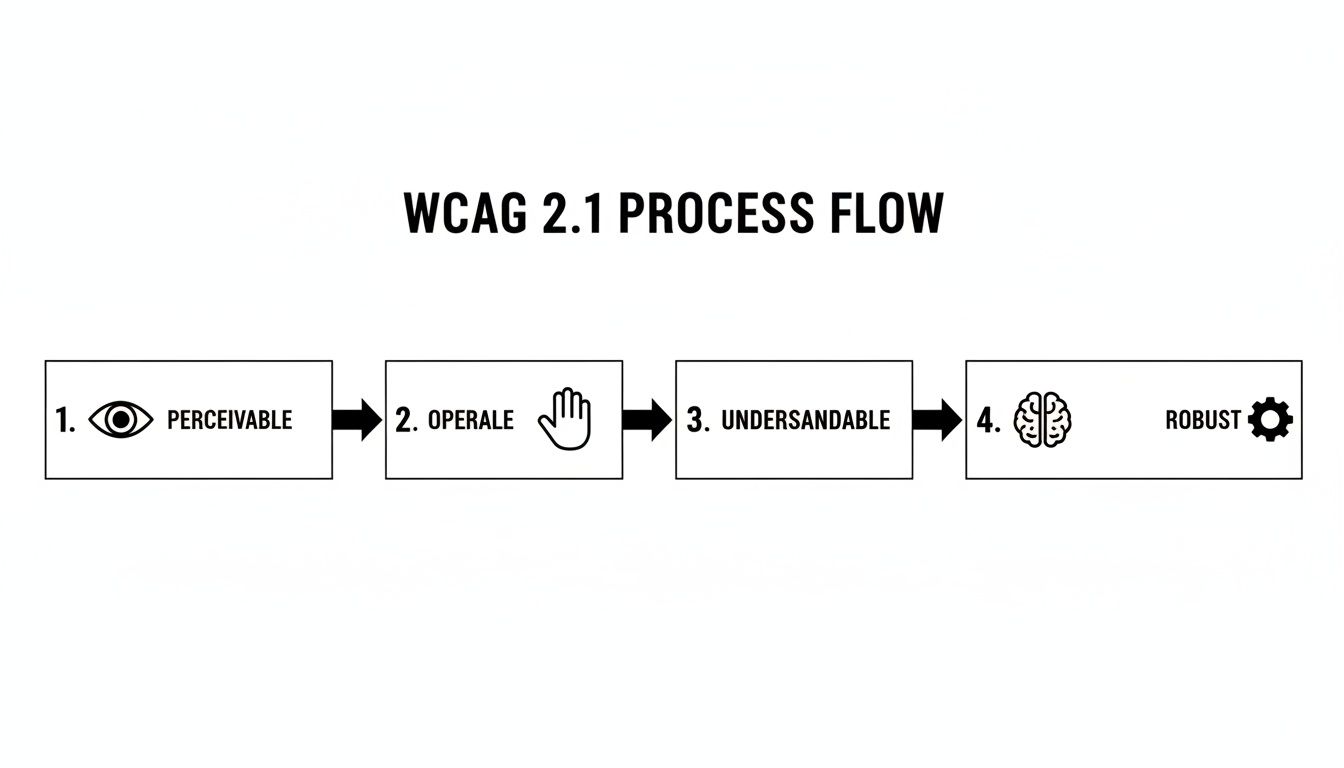
Each of these principles—making sure content is perceivable, operable, understandable, and robust enough for all technologies—builds on the last to create an experience that truly works for everyone.
Stage 3: Testing, Validation, and Remediation
With the foundational elements in place, the final stage is all about testing your work, finding what you missed, and making a plan to fix it. A mix of automated tools and real human testing will give you the most accurate picture of where your site stands.
Automated Testing Tools
Browser extensions and online scanners are great for a first pass. They can quickly flag common issues like missing alt text, low contrast, and heading errors. But they have a big blind spot—they can only catch about 30-40% of potential accessibility problems.
Manual Testing with Assistive Technology
This is where the real work happens. You have to experience your site the way your users do. That means manually testing with a screen reader (like NVDA, JAWS, or VoiceOver) and navigating with only a keyboard. This uncovers the real-world barriers that automated tools always miss, ensuring your site isn't just technically compliant but genuinely usable.
Create a Remediation Plan
Your testing will give you a to-do list. Organize it by severity and how much it impacts the user. For instance, a broken checkout button is way more critical than a minor contrast issue on a footer link. Document every issue for your development team with clear, actionable instructions on how to fix it.
A thorough testing process turns guesswork into a solid plan. To keep your efforts organized, it really helps to follow a structured process, which we detail in our comprehensive website audit checklist. This framework helps transform a daunting list of tasks into a clear, actionable roadmap for achieving and maintaining ADA compliance.
How to Maintain Ongoing Compliance
Getting your website accessible isn't a one-and-done project. It's more like a commitment you live out every day. Your website is constantly evolving—new blog posts, updated product pages, fresh features. Because of this, your approach to ADA and Section 508 compliance has to be just as dynamic, making accessibility a core part of how you operate.
Think of it like keeping a garden. You don't just plant the seeds and hope for the best. It needs consistent watering, weeding, and care to flourish. In the same way, an accessible website requires ongoing attention to make sure it stays open and usable for everyone.
Create a Public Accessibility Statement
One of the best first moves you can make is to publish an Accessibility Statement. This is simply a page on your site that outlines your commitment to inclusivity. It’s a powerful signal of transparency and shows your visitors that you're taking their experience seriously.
Your statement should cover a few key things:
- A clear declaration of your commitment to accessibility.
- The specific standard you're aiming for (like WCAG 2.1 Level AA).
- An easy way for people to give feedback or report any problems they run into.
This feedback channel is pure gold. It turns your users into allies, helping you spot and fix real-world issues you might have otherwise overlooked.
Vet Your Third-Party Tools
Chances are, your website doesn't exist in a vacuum. You're probably using third-party plugins for your e-commerce cart, a video player from another company, or analytics scripts. Each one of these add-ons can poke new holes in your accessibility efforts. You have to hold your vendors to the same high standards you set for yourself.
Before you install a new tool, ask the provider for their Voluntary Product Accessibility Template (VPAT). A VPAT is basically a report card that explains how well a product meets Section 508 standards. If a vendor can't give you one, that's a serious red flag.
Remember, you're on the hook for everything on your website, even the parts you don't directly control. A poorly-vetted third-party tool can undo all your hard work in an instant.
Build a Culture of Accessibility
At the end of the day, lasting success comes from making accessibility everyone's job. This means getting your team trained up and scheduling regular check-ups to make sure things don't slide.
- Conduct Regular Audits: Plan for periodic accessibility audits. Aim for at least once a year, and always after a major redesign. A mix of automated tools and hands-on manual testing will help you catch new problems before they grow.
- Train Your Team: Give your content creators, developers, and designers the skills they need to succeed. Basic training on how to write good alt text, use headings correctly, and pick accessible color combinations can stop a huge number of issues from ever making it to the live site.
Maintaining compliance is all about being proactive and weaving accessibility into your workflow from start to finish. For a more structured plan, you can check out our detailed website maintenance checklist, which gives you a great framework for keeping your site in top shape.
Common Questions About Web Accessibility
Diving into the world of digital accessibility can feel a little overwhelming at first. Let's break down some of the most common questions and concerns that pop up when businesses start thinking about ADA and Section 508 compliance.
What's the Very First Thing I Should Do?
The best way to kick things off is with a professional accessibility audit. Before you can start fixing problems, you need a crystal-clear map of where those problems are. A thorough audit gives you that roadmap, pointing out every WCAG violation and helping you prioritize what needs to be fixed first.
Can I Just Use an Automated Accessibility Tool?
Honestly, no. Automated tools and plugins, sometimes called "overlays," catch only about 30-40% of potential accessibility issues. They're great for finding low-hanging fruit, but they completely miss the more subtle, experience-based problems that only a human tester can identify.
Think about it this way: recent data reveals that 25% of digital accessibility lawsuits were filed against websites that were already using an overlay tool. In many cases, the tool itself was cited as creating new barriers. Relying only on automation can give you a false sense of security and actually increase your legal risk.
My Business Is Small. Can I Still Get Sued?
Yes, absolutely. The Americans with Disabilities Act (ADA) doesn't care how big or small your business is; its protections apply universally. Law firms specializing in accessibility cases go after companies of all sizes, from local mom-and-pop shops to major corporations.
The only real defense is being proactive. Making a genuine effort to meet the WCAG 2.1 AA standards is your single best protection against legal trouble.
Ready to build a website that's both beautiful and accessible to everyone? The experts at Sugar Pixels design and develop custom websites that meet compliance standards from the ground up. Visit us online to learn more about our web design services.