

Think of building a secure website like building a house. You wouldn't just throw up some walls and call it a day; you need a solid foundation, strong locks, and a reliable alarm system. The same multi-layered thinking applies to your digital presence. It's about combining secure hosting, strong encryption (like SSL/TLS), and clean, defensive code, all while keeping everything up-to-date.
Why Website Security Is Your Business’s Strongest Asset
In our hyper-connected world, your website isn't just a digital storefront—it's the central hub of your business and the primary place you connect with customers. A security breach isn't a minor technical hiccup; it's a direct blow to your bottom line, your reputation, and the trust you've worked so hard to build. Building a secure website isn't just an IT task anymore; it's a core business strategy.
The numbers don't lie. In 2025, a shocking 46% of small businesses were hit by cyberattacks, with new incidents happening every 11 seconds. These aren't just minor annoyances, either. The average global cost of a data breach climbed to $4.44 million, and in the U.S., that figure skyrocketed to $10.22 million thanks to hefty regulatory fines. The good news? Simply implementing proper HTTPS encryption helped businesses cut breach costs by up to 9% by enabling a faster, more effective response.
A solid grasp of how to secure web applications is the first step, covering every layer of your defense from the server to the user's browser.
Building a truly resilient website means focusing on prevention, detection, and response. You want to stop attacks before they ever get started, have systems in place to spot them quickly if they do, and maintain a clear playbook for how to recover when things go wrong.
"Website security isn't a 'set it and forget it' task. It's a continuous process of vigilance. The most secure sites are the ones that are actively managed, monitored, and updated to stay one step ahead of the bad guys."
This guide breaks down these principles into clear, actionable steps, giving you a roadmap to follow. It all starts with understanding the three foundational elements of security.
To put it all together, think of website security as resting on a few core pillars. Each one supports the others to create a strong, comprehensive defense for your digital assets.
Core Pillars of Website Security
A summary of the fundamental components required to build and maintain a secure website.
| Pillar | Objective | Key Actions |
|---|---|---|
| Confidentiality | Protect sensitive data from unauthorized access. | Implement strong encryption (SSL/TLS), manage access controls, secure data at rest. |
| Integrity | Ensure data is accurate and trustworthy. | Use checksums, prevent unauthorized data modification, maintain secure code repositories. |
| Availability | Keep the website online and accessible to users. | Use a Content Delivery Network (CDN), implement DDoS protection, maintain regular backups. |
By mastering these three concepts, you can transform your website from a potential weak point into a secure, trustworthy asset that supports your business goals and protects your customers from their very first click.
Choosing Your Hosting and Infrastructure Wisely
Your website's security starts long before you ever write a single line of code. It really begins with where you decide to host it. Think of your web host as the landlord for your online property. A great one keeps the building secure and well-maintained; a bad one leaves the doors wide open. Getting this choice right is absolutely fundamental.
The kind of hosting you pick sets the entire tone for your security. For a lot of startups and small businesses, shared hosting is the go-to because it's cheap. But that low price comes with a big risk. You're sharing a server with dozens, sometimes hundreds, of other websites. If just one of them gets hacked, the infection can easily crawl over to your site. It’s a classic "bad neighbor" problem.
A much safer bet is a Virtual Private Server (VPS). You're still on a physical server with others, but your slice of it is walled off in a private, isolated environment. This dramatically cuts down the risk of getting hit by someone else's security lapse and gives you far more control. If you're running an e-commerce store or handling any kind of sensitive customer data, dedicated hosting is the top tier, giving you an entire server all to yourself for maximum security.
To really dig into the pros and cons, it’s worth looking at a good breakdown of how to choose web hosting to find the right balance for your security needs and your wallet.
Must-Have Features from a Secure Host
No matter which type of hosting you go with, there are a few security features that are completely non-negotiable. As you compare providers, make sure these are on your checklist:
- Automated Backups: Your host needs to be taking daily, automatic backups of everything—your files and your database. If the worst happens, you need a clean version of your site that you can restore in minutes, not hours or days.
- Malware Scanning and Removal: Good hosts are proactive. They should have systems in place that are constantly scanning for malicious code to find and kill threats before they can do any real damage.
- DDoS Protection: A Distributed Denial-of-Service attack is a brute-force attempt to knock your site offline by flooding it with traffic. Even basic DDoS mitigation from your host is crucial to keep your site online when you need it most.
This whole process—from seeing the threats to putting the right protections in place—is a journey, not a one-time task.
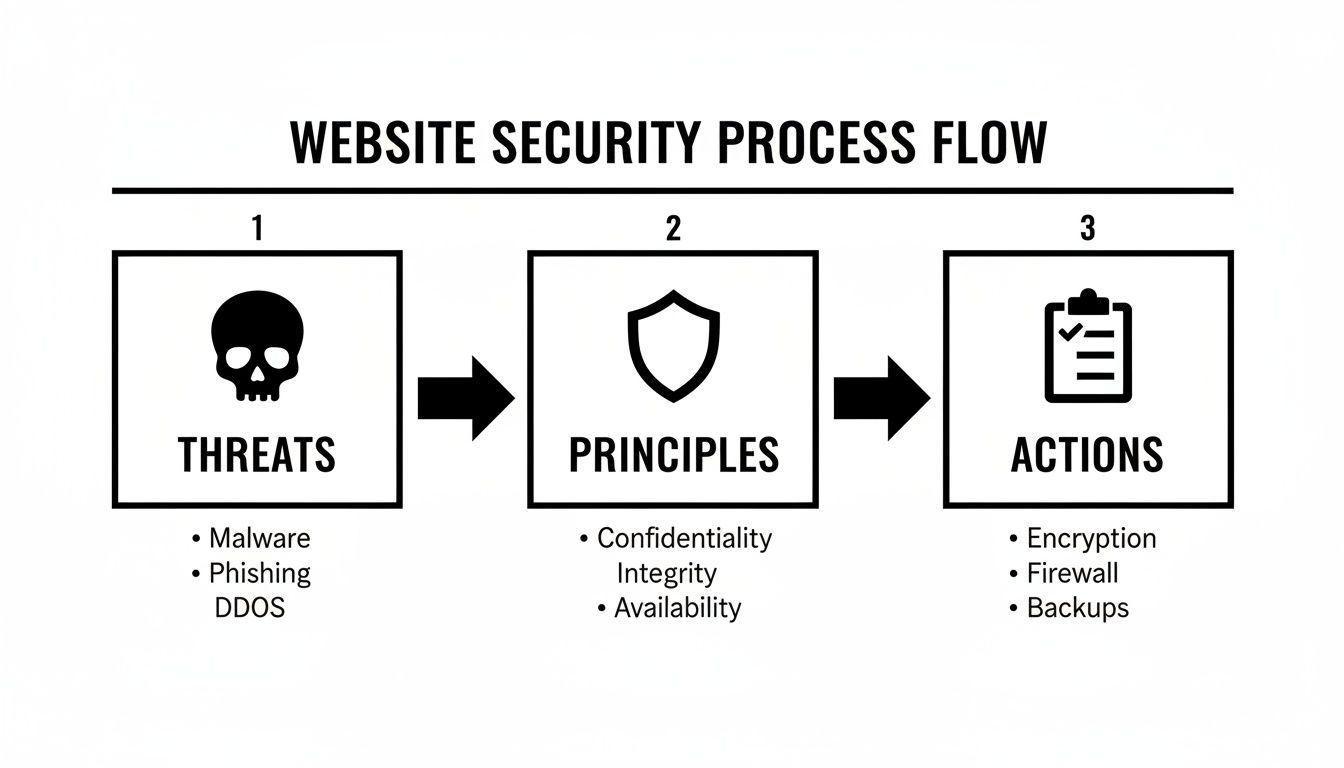
The diagram above drives home that building a secure website is a structured process. It all starts with understanding the threats you face, then applying core security principles, and finally, taking concrete actions to defend your site.
Fortifying Your Foundation with SSL, CDN, and WAF
Once you’ve got a solid host, it's time to add more layers of protection. These tools work together to build a serious defense against a whole host of common attacks.
First up, an SSL/TLS certificate isn't optional anymore; it's essential. This is what enables the secure HTTPS protocol, encrypting all the data that travels between a user's browser and your server. Without it, things like passwords and credit card numbers are sent in plain text, making them incredibly easy for an attacker to snatch. Browsers now actively warn users away from sites that aren't secure, which will kill customer trust and sink your SEO rankings.
Next, get a Content Delivery Network (CDN) in place. Most people know CDNs for making websites faster by caching content on servers around the globe. What they often miss is that CDNs are also a huge security win. They can absorb massive DDoS attacks and shield your main server from direct threats.
For the ultimate layer of defense, a Web Application Firewall (WAF) acts as your website's personal bodyguard. It sits between your site and all incoming traffic, inspecting it for malicious patterns. A WAF actively blocks common attacks like SQL injection and cross-site scripting (XSS) before they even have a chance to reach your server. Many modern security services now bundle a CDN and WAF together, which is a fantastic way to get robust, layered protection without the management headache.
Your hosting environment is your first and most important line of defense. Don’t treat it like a commodity. Treat it as a strategic investment in your business's resilience and your customers' trust.
By starting with a great host and then layering on technologies like SSL, a CDN, and a WAF, you build a powerful foundation designed to stand up to modern cyber threats. Getting this right from the start makes every other security measure you take that much more effective.
Writing Bulletproof Code and Hardening Your CMS
Think of your hosting and infrastructure as the outer walls of a castle. Your website's code and the Content Management System (CMS) it runs on? That's the inner keep. If there are weaknesses here, all your other defenses become practically useless. This is where we shift from building walls to ensuring every door and window has an unbreakable lock.
Securing your site at the code level means you need a defensive mindset from the get-go. Every single form, login page, and user interaction is a potential entry point for an attack. This is exactly why understanding common vulnerabilities, like those in the OWASP Top 10, is so crucial for anyone building for the web.
Adopting Secure Coding Practices
If there's one fatal mistake I see developers make, it's implicitly trusting user input. Whether it's data coming from a search bar, a comment form, or a file upload, you absolutely must assume all of it is malicious until proven otherwise. This single principle is the key to stopping some of the most devastating and common attacks.
Your primary tool here is input validation. It’s non-negotiable. This means you rigorously check every piece of data a user submits to make sure it's in the exact format you expect. For instance, if a field is for a zip code, your code should flat-out reject anything that isn't a valid number in the correct format. A simple check like this can shut down attempts to inject harmful scripts or SQL commands right at the source.
Another critical battleground is authentication and session management. How you handle users logging in and staying logged in can make or break your site's security.
- Enforce Strong Passwords: Don't just suggest strong passwords—require them. A mix of uppercase and lowercase letters, numbers, and symbols is the bare minimum today.
- Implement Multi-Factor Authentication (MFA): Adding that second verification step, like a code sent to a user's phone, makes it exponentially harder for an attacker to get in, even if they have the password.
- Secure Session Cookies: Always ensure your cookies have the
SecureandHttpOnlyflags set. This prevents them from being hijacked over insecure connections or accessed by rogue client-side scripts.
Security isn’t a feature you tack on at the end. It's a foundational part of the entire development process. Thinking about potential threats while you're writing the very first line of code is how you create a website that can actually stand the test of time.
These principles are a core part of building a robust online presence. For a more detailed look, our guide on https://www.sugarpixels.com/web-development-best-practices/ dives deeper into creating clean, efficient, and secure code.
Hardening Your Content Management System
For most businesses, a CMS like WordPress, Shopify, or Joomla is the engine powering their website. While they're incredibly powerful, these platforms are also massive targets for attackers. Hardening your CMS is all about locking down its configuration to minimize the "attack surface," or the number of potential entry points for a hacker.
A great place to start is by being extremely selective with your plugins and themes. Every single one adds new code to your site and, with it, a potential new security risk. Only install extensions from reputable developers who have a long history of consistent updates and positive reviews. Before you click "install," ask yourself: is this functionality truly essential?
Recent trends show social engineering is skyrocketing. With phishing attacks affecting 42% of organizations and 44% of security incidents involving web browsers, protecting users has never been more important. Good coding and strong CMS hardening can block malicious redirects and malware. To that point, implementing MFA has been shown to slash phishing success by over 90% in companies that adopt it.
A Practical CMS Hardening Checklist
Locking down your CMS isn't one big task; it's a series of small, deliberate actions that work together to create a formidable defense. Here’s a checklist to get you on the right track:
- Change Default Settings: The very first thing you should do is change the default admin username from "admin" to something unique and hard to guess.
- Enforce the Principle of Least Privilege: Give users the absolute minimum level of access they need to do their jobs. Not everyone on your team needs to be an administrator.
- Keep Everything Updated: This is the golden rule. Regularly update your CMS core, all your themes, and every single plugin to their latest versions. A key part of this is understanding what patch management is and having a process for it.
- Disable File Editing: Most CMS platforms let you edit theme and plugin files from the dashboard. Turn this feature off. If an attacker gets in, this prevents them from easily modifying your site's code.
By combining bulletproof coding habits with a systematic approach to CMS hardening, you’re building security directly into your website's DNA. It’s a proactive strategy that is far more effective than scrambling to patch holes after an attack has already happened.
Protecting Your Most Valuable Asset: Customer Data
Think of your website's code and infrastructure as the walls and gates of your digital fortress. But what are you protecting? The treasure inside: your customer data. This isn't just a technical footnote; it’s a core business responsibility that directly impacts customer trust and, frankly, your company’s survival.
Let's be clear: in a world where data is a prime target for cybercriminals, responsible data handling is completely non-negotiable. Regulations like GDPR in Europe and CCPA in California have set a global standard, laying out clear rules for how businesses must collect, use, and secure personal information.
These laws aren't just for the big players. They're built on common-sense principles every website owner should live by.
Embrace Data Privacy by Design
The simplest way to protect data is to not have it in the first place. This concept, known as data minimization, is your first line of defense. Only ask for information that is absolutely essential for a specific task.
If someone is just signing up for a newsletter, all you need is their email address. You don't need their phone number, home address, or birthday. Every extra piece of data you store increases your liability and makes you a more attractive target for attackers.
Next up is encryption. While SSL/TLS handles data in transit (moving between the user and your server), you also have to protect it at rest (sitting in your database). End-to-end encryption ensures that even if a hacker breaches your server, the data they find is just a scrambled, unreadable mess without the right decryption keys.
Handle Sensitive Information with Extreme Care
Some data, especially passwords, requires an even higher level of protection. You should never, ever store passwords in plain text. If that database gets compromised, every single user account is instantly exposed.
The industry standard for protecting passwords involves two critical techniques:
- Hashing: This is a one-way street. Hashing turns a password into a unique, fixed-length string of characters. It’s irreversible, meaning you can't turn the hash back into the original password.
- Salting: Before you hash a password, add a unique, random string of characters (the "salt") to it. This step is crucial. It ensures that even if two users have the same password, their stored hashes will look completely different, neutralizing attacks that use pre-computed "rainbow tables."
Combining hashing with salting makes it incredibly difficult for an attacker to crack user accounts, even if they manage to steal your database.
The fallout from a data breach is devastating. By 2024, data theft in extortion schemes had soared to 60% of all ransomware attacks. One major incident exposed the Social Security numbers of 766,000 customers due to insider malware, forcing an urgent overhaul of their security. With the average global breach costing $4.44 million, robust data protection isn't just good practice—it's a financial imperative. You can learn more about these cybersecurity statistics and what they mean for businesses like yours.
Build a Resilient Backup Strategy
Even with the best defenses, things go wrong. A server can fail, a sophisticated attack might succeed, or a simple human error could wipe everything out. This is where a rock-solid backup and disaster recovery plan becomes your ultimate safety net.
A flimsy backup strategy is almost as bad as having no backups at all. The gold standard for data resilience is the 3-2-1 rule—a simple but powerful framework that has saved countless businesses.
Here's how it works:
- Three Copies: Keep at least three copies of your data: the live version plus two backups.
- Two Different Media Types: Store your backups on at least two different kinds of storage, like an external hard drive and a cloud service (e.g., AWS S3, Backblaze).
- One Offsite Copy: At least one of these backup copies must be stored in a completely separate physical location. If a fire or flood hits your office, your offsite backup is safe and sound.
Most reputable hosting providers offer automated backups, but you need to check if they follow this rule. Don't just set it and forget it, either. Regularly test your backups by restoring them to a staging environment. After all, a backup you’ve never tested is just a hope, not a plan.
Maintaining Security with Ongoing Vigilance
Getting your website live is a massive win, but it's not the finish line—it's the starting block for your security work. The digital world doesn't sit still. New threats pop up constantly, and what was locked down yesterday could be vulnerable tomorrow. Real website security is an active, ongoing process, not a "set it and forget it" task.
This mental shift from building to maintaining is what separates a secure site from a sitting duck. It's easy to breathe a sigh of relief after launch, but that’s exactly when attackers are looking for their chance. An unmaintained website is a welcome mat for trouble, especially since outdated software is one of the top ways hackers get in.
The Critical Role of Routine Maintenance
Think of your site’s software—the CMS core, themes, and plugins—like the OS on your phone. You get update notifications all the time, right? Many of those updates patch security holes that someone just discovered. Ignoring them on your phone is risky, and on your website, it's downright dangerous.
A consistent maintenance schedule is your number one defense after launch. Hackers run automated bots 24/7 that do nothing but scan the web for sites with outdated software and known vulnerabilities. It’s a race against the clock, and you really can’t afford to lose.
To stay out in front, you need a solid update routine:
- Weekly Checks: Set aside time every single week to check for and apply updates to your plugins, themes, and any minor CMS patches. This stops small issues from becoming a major breach.
- Major Version Updates: For big CMS updates (like WordPress 6.0 to 7.0), don't just click "update" on your live site. Test it on a staging copy first to make sure nothing breaks.
- Vulnerability Alerts: Sign up for security newsletters or use a tool that specifically alerts you to new threats affecting the software you use.
Security isn't a project with an end date; it's a commitment to continuous improvement. The moment you stop maintaining your site is the moment you start losing ground to attackers who are always hunting for their next target.
Building this habit is non-negotiable. For a step-by-step process, our website maintenance checklist can help you create a repeatable system to keep your site safe and sound.
Monitoring and Logging Suspicious Activity
You can’t stop an attack you can’t see. That’s where continuous monitoring and detailed logging come in. Think of them as the security cameras and alarm system for your website, giving you eyes on what’s happening behind the scenes.
Good logging keeps a record of important events like failed login attempts, permission changes, or unexpected file edits. By checking these logs regularly—or having a tool do it for you—you can spot patterns that scream "attack!" For example, a huge spike in failed logins from one country is a massive red flag for a brute-force attempt.
Modern security plugins and services can handle most of this heavy lifting. They’ll scan for malware, watch for file changes, and shoot you an alert the second they see something shady. This lets you react immediately, often stopping a threat before any real damage is done.
Creating a Simple Incident Response Plan
No matter how well you've built your fortress, you have to be ready for the possibility of a breach. When something goes wrong, panic is your worst enemy. A clear, simple incident response plan, created long before you ever need it, can transform a potential disaster into a manageable problem.
This plan doesn't have to be a novel. It just needs to answer a few crucial questions:
- Who is the first call? Is it your developer, your hosting company, or a security specialist? Have their contact info ready.
- How do we contain the problem? This usually means taking the site offline temporarily to stop the bleeding.
- How do we recover? Know exactly where your clean backups are stored and the steps to restore them.
- How do we communicate? If customer data was involved, you need a plan for notifying them honestly and clearly.
Having these steps written down ahead of time allows you to act with purpose instead of panic, minimizing downtime and protecting the trust you’ve built with your audience. It’s this ongoing vigilance that truly keeps a website secure.
Your Essential Website Security Checklist
Building a secure website isn’t a one-shot deal; it's a process. To make it manageable, you need a clear, systematic way to track everything from the big-picture infrastructure choices down to the nitty-gritty code-level details.
This checklist pulls together all the critical actions we've covered, giving you a practical tool to audit your defenses. Whether you're launching a new site or shoring up an existing one, use this to make sure nothing important gets missed.
Laying a Secure Foundation
Before a single line of code is deployed, your first job is to lock down the core infrastructure. Getting this right from the start saves a world of trouble later.
- Secure Hosting: Start with a reputable hosting provider. Look for one that offers features like automated backups, malware scanning, and built-in protection against DDoS attacks. This is your first line of defense.
- Enable HTTPS: There's no excuse not to. Install a valid SSL/TLS certificate to encrypt every piece of data that travels between your users and your server. It's a fundamental trust signal.
- Configure Security Headers: Think of these as instructions for the browser. Setting up headers like Content Security Policy (CSP) and HSTS can shut down entire categories of common attacks, like cross-site scripting.
- Deploy a WAF: A Web Application Firewall acts as a gatekeeper, filtering out malicious requests before they even have a chance to hit your website.
Hardening Your Application at Launch
With a solid infrastructure in place, the focus shifts to the application itself. This is about closing the loopholes in your CMS, plugins, and custom code that attackers love to exploit.
A secure website isn't a project you finish; it's a commitment to ongoing vigilance. This checklist is your roadmap, turning abstract security concepts into concrete, repeatable actions.
- CMS Lockdown: The basics here are non-negotiable. Ditch the default 'admin' username, enforce strong, complex passwords, and implement login attempt limits to stop brute-force bots in their tracks.
- Vet Your Plugins and Themes: Every extension you add is a potential entry point. Stick to plugins and themes from trusted developers with a solid track record of frequent updates and positive security reviews.
- Protect User Data: Never, ever store passwords in plain text. Always hash and salt them. Be ruthless about what sensitive information you actually need to store.
- Nail Your Backup Strategy: Follow the 3-2-1 rule: at least three copies of your data, on two different types of media, with one copy stored offsite. Most importantly, test your restore process regularly to make sure it actually works when you need it.
Website Security Audit Checklist
Here’s a more detailed, actionable checklist you can use to track your progress. Go through it line by line to ensure every critical security measure is implemented and verified. This isn't just for launch—revisit it quarterly to stay ahead of new threats.
| Category | Security Action | Status (Not Started / In Progress / Complete) |
|---|---|---|
| Infrastructure | Choose a secure hosting provider with DDoS protection | |
| Install and correctly configure an SSL/TLS certificate (HTTPS) | ||
| Implement HTTP Security Headers (CSP, HSTS, X-Frame-Options) | ||
| Deploy and configure a Web Application Firewall (WAF) | ||
| Set up a Content Delivery Network (CDN) with security features | ||
| Development | Validate and sanitize all user inputs (server-side) | |
| Use parameterized queries to prevent SQL injection | ||
| Implement secure authentication (MFA, strong password policies) | ||
| Manage user sessions securely (e.g., regenerate IDs on login) | ||
| CMS/Platform | Change default admin usernames and settings | |
| Keep the core platform, plugins, and themes updated | ||
| Remove unused or outdated plugins and themes | ||
| Limit login attempts and enable brute-force protection | ||
| Data & Backups | Hash and salt all user passwords | |
| Encrypt sensitive data at rest and in transit | ||
| Implement and test the 3-2-1 backup and recovery plan | ||
| Maintenance | Set up regular automated security scans and monitoring | |
| Establish an incident response plan | ||
| Regularly review user access controls and permissions |
Completing this checklist gives you a robust security posture, but remember that security is a moving target. Consistent monitoring and maintenance are what truly keep your website and your users safe over the long haul.
Common Questions About Website Security, Answered
If you're trying to wrap your head around website security, you're not alone. It's a topic that brings up a lot of questions. Here are some of the most common ones I hear from business owners, along with straightforward, no-nonsense answers.
What's the One Thing I Absolutely Must Do?
If you only do one thing, make it this: get an SSL/TLS certificate and switch your site to HTTPS. This is the lock on the door. It encrypts the connection between a visitor's browser and your website, stopping anyone from snooping on sensitive data like passwords or credit card numbers.
These days, it's non-negotiable. Browsers like Chrome will slap a big "Not Secure" warning on any site still using HTTP, which is a trust killer for visitors.
Once that's done, your next biggest priority is keeping everything up to date. I can't tell you how many hacks I've seen that could have been prevented by simply updating a plugin. Outdated software is a welcome mat for attackers, so stay on top of updates for your CMS, themes, and plugins. It’s your best defense.
What's This Going to Cost Me?
The price tag for website security can be anything from nearly free to thousands of dollars a month. It really boils down to how complex your site is and the kind of data you're handling.
- For a simple blog or portfolio: You can get by with a pretty minimal investment. Most good web hosts throw in a free SSL certificate. A solid security plugin might run you $50-$100 a year.
- For an e-commerce shop: You’ll need to invest more here. A premium Web Application Firewall (WAF) and CDN service is essential, and that can range from $20 to $200 per month.
Here's the thing to remember: the cost of cleaning up after a security breach—factoring in lost sales, potential fines, and a shattered reputation—is almost always way higher than the cost of preventing it in the first place.
Is It Possible to Make My Website 100% Secure?
In a word, no. No one can promise 100% security, and if they do, you should run the other way. New threats pop up every single day, so the game is constantly changing.
The real goal isn't to build an impenetrable fortress; it's to build a resilient one. Think of it like having layers of defense. If an attacker gets past one layer, another one is there to catch them.
A truly resilient setup means combining strong prevention (like a WAF and good coding), active detection (logging and monitoring), and a tested recovery plan (reliable backups). It’s about being able to get back up quickly with as little damage as possible.
Building a website that's both secure and fast can feel like a massive undertaking. At Sugar Pixels, we live and breathe this stuff. We build custom websites with security baked in from the start, letting you focus on what you do best: running your business.